

Does an AT&T coverage map tell you whether 5G+ will work inside your home, at work, or along your commute? It’s a useful starting point, but the AT&T 5G Plus network availability shown for an area can’t guarantee the signal at a specific spot. AT&T says its mid-band 5G+ reaches more than 310 million people nationwide, yet buildings, terrain, and your phone can still affect the connection.
It’s easy to confuse the “5G” and “5G+” indicators. They represent different parts of AT&T’s network, and accessing 5G+ depends on having a compatible device and an eligible plan. Use the coverage map to narrow down where service may be available, then check your phone’s indicator at the places you actually use it.
This guide explains what AT&T 5G+ means, how it differs from standard 5G, and how to check coverage at the locations that matter to you. You’ll also learn what device, plan, and signal conditions can shape your experience. AT&T owns and operates its network. Internet and Wireless Deals is an independent third-party marketing partner and authorized AT&T retailer that helps customers explore AT&T wireless plans.
Key Takeaways
- Understand what the 5G+ indicator represents and how it differs from standard 5G.
- Learn how spectrum, phone compatibility, plan eligibility, and signal conditions can shape your connection.
- Use AT&T’s coverage map to check your home, workplace, and frequently visited places, not just one address.
- AT&T 5G Plus network availability on a map is a starting point, not a guarantee of a 5G+ connection at every spot.
- Follow a practical sequence: check coverage, confirm your device supports 5G+, then compare suitable AT&T wireless plans.
What AT&T 5G+ Network Availability Means for Your Coverage
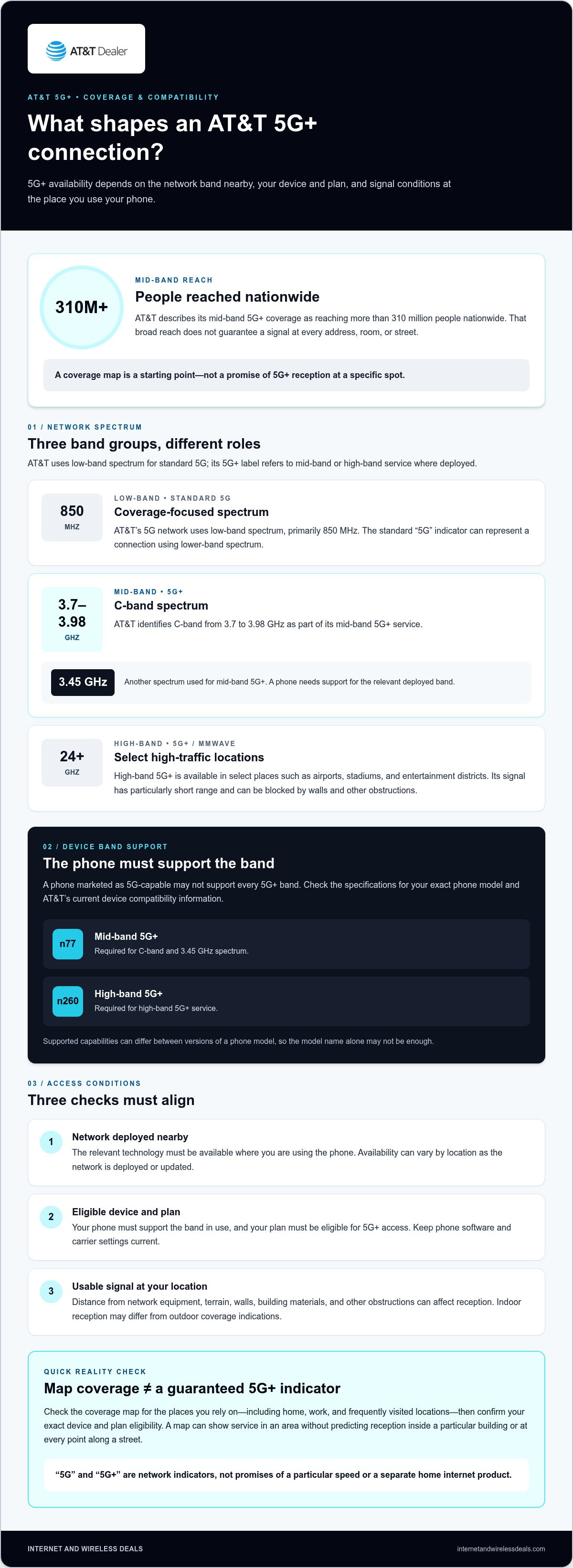
AT&T 5G+ is the enhanced 5G service label AT&T uses for connections on its mid-band and high-band networks. It’s distinct from the standard “5G” indicator, which can represent a connection using lower-band spectrum. The labels describe the type of network connection, but they don’t promise the same signal or performance everywhere.
Featured snippet definition: AT&T 5G+ is AT&T’s label for enhanced 5G service using mid-band or high-band spectrum. Availability depends on network deployment, a compatible device, plan eligibility, and local signal conditions.
AT&T describes its mid-band 5G+ coverage as reaching more than 310 million people nationwide. That broad reach doesn’t mean every address, room, or street has a 5G+ signal. High-band 5G+, also known as mmWave, is available in select high-traffic locations such as airports, stadiums, and entertainment districts. Standard 5G and 5G+ are mobile network connections, not separate home internet products.
How AT&T 5G+ differs from standard 5G
Think of “5G” and “5G+” as network indicators, not promises of a particular speed. Standard 5G can use low-band spectrum, while AT&T’s 5G+ label indicates access to mid-band or high-band service where deployed. These bands differ in how they balance coverage and signal reach. For broader context on how the technologies fit together, see this overview of 5G NR frequency bands.
A phone that supports 5G may not support every 5G+ band. Even a compatible phone won’t show 5G+ unless the network is available where you’re using it and your device and plan qualify. The 5G+ symbol signals a mobile network connection, not a separate home service.
What can affect 5G+ coverage in practice?
Coverage depends on more than the shaded area on a map. AT&T must have deployed the relevant network technology nearby, and your phone must support the frequency band in use. The signal can also vary with distance from network equipment, terrain, and obstacles. High-band signals have a particularly short range and can be blocked by walls and other obstructions.
Indoor reception may differ from what an outdoor coverage indication suggests. A map can show service in an area without predicting reception inside a specific building or at every point along a street. Check the locations you rely on, including home and work, and treat the map as a guide to availability rather than a promise of an individual connection.
Advertised coverage describes where service may be available; your connection depends on the network, device, and conditions at your exact location. That’s the practical meaning of AT&T 5G Plus network availability: a useful starting point for checking coverage, not a guarantee that 5G+ will appear wherever you go.
How AT&T 5G+ Works: Spectrum, Devices, and Signal Conditions
5G isn’t one single radio frequency. Wireless networks use different spectrum bands, and the band your phone connects to can affect which 5G service indicator appears. AT&T’s current descriptions identify mid-band and high-band service as 5G+. Mid-band 5G+ uses C-band spectrum from 3.7 to 3.98 GHz and 3.45 GHz spectrum. High-band 5G+, also called mmWave, uses spectrum at 24 GHz and above.
What spectrum bands may be associated with 5G+?
The frequency names describe parts of the radio spectrum, not separate plans or phone services. AT&T’s 5G network also uses low-band spectrum, primarily 850 MHz, while 5G+ refers to its mid-band and high-band deployments. Which bands are available can vary by location as network deployment changes. A device must support the band being used to connect to it.
That distinction helps explain why two phones in the same general area may not show the same network indicator. One may support a deployed 5G+ band while another can connect only to a different available band. The 5G+ label alone doesn’t reveal which exact frequency your phone is using.
Does your phone support AT&T 5G+?
A phone marketed as 5G-capable may not support every band AT&T uses for 5G+. For mid-band access, the device needs support for band n77, which covers C-band and 3.45 GHz spectrum. High-band 5G+ requires support for band n260. Check the specifications for your exact phone model and AT&T’s current device compatibility information. The model name alone may not be enough, since supported capabilities can differ between versions.
Also check that your plan is eligible for 5G+ access and that your phone’s software and carrier settings are current. These are separate checks: a compatible device doesn’t create coverage where the network hasn’t been deployed, and coverage won’t overcome missing band support. AT&T’s current device and plan requirements are the references to use when confirming eligibility.
Why do signal conditions still matter?
Even with the right phone and plan, the signal reaching your device depends on where you’re using it. Walls, building materials, terrain, distance from network equipment, and other obstructions can affect reception. High-band mmWave is especially easy to block and has a limited reach, so an outdoor signal indication may not match reception inside a building. Network availability can also change as AT&T deploys or updates service.
5G+ access depends on three things working together: nearby network coverage, a compatible device and plan, and signal conditions at your location. If you’re weighing AT&T wireless options after checking your phone’s capabilities, Internet and Wireless Deals, an independent third-party marketing partner and authorized AT&T retailer, can help you explore AT&T wireless plans.
How to Check AT&T 5G Plus Availability at the Places You Use
To assess AT&T 5G Plus network availability, start with AT&T’s official wireless coverage map, then check the places you actually depend on. A single search can miss differences between your home, workplace, and regular destinations. The map is a planning tool, not a guarantee of reception inside every building or at every point on a street.
How to read an AT&T 5G+ coverage map
Open the official AT&T wireless coverage map on AT&T’s website. Enter an address or search for a location, then select the relevant 5G or 5G+ coverage layer if the map offers one. Read the legend before interpreting shaded areas. Map labels and boundaries can be revised as network deployment and displayed coverage information are updated.
Treat the result as an estimate of outdoor availability. A shaded area doesn’t show how well a signal will reach a particular room, and nearby buildings or terrain can affect reception. If a map doesn’t clearly distinguish standard 5G from 5G+, don’t assume that a general 5G indication means 5G+ service. Check the legend and coverage details rather than relying on color alone.
Check more than one location before choosing service
Make a short list of the places where you use your phone most. Search each one separately, especially if your routine includes different indoor and outdoor settings. Use this sequence:
- Check your home address, including the map’s 5G+ information where available.
- Repeat the search for your workplace and other places where you regularly need mobile service.
- Review frequent destinations and the routes between them, since coverage can change as you move.
- Compare the map results with your exact phone’s 5G band support and your plan’s eligibility requirements.
For example, a map may indicate 5G+ around an office address, but the signal inside a particular room can differ from the outdoor estimate. Likewise, a phone may connect to a different network layer as you travel through areas with varying deployment. When practical, observe the network indicator on your own compatible phone at the locations and times that matter to you. Treat that observation as a real-world reference, not a guarantee of future performance.
Use this checklist: location first, then device compatibility, plan eligibility, and finally real-world signal. This order helps separate a coverage question from a phone or plan limitation. Once you’ve checked the places you rely on, review the AT&T wireless plans guide to consider plan details alongside your coverage needs. Internet and Wireless Deals is an independent third-party marketing partner and authorized AT&T retailer. AT&T owns and operates its network.
Why AT&T 5G+ May Not Appear Even When a Map Shows Coverage
A 5G+ coverage indication means service may be available in the mapped area. It doesn’t guarantee your phone will connect to 5G+ at every address, inside every building, or at all times. The map can’t account for every device, plan, building material, or moment-to-moment network condition. If your phone shows standard 5G instead, several factors may explain the difference.
Why your phone may show standard 5G instead
Start with device compatibility. A phone may support 5G generally but lack support for the specific band used for 5G+ in that area. Next, check that your current plan is eligible and review AT&T’s device support information for your exact phone model. A setting change can’t create 5G+ service where the network or device can’t provide it.
Local deployment and network conditions matter, too. 5G+ may not be available at your exact position, even if a nearby area appears covered on the map. Temporary conditions can also influence which network connection your phone uses. A displayed “5G” indicator doesn’t necessarily mean something is wrong; it may reflect the network available to your phone at that moment.
Why indoor and moving coverage can differ
Coverage predictions can’t describe every indoor environment. Walls, windows, construction materials, and the distance between your phone and network equipment may affect reception. A map can indicate service outdoors while a signal inside a particular room is weaker or connects differently. High-band 5G+ can be especially sensitive to obstructions.
Movement changes the picture. As you travel, your phone may pass between areas with different network deployments or signal conditions. Check your connection at the places and times you normally use your phone, such as inside your home or workplace and while moving between regular stops. One brief test is a snapshot, not a promise of consistent future performance.
Use this troubleshooting sequence to narrow down the cause:
- Recheck the specific location on AT&T’s current coverage map, including its legend and displayed network layer.
- Confirm your exact phone model supports the relevant AT&T 5G+ bands, and review device settings and current AT&T support guidance.
- Review whether your plan is eligible for 5G+ access.
- Test the connection in another nearby spot, then compare indoor and outdoor reception without assuming either result guarantees future service.
Keep mobile 5G+ separate from home internet. 5G+ describes a mobile network connection on a compatible phone; AT&T Internet Air and 5G home connectivity concern a home internet service, not the 5G+ indicator on your phone. After reviewing your coverage, explore AT&T wireless service options through Internet and Wireless Deals, an independent third-party marketing partner and authorized AT&T retailer. AT&T owns and operates its network.
Choose Your Next Step After Checking AT&T 5G+ Availability
Turn your coverage research into a practical decision. Confirm service information for the places you use, verify that your exact phone supports the relevant 5G+ bands, then review current plan details and eligibility. The AT&T 5G Plus network availability map is one factor, not the whole decision. Your usual locations and how your phone connects there matter more than seeing a 5G+ label somewhere nearby.
A quick checklist before reviewing wireless plans
Keep your checks in order. Start with your home, workplace, and regular destinations. Then confirm the capabilities of your specific phone, not just whether it is described as 5G-compatible. Finish by reviewing current plan terms and 5G+ eligibility. This gives you a clearer basis for comparing wireless options without assuming the map predicts your everyday connection.
- Locations: Note the addresses and regular destinations where you rely on mobile service, then review AT&T’s current coverage information for each.
- Device: Check your exact phone model’s specifications and AT&T compatibility information for support of the relevant 5G+ bands.
- Plan: Review current plan details and eligibility requirements for 5G+ access before deciding.
- Experience: Consider what you observe in your usual settings, since indoor reception and connection quality can differ by location.
This sequence helps separate different questions. A location may have a 5G+ coverage indication, while a phone may not support the band in use. A compatible phone may still connect differently indoors or while moving between areas. Make your choice around the places and situations that matter to you, not the network indicator alone.
Explore AT&T wireless options
Once you’ve reviewed coverage and device compatibility, compare current AT&T wireless options against your needs. Look at plan details and eligibility alongside where you use your phone most. The AT&T wireless plans comparison guide can help you review plan considerations without treating 5G+ availability as the only factor.
Internet and Wireless Deals is an independent third-party marketing partner and authorized AT&T retailer that helps customers explore AT&T wireless plans and service options. AT&T owns and operates its network. For a straightforward next step, explore available AT&T wireless options and consider them alongside your location and device checks. Coverage, device support, plan eligibility, and real-world signal all play a role, so review each before deciding.
Put Your Coverage Research to Work
Make your next wireless decision around how you actually use your phone. Keep your most important locations and exact device model in view as you review available options. If your needs or phone change, revisit AT&T 5G Plus network availability rather than relying on an old map check or a network icon seen somewhere else.
Internet and Wireless Deals is an independent third-party marketing partner and authorized AT&T retailer. Customers can explore AT&T wireless offers and service options online, with AT&T owning and operating its network. Take the next step at your pace: Explore AT&T wireless options and find a plan that fits.
A thoughtful check can help you make a more informed choice. Explore your options with confidence and choose what best matches the places and ways you stay connected.
Frequently Asked Questions
Is AT&T 5G+ available everywhere in the United States?
No, AT&T 5G+ isn’t available everywhere in the United States. AT&T’s broader 5G service reaches more places, while 5G+ depends on deployment of the network bands that support it. Search current AT&T coverage information for the addresses you rely on, such as home, work, and a regular destination. A 5G indication in one part of a trip doesn’t establish 5G+ access along the full route.
Can I use AT&T 5G+ with any 5G phone?
No, general 5G capability doesn’t guarantee access to AT&T 5G+. Your exact phone model must support the relevant network bands, and plan eligibility and local 5G+ coverage can matter, too. For example, two phones labeled 5G may have different band support. Check the specifications for your specific model and AT&T’s current compatibility and service guidance before choosing a device or plan. Compatibility alone doesn’t ensure a 5G+ connection.
How can I check AT&T 5G+ coverage at my address?
Use AT&T’s current official coverage map and search your address. Select the relevant network layer, then read the map legend to distinguish displayed 5G+ information from broader 5G coverage. Repeat the search for other places that matter, such as work or a regular destination. Map results estimate coverage; they can’t guarantee service at your address or predict reception inside a specific room. Recheck current information when making a decision.
Why does my AT&T phone show 5G instead of 5G+?
Your phone may show 5G because the 5G+ signal isn’t available where you’re standing, your device doesn’t support the relevant band, or network conditions and service eligibility affect the connection. Check the exact phone model and review current AT&T device or account guidance. Notice whether the indicator changes between locations, but don’t assume changing a setting will create 5G+ coverage where it isn’t available.
Does AT&T 5G+ work indoors?
It can, but indoor reception varies. Building materials, walls, your device, nearby signal conditions, and your position inside a building can all affect the connection. A coverage map doesn’t confirm reception in every room, so consider where you actually use your phone, such as a desk, living area, or interior workspace. Check the connection in those specific spaces under your usual conditions rather than relying on an outdoor map indication alone.
Can AT&T 5G+ coverage change over time?
Yes. Network deployments and the coverage information shown by AT&T can be updated, so a map result you saved earlier may not reflect current conditions. If you’re choosing or reviewing wireless service, consult AT&T’s current coverage information for the locations you use. Don’t assume a past result describes today’s service or rely on predictions about where or when coverage may expand. Your device and local signal conditions still affect the connection.
Is AT&T 5G+ the same as AT&T Internet Air?
No. AT&T 5G+ is a label for a mobile network connection, while AT&T Internet Air is a home internet service. They are different services, so their availability, equipment, and performance shouldn’t be assumed to match. If you’re considering home connectivity rather than mobile service on a phone, read the AT&T Internet Air guide for more information about that separate option.


