

One box can handle two jobs: an AT&T Wi-Fi gateway combines a modem, which connects the home to the provider’s network, and a router, which shares that connection with devices. The AT&T Wi-Fi gateway equipment specs that matter most include its internet port, fiber connection, Wi-Fi standard, frequency bands, and supported speed.
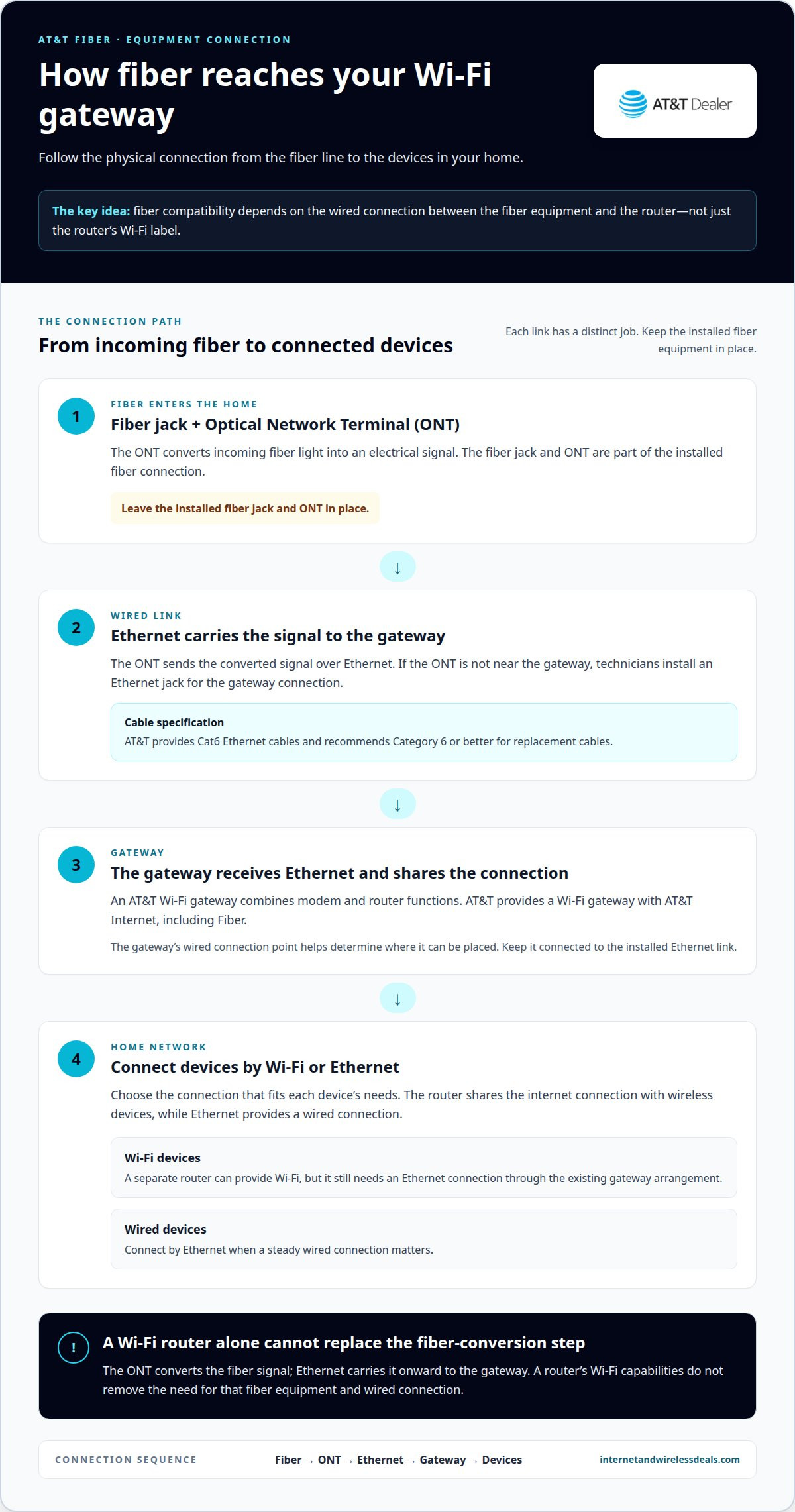
Fiber reaches the home differently from the Wi-Fi signal devices use. An Optical Network Terminal converts the incoming fiber signal and carries it over Ethernet to the gateway. Compatibility therefore depends on the connection between the fiber equipment and router, not just the Wi-Fi label on the device.
If you’re choosing equipment or checking whether a router can keep up, the details can feel like alphabet soup. This guide explains gateway basics, wired-port requirements, fiber compatibility, Wi-Fi standards and bands, and how advertised throughput relates to the connection your devices can use.
Key Takeaways
- Match a router’s internet port to your plan’s speed needs; AT&T Internet 5000 calls for a router or mesh system with a 10 Gbps internet port.
- For fiber, focus on the Ethernet connection between the fiber equipment and gateway, as well as whether the router can serve your home’s devices.
- Wi-Fi 6 is also known as 802.11ax, while Wi-Fi 7 capability is included with AT&T All-Fi Pro; compatible devices matter for Wi-Fi 6 performance.
- Compare wired and wireless capabilities separately: advertised service speeds, gateway ports, Wi-Fi bands, and device support all affect the connection you experience.
Router Port Requirements for AT&T Plans
Match the router’s internet port to the speed tier you plan to use. For AT&T Internet 5000, a router or mesh system should have a 10 Gbps internet port. A slower port can limit wired throughput, even when the service and gateway support faster speeds. AT&T advertises up to 5 GIG for All-Fi, while its maximum single-device wired speed is 4.7Gbps.
How do AT&T gateway specs compare with other internet providers' equipment? AT&T equipment varies by connection type and gateway model, so compare the specific port and Wi-Fi capabilities rather than assuming every gateway has the same specs. A general ranking against other providers isn’t possible from these details alone.
Common AT&T Fiber and Internet gateway models include BGW720, BGW620, BGW320, BGW210, Pace 5268, NVG599, and NVG589. AT&T also provides a Wi-Fi gateway with AT&T Internet, including Fiber. For multi-gigabit Fiber plans starting at 2 GIG, customers have access to a Wi-Fi 6 gateway. The model matters because gateway capabilities differ.
Wireless performance also depends on radio conditions. AT&T identifies 2.4 GHz and 5 GHz as frequencies that can compete with a Wi-Fi connection. Nearby wireless activity can affect the signal, so place the gateway away from other electronics and test devices in the rooms where you use them.
What are the steps to set up and configure an AT&T Wi-Fi gateway? When self-install is available at your address, connect the gateway to the installed internet jack, attach its power supply, then follow the setup instructions for that equipment. Keep installed fiber equipment in place.
Internet Air uses All-Fi Hub models BGW830, BGW530, and CGW450. What security features, limitations, and known issues affect AT&T gateways? Router functions can enable security features such as parental controls and firewalls; wireless interference on 2.4 GHz or 5 GHz can also affect connections. Check the gateway’s specific controls and use wired Ethernet when a steady connection matters.
Wi-Fi router compatibility with AT&T fiber
Fiber compatibility depends on the connection between the Optical Network Terminal (ONT) and the router. The ONT converts incoming fiber light into an electrical signal, which Ethernet carries to the Wi-Fi gateway. A Wi-Fi router alone can’t replace this fiber-conversion step.
AT&T provides a Wi-Fi gateway with AT&T Internet, including Fiber. The gateway combines modem and router functions. A separate router can provide Wi-Fi and connect devices, but fiber equipment and an internet connection through the gateway setup are still required. Compatibility depends on the physical connection, not just a router’s Wi-Fi label.
During installation, AT&T field technicians install a fiber jack. Leave it in place. If the ONT is not near the gateway, technicians install an Ethernet jack, and the gateway connects to it. This determines where the gateway receives its wired connection, so consider its location when arranging nearby equipment.
Use this practical sequence to understand the connection:
- Locate the installed fiber jack and ONT. Don’t remove either component.
- Trace the Ethernet connection from the ONT or Ethernet jack to the gateway.
- Connect devices to the gateway by Wi-Fi or Ethernet, based on their needs.
- If adding a separate router, connect it through the existing gateway arrangement. The router needs an Ethernet connection to share the internet with wireless devices.
AT&T provides Cat6 Ethernet cables with its internet equipment and recommends Category 6 or better for replacement cables. That gives you a clear cable specification for the wired link. Keep the ONT and installed jacks intact; they form part of the fiber connection. For households considering fiber, explore fiber internet options alongside the equipment requirements.
Router Wi-Fi standards, bands, and throughput
Wi-Fi standards describe how a gateway and wireless devices communicate. Wi-Fi 6 is also known as 802.11ax. Older standards include 802.11b, 802.11g, and 802.11n. AT&T All-Fi Pro includes Wi-Fi 7 capability. These labels help identify generations, but they don’t tell you the speed every device will reach.
Device support matters. Optimal Wi-Fi 6 performance requires devices that support Wi-Fi 6. A Wi-Fi 6 gateway can still serve devices using older standards, but those devices won’t gain Wi-Fi 6 capabilities. For example, check both the gateway and a laptop’s wireless specifications before expecting the newer standard’s performance.
AT&T identifies 2.4 GHz and 5 GHz as frequencies that can compete with a Wi-Fi connection. Nearby wireless activity can affect performance on either band. If a device’s connection feels inconsistent, compare its performance near the gateway with performance in its usual location. This helps distinguish a device or coverage issue from a wider service problem.
Think of throughput as a chain. The plan, gateway, Wi-Fi standard, device, and radio conditions all affect the data reaching a device. A newer standard alone can’t overcome a slower link elsewhere. Use these checks to identify the likely bottleneck:
- Compare the device’s supported Wi-Fi standard with the gateway’s standard.
- Test the device in the same room as the gateway, then in its regular spot.
- Compare wireless results with a wired connection to separate Wi-Fi conditions from the internet connection.
- Look at several devices. If only one struggles, its own wireless capability may be the constraint.
For a practical example, a Wi-Fi 6 gateway paired with a Wi-Fi 6 laptop can use that standard’s capabilities. A device using 802.11n won’t become Wi-Fi 6 simply by joining the same network. Match the equipment to the devices you use most, then assess throughput where those devices actually connect.
How many Ethernet ports and what port speeds do AT&T gateways have?
Ethernet port counts and speeds depend on the gateway model. The model name alone doesn’t establish every port’s capability. Common AT&T gateway models include BGW320, BGW210, Pace 5268, NVG599, and NVG589. Check the labels beside the Ethernet jacks and the model’s specifications before planning wired connections.
Distinguish the internet-facing port from the ports used for home devices. The internet port links the router to the provider’s connection; the other Ethernet ports connect devices such as computers, televisions, or a network switch. A fast port for a home device can’t overcome a slower internet-facing port. Every link in the wired path matters.
For AT&T Internet 5000, a router or mesh system should have a 10 Gbps internet port. AT&T states that maximum single-device wired speed is 4.7Gbps. These figures describe different things: the port requirement is a hardware selection criterion, while the wired-speed figure is the stated single-device limit. Don’t treat either as a promise that every device will reach that throughput.
Use a wired connection when stable performance matters for a desktop, console, or work computer. Connect the device to an Ethernet port, then test the connection and compare it with Wi-Fi on the same device. If several wired devices need connections, a network switch can add ports, provided its uplink and connected equipment support the intended traffic.
- Identify the gateway model, such as BGW320 or NVG599.
- Check the internet-port capability when pairing a router with a high-speed plan.
- Count the available Ethernet jacks on your actual gateway before assigning devices.
- Use wired testing to distinguish Ethernet performance from wireless conditions.
Choosing equipment for fiber? Explore fiber internet options and consider how your wired devices connect.
Internet and Wireless Deals: AT&T Fiber Internet
Internet and Wireless Deals helps you move from gateway specifications to choosing an internet plan. If fiber suits your home, explore AT&T Fiber Internet and compare options. Check availability for your address and review current offers, then consider your expected wired and Wi-Fi use alongside the equipment requirements discussed above.
This is especially useful when choosing a service before setting up a gateway or matching a router to a fiber connection. Plan details and availability at your address shape the practical choice, while your devices and wired equipment determine how you use that connection at home.
Visit Internet and Wireless Deals to explore AT&T Fiber Internet options.
Make Your Next Connection Choice
Use the AT&T Wi-Fi gateway equipment specs as a planning tool, not just a box-by-box checklist. Consider which devices need wired connections, where people use Wi-Fi most, and whether your internet plan suits your household’s work and streaming needs. This practical approach can help you choose your next step with confidence.
Internet and Wireless Deals offers AT&T Fiber Internet, AT&T Wireless Plans, and AT&T Internet Air. If you’re considering home internet or broader connectivity needs, explore the options and check availability for your address. Start with the service that fits your everyday use, then consider how your devices connect at home.
Contact Internet and Wireless Deals for help as you consider your connectivity options. A clear plan for your home setup makes the next decision easier. Keep your needs in focus, and move ahead with confidence.
Frequently Asked Questions
What is a Wi-Fi gateway?
A Wi-Fi gateway combines modem and router functions in one device. The modem connects the home to internet service, while the router shares that connection with devices. For example, a laptop can connect over Wi-Fi while a desktop uses Ethernet. This single-device setup differs from using separate modem and router equipment.
Which AT&T Wi-Fi gateway models are currently available?
Common AT&T Fiber and Internet gateway models include BGW720, BGW620, BGW320, BGW210, Pace 5268, NVG599, and NVG589. AT&T Internet Air All-Fi Hub models include BGW830, BGW530, and CGW450. The model provided depends on the service and equipment assigned. Check the label on your installed device to identify its exact model.
Which Wi-Fi standards, bands, and maximum speeds do AT&T gateways support?
Supported features depend on the model. Wi-Fi 6 is also called 802.11ax, and AT&T All-Fi Pro includes Wi-Fi 7 capability. AT&T identifies 2.4 GHz and 5 GHz as Wi-Fi frequencies. All-Fi is advertised with speeds up to 5 GIG, while the maximum single-device wired speed is 4.7Gbps. Wireless results vary with device support and conditions.
Do AT&T gateways include a built-in modem, and which internet technologies do they support?
Yes. The AT&T Wi-Fi Gateway combines modem and router functions. AT&T provides gateways with internet service, including Fiber, while Internet Air uses All-Fi Hub equipment. The device depends on the connection type. For fiber, the home’s Optical Network Terminal converts the fiber signal before Ethernet carries it to the gateway.
Can customers use their own router or gateway with AT&T internet?
A separate router can connect to the home network, but fiber service still needs the Optical Network Terminal and its Ethernet handoff. The router must have an internet port suited to the connection and speed plan. For AT&T Internet 5000, a router or mesh system should have a 10 Gbps internet port. Check how the equipment connects before replacing gateway functions.
How do you find the model number and specifications of an AT&T gateway?
Find the model identifier on the gateway’s product label, often on its back or underside. Match that identifier, such as BGW320 or BGW210, to the equipment details for that specific model. Then compare its listed Wi-Fi standard and Ethernet capabilities with your devices and plan. Don’t infer port speeds from the model name alone; inspect the port labels and specifications.


