

More bandwidth doesn’t always make a home feel faster. A 2 gigabit fiber internet plan can provide up to 2,000 Mbps of capacity, but it won’t automatically make every phone, laptop, or stream twice as fast. Whether you’ll notice a difference depends on what your household does online and whether your devices can use the extra speed.
It makes sense to want room for busy evenings, large downloads, gaming, and working from home. But even a home with several people online may find that 1 gig is enough. The best choice isn’t simply the biggest number. It’s the plan that fits your household’s demand without leaving your home network as the bottleneck.
This guide explains what 2,000 Mbps means for everyday use, how a 2-gig plan compares with 1 gig, and how your router, Ethernet connection, and devices affect real-world performance. Use the practical checklist to identify what may be slowing you down, then check AT&T Fiber options for your address.
Key Takeaways
- A 2 gigabit fiber internet plan offers up to 2,000 Mbps of household capacity, not that speed on every device at once.
- Compare 1-gig and 2-gig plans by your busiest online periods, large-file needs, and number of high-bandwidth activities.
- Router capability, Wi-Fi conditions, Ethernet connections, and device limits all affect the speeds you actually experience.
- Before upgrading, identify whether slowdowns come from internet capacity or a networking equipment bottleneck.
- Check AT&T Fiber availability by address and review the speed tier and terms shown for your location.
What Does a 2 Gigabit Fiber Internet Plan Actually Deliver?
A 2 gigabit fiber internet plan advertises download capacity of up to 2,000 megabits per second (Mbps), or 2 gigabits per second. That measures bits, not bytes. A byte is made up of eight bits, which matters when comparing internet speeds with file sizes, often shown in megabytes or gigabytes.
Think of Mbps as the rate at which information can move. The advertised speed is the connection’s capacity, shared across household activity. It isn’t a dedicated 2,000 Mbps lane for every device, and devices don’t necessarily split that capacity evenly.
Plan speed describes the connection’s capacity; a device’s speed test describes its performance at that moment. Test results can vary with other household activity and the connection between the router and device. Fiber carries information as light through optical fiber, the basic principle behind fiber-optic communication.
What does 2,000 Mbps mean for everyday internet use?
Mbps measures how much information can move each second. A higher rate gives your home more room for data-heavy tasks to overlap, but it doesn’t guarantee a particular download time or make every online activity feel faster. Download and upload speeds are separate characteristics: downloads bring information to your home, while uploads send it out. Review both when comparing plans rather than assuming they’re identical.
Example: Imagine one person joining a video call while another uploads a large work file and someone else streams high-resolution video. All three activities draw on the household connection at the same time. The plan’s capacity is the shared pool, and each task uses what it needs. Network conditions also affect the speed each device receives.
Which household activities can benefit from more capacity?
Extra capacity matters most when demanding activities overlap. A single video call or stream may work well on a lower-speed plan, while several calls, large downloads, cloud backups, and high-resolution streams running together can create a heavier combined load. Consider your busiest hour, not just the most demanding task you do alone.
Ask what happens when everyone is online. Do calls become unreliable while backups run? Do large downloads compete with other work? Or does the household already run smoothly? One intensive activity on its own doesn’t prove you need 2 gig. Look for repeated slowdowns during simultaneous use, and consider whether a particular device or Wi-Fi connection could be the cause. For more context on how speed tiers relate to real-world use, see this fiber speed guide.
The decision comes down to two things: how much capacity your household uses at peak times and whether your network can deliver it to your devices. More speed matters when both are ready to make use of it.
How Fiber Speed, Wi-Fi, and Your Devices Shape 2-Gig Performance
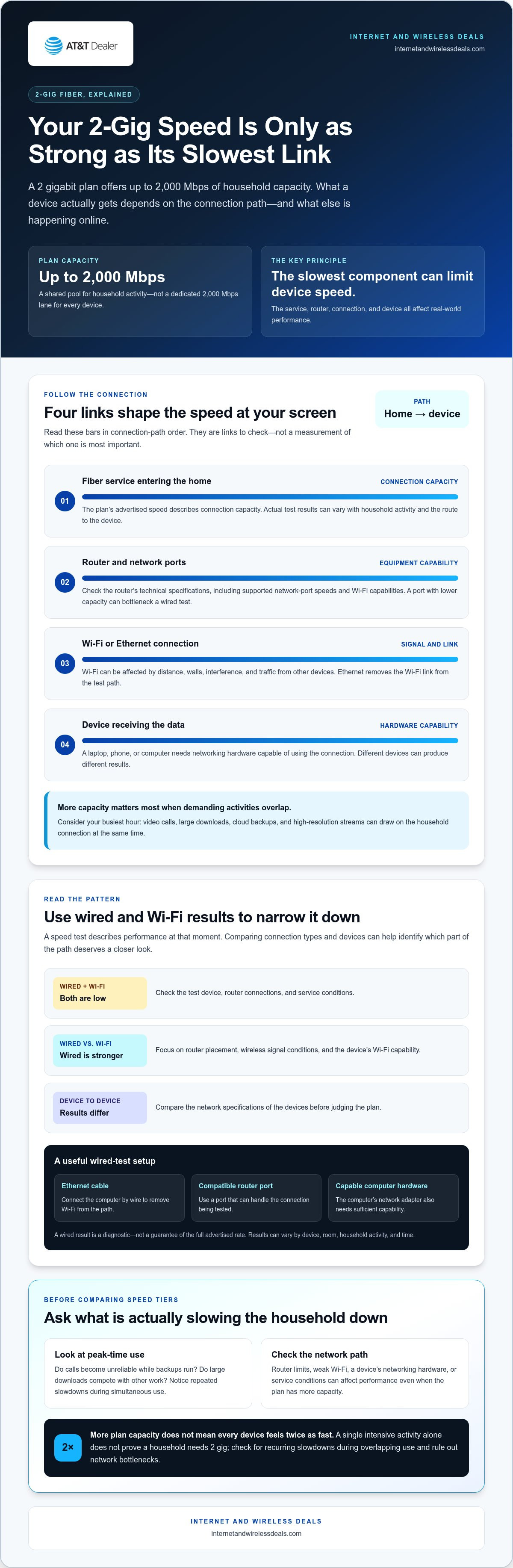
A fast fiber connection is only one part of the path to your screen. Performance depends on several links: the fiber service entering the home, the router distributing it, the Wi-Fi or Ethernet connection, and the device receiving the data. A 2 gigabit fiber internet plan can provide high capacity, but each link needs to handle the traffic for a device to benefit.
The slowest component between your internet connection and a device can limit that device’s measured speed. A laptop with limited networking capability, an older router, or a weak wireless signal may produce a lower speed test result even when the fiber service is performing well. The result is useful, but it doesn’t diagnose the cause by itself.
Can your router and home network use a 2-gig connection?
Check the router’s technical specifications, including the speed supported by its network ports and its Wi-Fi capabilities. Review the equipment details provided with the plan, too. The router and its connections need to keep pace with the service for your devices to benefit from the additional capacity.
A wired test can help isolate the connection. Use an Ethernet cable and a computer with networking hardware capable of handling a multi-gig connection, and connect through a compatible router port. If the computer’s network adapter or the router port has a lower capacity, it can become the test’s bottleneck. A wired result is a useful diagnostic, not a guarantee of the full advertised rate.
Why can Wi-Fi speed differ from the plan’s advertised speed?
Wi-Fi performance changes with the route between router and device. Distance and walls can weaken the signal, interference from nearby networks or household electronics can affect it, and other devices add traffic. Your phone or laptop also needs wireless hardware that can take advantage of the router’s capabilities. The FCC Broadband Speed Guide provides helpful context on broadband speed and how it relates to online use.
A Wi-Fi speed test measures wireless performance under the conditions at that moment. A wired test removes the Wi-Fi link from the path, helping you assess whether wireless conditions are the limiting factor. Neither test guarantees the same result across devices, rooms, or times of day. For a closer look at upload performance, the fiber upload speed guide explains why sending data deserves attention alongside downloads.
- Low wired and Wi-Fi results: Check the test device, router connections, and service conditions.
- Stronger wired than Wi-Fi results: Focus on router placement, signal conditions, and device wireless capability.
- Different results across devices: Compare their network specifications before judging the plan.
Once you know which link is limiting performance, you can judge whether a faster service tier would address the problem. Explore AT&T Fiber options and check availability by address at Internet and Wireless Deals.
2 Gig vs. 1 Gig Fiber: Which Plan Fits Your Household?
Moving from 1 gig to 2 gig doubles the connection’s advertised capacity, but it doesn’t automatically double the speed each device experiences or cut every download time in half. The practical difference depends on how much data your household uses at once and whether your network can distribute the additional capacity.
Use this comparison to focus on fit, not just the larger number. It describes general speed-tier differences rather than the terms or equipment for a particular plan.
| Factor | 1 gig | 2 gig |
|---|---|---|
| Advertised capacity | Up to 1,000 Mbps | Up to 2,000 Mbps |
| Likely fit | Routine browsing, streaming, video calls, gaming, and several household activities at once | More headroom for overlapping high-demand tasks and recurring large transfers |
| Equipment readiness | Check that the router, its ports, and devices can make useful use of gigabit service | Check for multi-gig capability along the wired path, plus suitable router and device support |
Plan terms, speeds, and prices vary. Review the current details shown for each available tier rather than assuming the higher tier has the same conditions or equipment.
When can upgrading from 1 gig to 2 gig make sense?
Consider 2 gig if large transfers happen often while other people are working, streaming, gaming, or backing up files to the cloud. The case is strongest when those demands overlap regularly and you’ve identified that your internet connection, rather than Wi-Fi or a device, is the bottleneck. Household size alone isn’t a reliable guide: a few people with demanding simultaneous tasks may use more capacity than a larger household with lighter activity.
When might a 1-gig plan be enough?
A 1-gig tier may suit a home where browsing, streaming, and video calls run smoothly, even during busy periods. Those everyday activities don’t necessarily use the full capacity of a 2-gig connection. If your router or devices can’t handle multi-gig speeds, upgrading may add capacity without a noticeable improvement on the equipment you use most.
Choosing 1 gig in that situation isn’t settling for poor internet. It’s matching the plan to your actual demand and network. First identify recurring slowdowns, then consider whether they happen during heavy simultaneous use or only on particular devices or in certain rooms. That distinction can help prevent an unnecessary speed upgrade.
If you’re weighing a lower tier, the 1-gig internet plan guide offers more context on fiber speed and everyday performance. Compare plan terms alongside capacity, then weigh the extra room a 2-gig connection offers against the needs and equipment in your home.
How to Decide Whether a 2-Gig Fiber Upgrade Is Worth It
Base your decision on what happens in your home, not the headline speed alone. A 2 gigabit fiber internet plan adds capacity, but it’s worth considering if your household regularly needs that capacity and your network can deliver it to the devices that matter. Use this four-step check to see where you stand.
A four-step household bandwidth check
- Map your busiest hours. Note how many people and devices are active at the same time. Focus on peak periods, such as evenings when calls, streaming, gaming, and connected devices may overlap.
- Record demanding tasks. For several typical busy periods, list large downloads and uploads, cloud backups, video calls, and high-resolution streaming. Look for recurring combinations, not a one-off busy moment.
- Check for a connection bottleneck. When practical, run a speed test on a capable computer connected to the router by Ethernet. Compare it with a Wi-Fi test from the same location and note whether slowdowns happen at predictable times. A test is a snapshot, so repeat it under similar conditions before drawing conclusions.
- Review your equipment. Check the router, its ports, and the devices you use for networking limits. If a device or connection can’t handle the additional capacity, a faster plan may not resolve its slow performance.
Use your notes to connect the symptom to its likely cause. If performance dips mainly during overlapping high-demand tasks and a wired test also shows a constraint, more plan capacity may help. If only one device or room struggles, investigate its connection path before treating the issue as a plan-speed problem.
What should you compare beyond the speed number?
Download speed is only one part of the decision. Consider upload performance if your household sends large files, backs up data, or relies on video calls. Consider latency, the delay in sending and receiving data, for real-time activities such as interactive gaming and calls. Also consider reliability: recurring interruptions are different from a connection that simply needs more capacity.
Then review the plan details as a whole. Compare stated speeds in both directions, included or required equipment details, service terms, and availability for your address. If an offer includes a temporary promotion, distinguish its promotional period from the ongoing terms so you can evaluate the longer-term fit. Offers and terms can change, so use the details presented for your address rather than relying on an old comparison.
For a broader look at AT&T Fiber offers, the AT&T Fiber deals guide can help you review options alongside your speed and equipment needs.
Upgrade when household demand and capable equipment can make use of the additional capacity. If your checks point to a genuine need, check AT&T Fiber availability for your address and compare the current plan details before choosing.
Explore AT&T Fiber and Check Availability for Your Address
Once you’ve identified your household’s speed needs and checked whether your network can use extra capacity, see which AT&T Fiber options are shown for your service address. Availability and displayed options are address-specific, so use the results for the location where you need service.
Check which AT&T Fiber options are available at your address
Enter your service address in the availability process and review the current options shown. Consider the speed tier and plan terms together. Check how download and upload speeds are described, what equipment details are provided, and whether offer terms include a promotional period. These details help you compare the options presented with your household’s actual usage and network setup.
If you’re researching a 2 gigabit fiber internet plan, use the speed options and plan details shown for your address. This makes it easier to assess how a plan fits your household’s needs and equipment.
Choose a plan based on fit, not just the biggest number
A higher speed tier can add capacity, but the right fit depends on how your household uses the connection, whether your router and devices can use the additional speed, and whether the plan terms work for you. Compare the options shown for your address against your busy-hour activities and any equipment limitations you identified. A lower tier may suit a household with modest demand; more capacity may fit better when demanding tasks regularly overlap and the network can deliver it.
Internet and Wireless Deals is an independent third-party marketing partner and authorized AT&T retailer. Its online process supports checking service availability by address and exploring AT&T Fiber offers. Review the current speed tier and terms presented for your address, then choose based on your needs, not simply the largest speed number.
Explore AT&T Fiber options and check availability for your address.
Make Your Next Internet Move With Confidence
The right plan supports how your home uses the internet, not simply the biggest speed label. Before choosing a 2 gigabit fiber internet plan, consider whether your household’s needs are likely to change and whether your network can make use of the extra capacity. A clear, address-specific comparison can make the decision a practical next step.
Internet and Wireless Deals is an authorized AT&T retailer with an online process for checking AT&T internet availability by address. Review the options and current terms shown for your location, then choose the fit that makes sense for your household.
Explore AT&T Fiber options and check availability. Find an internet option that fits the way you connect.
Frequently Asked Questions
What is a 2 gigabit fiber internet plan?
A 2 gigabit fiber internet plan advertises up to 2,000 megabits per second (Mbps), which describes data-transfer capacity rather than file size. It doesn’t mean every device receives that rate. A speed test on a laptop, for example, reports that device’s connection at that time. Results can differ between devices using the same service because their hardware and network paths differ.
Does 2 gigabit internet mean 2 gigabytes per second?
No. Internet speed is generally measured in megabits per second, while megabytes describe data volume. Since eight bits make one byte, 2,000 Mbps is equivalent to a theoretical 250 megabytes per second before overhead. That conversion isn’t a promise of file-transfer speed. The source server, device storage, network path, and changing connection conditions can all affect how quickly a file arrives.
Can a 2-gig fiber plan improve video-call quality?
It can leave more shared capacity for a call when other household members are also online, but call quality depends on more than download speed. A large file upload running during a meeting, for example, may affect performance differently from someone streaming a video. If call problems happen only in one room, try a stronger connection location before assuming the plan tier is the cause.
Does 2-gig fiber guarantee faster online gaming?
No. A higher speed tier doesn’t automatically lower ping, which measures delay between your device and a game server. If a game feels sluggish, note whether the issue is delayed responses, brief disconnections, or slow game downloads. Each points to a different possible cause. Extra capacity may help keep other household activity from competing with gameplay, but it can’t control the game server or every part of the network path.
Will every device in my home get 2,000 Mbps on a 2-gig plan?
No. A device’s test result depends on the connection it uses and what its network hardware can handle. To compare devices fairly, test them in the same location and under similar household conditions. If one reports much less than another, check its network settings and specifications. That comparison can help distinguish a device-specific limit from an issue affecting the connection more broadly.
Is fiber internet better than cable for a 2-gig plan?
There isn’t one answer for every service. Compare the options available to your address, including advertised upload and download speeds, latency information, reliability terms, and plan conditions. Consider your regular tasks, too: frequent large uploads may make upload performance especially relevant. Those details provide a more useful basis for deciding than the connection type alone.
Can I change my internet speed plan later?
That depends on the provider’s current terms and the options offered for your address. Before signing up, review any stated rules or conditions for changing speed tiers so you understand what applies to your plan. If your household’s usage changes later, review the options then. Don’t assume an upgrade or downgrade will happen automatically or keep the same terms as your original offer.


