

Moving your high-speed internet isn’t as simple as carrying your router to the next home. To transfer your internet to a new address, enter the new location to check whether Fiber or Internet Air is available, then schedule disconnection at your current home and installation at the new one. The provider will tell you whether you can self-install or need a technician. The address determines which option you can set up there.
If you are an active subscriber, the key first step is finding out what service reaches your new address. It makes sense to want a clear plan before moving day, especially when home internet supports work, streaming, and everyday routines. Through Internet and Wireless Deals, this guide walks you through checking availability, understanding what happens if top-tier Fiber isn't offered at the new home, and coordinating your current service disconnect with the new installation. You’ll also learn why to follow the transfer process before moving your equipment, so you can handle the move in the right order.
Key Takeaways
- Use your full new address to see whether AT&T Fiber or Internet Air is available there.
- Plan your current-home disconnection and new-home installation together, and follow the transfer steps before moving your equipment.
- Find out what to review about your plan and promotional discounts when service options change at your new address.
- See what affects activation timing, including whether your setup is self-install or needs a technician.
Checking Fiber or Internet Air availability at a new address
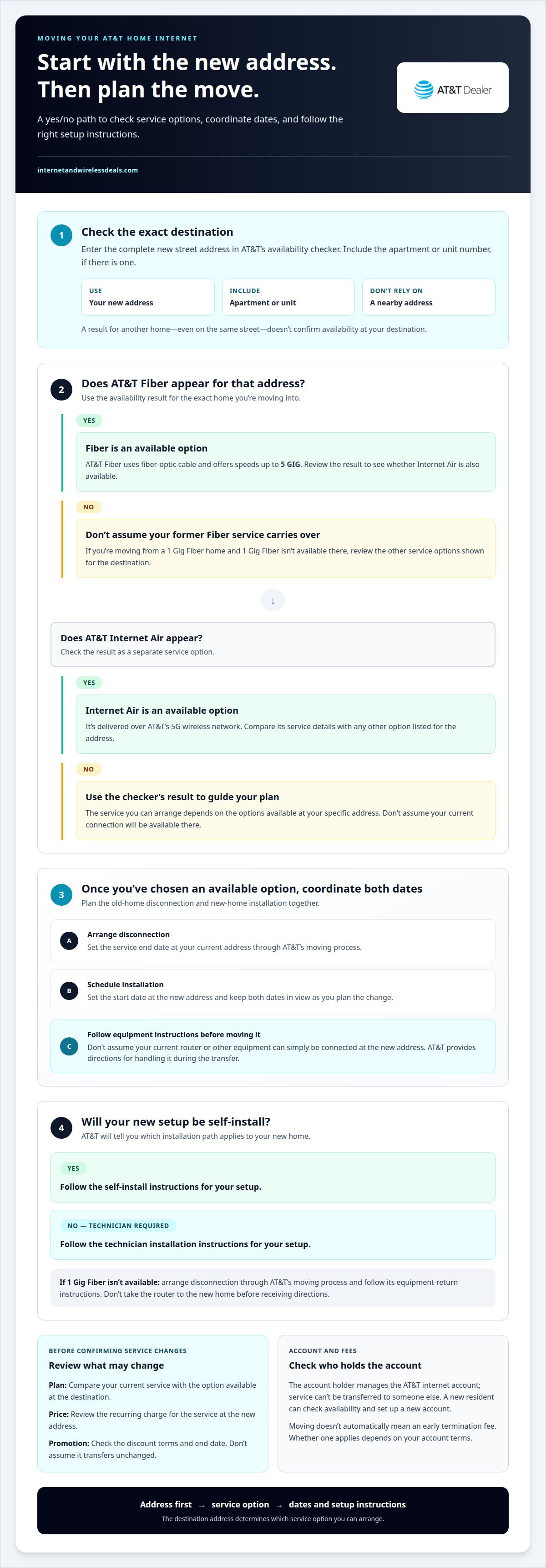
Start by entering your complete new address in AT&T’s availability checker. Use the destination, not your current home address, and include an apartment or unit number if applicable. The result shows which AT&T home internet options are available at that location.
Review AT&T Fiber and AT&T Internet Air as separate options. AT&T Fiber uses fiber-optic cable and offers speeds up to 5 GIG. AT&T Internet Air is delivered over AT&T’s 5G wireless network. These different delivery methods mean the available option depends on your specific address.
Check availability for the exact home you’re moving into. A nearby address, even on the same street, doesn’t confirm service at your destination. For an apartment building, include your unit number so the result reflects your specific residence.
- Enter the new street address and any apartment or unit number.
- Review whether AT&T Fiber or AT&T Internet Air appears for that location.
- Use the result to decide which service option to consider for your move.
If you’re moving from an AT&T 1 Gig Fiber home, check the new address before planning to keep the same service. If 1 Gig Fiber isn’t available there, don’t assume the former connection carries over. Look at the available service options for the new location instead.
A new resident who wants AT&T internet can check the address and set up a new account. This is important if the person moving in isn’t the current account holder: Internet service arrangements may depend on the account holder, so check the account requirements before making plans. To transfer AT&T internet to a new address, first find out which service is available there. Then plan the next steps for the existing account and equipment.
Scheduling service disconnection and installation
Once you’ve chosen an available option, coordinate the service end date at your current home with the start date at your new one. AT&T’s moving process covers disconnection at the old address and installation at the new address. Keeping both dates in view helps you plan for the change. Follow AT&T’s instructions before moving your router or other equipment.
AT&T will tell you whether your new home qualifies for self-installation or requires a technician. Follow the instructions for your specific setup, and don’t assume equipment from your old home can simply be connected at the new address. AT&T provides directions for handling existing equipment during the transfer process.
- Arrange disconnection at your current address.
- Schedule installation at the new address.
- Follow AT&T’s instructions for installation and equipment.
If you’re changing from Fiber to Internet Air, or considering an available upgrade, base the decision on the new address’s options. Fiber uses fiber-optic cable; Internet Air runs over AT&T’s 5G wireless network. The service available at your destination determines which option you can arrange.
The account holder manages the AT&T internet account. Because service is linked to that person, it can’t be transferred to someone else. A new resident who needs service under their own name can check availability at the address and set up a new account.
Moving doesn’t automatically mean an early termination fee; whether one applies depends on your account terms. Follow the equipment instructions too, especially if your current service can’t continue at the new address.
If AT&T 1 Gig Fiber isn’t available at the destination, schedule disconnection at your current home and return the equipment. Arrange the disconnection through AT&T’s moving process, then follow its return instructions. Don’t take the router to the new home before receiving directions.
Compare the available AT&T Fiber and Internet Air options as you plan the move. Matching the service choice to the new address helps you prepare the right installation path.
Will my AT&T Internet plan, price, and promotional discounts transfer when I move?
Don’t assume your current plan, monthly price, or promotion will carry over unchanged. Your options at the new address depend on which AT&T internet service is available there. AT&T Fiber and AT&T Internet Air use different delivery methods, so you may need to review a different service option after moving.
Before scheduling the move, compare the service details for your destination with your current account. Review the plan name, speed tier, recurring charge, and any promotion’s terms and end date. This helps you see what, if anything, will change when service is arranged at the new address.
Promotional discounts depend on the offer’s terms. Review those terms alongside the services available at your new address rather than assuming a promotion will transfer. For example, if your current account has Fiber and the new address offers Internet Air, compare the new service details with your existing plan and promotion before deciding.
- Plan: Identify your current AT&T internet service and the option available at the destination.
- Price: Review the recurring charge associated with the service you’ll have at the new address.
- Promotion: Check the discount terms and end date shown for your account or offer.
Keep a record of the details before confirming any service changes. This gives you a clear comparison between your existing account and the arrangement for your new home. If the destination supports the same service, review whether the plan and promotion terms still apply. If a different option is available, compare its terms instead.
Make your service decision before finalizing installation details. Availability determines which AT&T internet options you can consider, while your plan and promotion terms determine what applies to your account. Review both, then schedule the service change using the option that fits your new address.
How long to activate AT&T Internet at a new address?
Activation timing depends on the installation method AT&T assigns at your new address. AT&T will tell you whether you can self-install or need a technician. The required setup determines what must happen before your service works.
For self-installation, follow the instructions provided for your service and equipment. Complete the setup at your new home, then check that the connection works. If a technician is required, the appointment is an important part of your timeline. Plan around the appointment details you receive.
Service type can affect the work involved. AT&T Fiber reaches homes through fiber-optic cable, while AT&T Internet Air uses AT&T’s 5G wireless network. The address and required installation determine whether setup involves a technician or self-installation. Don’t assume the process will match your previous home.
- Confirm the installation method AT&T assigns for the new address.
- Follow the self-install instructions or prepare for the technician appointment.
- Complete the setup steps and test the connection before relying on it.
For example, if your new home needs a technician, account for the visit when planning work calls or other online needs. If self-installation is available, set aside time to follow the supplied instructions after you arrive. There isn’t one activation time that applies to every move.
To avoid preventable delays, keep the equipment and setup instructions together during your move. Use the equipment AT&T directs you to use, and follow its transfer instructions before moving or connecting existing equipment. If an installation appointment is scheduled, make sure you can access the new home for the visit.
Need to plan around the service available at your destination? Review internet options for your move and use the address-specific result to prepare for installation.
Internet and Wireless Deals: AT&T Fiber Internet
Internet and Wireless Deals helps you explore AT&T Fiber Internet and AT&T Internet Air as you plan your move. Use the availability tool to see which home internet option is available at your new address, then compare plans before deciding how to proceed. This is especially useful if your current service may not be offered at your destination.
You can also explore AT&T Wireless Plans and 5G Smartphones if you’re reviewing connectivity for your household alongside home internet. Keep the new address and your preferred service type in mind as you compare available options.
Visit Internet and Wireless Deals to explore AT&T internet options for your move.
Make Your Next Address Connectivity-Ready
A move is a good time to consider what connectivity and interior setup will suit your next home and household. Beyond coordinating utilities and outfitting your new space with custom window treatments through thewindowvalet.com, getting your home network running smoothly is essential for daily life. As you transfer AT&T internet to a new address, think about everyday needs such as remote work, streaming, and staying connected on the go. Review the options available at your destination instead of assuming they’ll match your previous home.
Internet and Wireless Deals offers AT&T Fiber Internet, AT&T Internet Air, and AT&T Wireless Plans. Explore these options as you plan connectivity at your new address. Whether you need home internet, wireless service, or both, reviewing the available choices can help clarify your next step.
Contact Internet and Wireless Deals to explore your AT&T connectivity options. Take the next step toward getting settled and connected in your new home.
Frequently Asked Questions
Can I move my AT&T router to another house?
Don’t move or connect your AT&T router before following the service-transfer process. AT&T provides directions for handling existing equipment once you arrange the move. Setup at your new home may differ from your current setup. If AT&T assigns a technician, for example, keep the equipment available and follow the installation instructions rather than setting it up early.
What is the process for transferring AT&T Fiber internet when moving?
Start by checking whether AT&T Fiber is available at the destination address. Then arrange disconnection at your current home and installation at the new one through AT&T’s moving process. AT&T will tell you whether setup is self-install or requires a technician. If 1 Gig Fiber isn’t available at the new address, disconnect current service and return the equipment as directed.
What steps do I need to follow to move my AT&T service to a new home?
First, check availability using the complete destination address, including an apartment number when applicable. Next, arrange disconnection at your current home and installation at the new one. Follow AT&T’s equipment instructions and prepare for self-installation or a technician visit as assigned. Keep the account holder involved because service is linked to that person and can’t be transferred to someone else.
How do I transfer AT&T Internet service to a new address?
To transfer AT&T internet to a new address, start by checking availability for the exact destination. Review the options shown, then arrange the old-home disconnection and new-home installation through AT&T. Follow its equipment instructions before moving the router. If someone else will be responsible for service at the destination, they can check availability and set up a new account.
Can I check whether AT&T Internet is available at my new address?
Yes. Enter the complete new address in AT&T’s internet availability checker, including the unit number for an apartment or other multi-unit residence. Check whether Fiber or Internet Air is available at that location. A nearby address doesn’t confirm availability at your home, so use the exact destination. New residents can also check availability and set up a new account.
Can I keep my AT&T equipment and Wi-Fi network name after moving?
Follow AT&T’s equipment directions before moving or connecting your router. The transfer process determines what to do with existing equipment, so don’t assume the same router can be used at the new home. Keep your Wi-Fi network name and password handy during setup. Follow the instructions for your new installation to handle the equipment.


