

Unlimited data won’t make a slow connection feel fast. For an unlimited home plan, aim for at least 300 Mbps; households streaming 4K on several screens should consider 300 to 500 Mbps download speeds and 20 to 30 Mbps upload speeds. The right low cost unlimited internet plan pairs enough speed for your household with unlimited data.
It’s easy to focus on “unlimited” and overlook the speed, availability, and terms that shape your experience. This guide explains what to consider for streaming, video calls, and working from home, and how to check which options serve your address. You’ll also learn how to compare monthly pricing, contracts, equipment, and installation, so you can assess the full plan rather than a single headline feature.
Key Takeaways
- Match download and upload speeds to how your household streams, games, and works from home.
- Check availability by address because network coverage and plan options can vary from one location to another.
- Compare the full plan, including data limits, contract terms, equipment, and installation, before choosing.
- According to the Federal Communications Commission, households may qualify for Lifeline if their income is at or below 135% of the federal poverty guidelines.
What speeds can I expect from unlimited home internet plans?
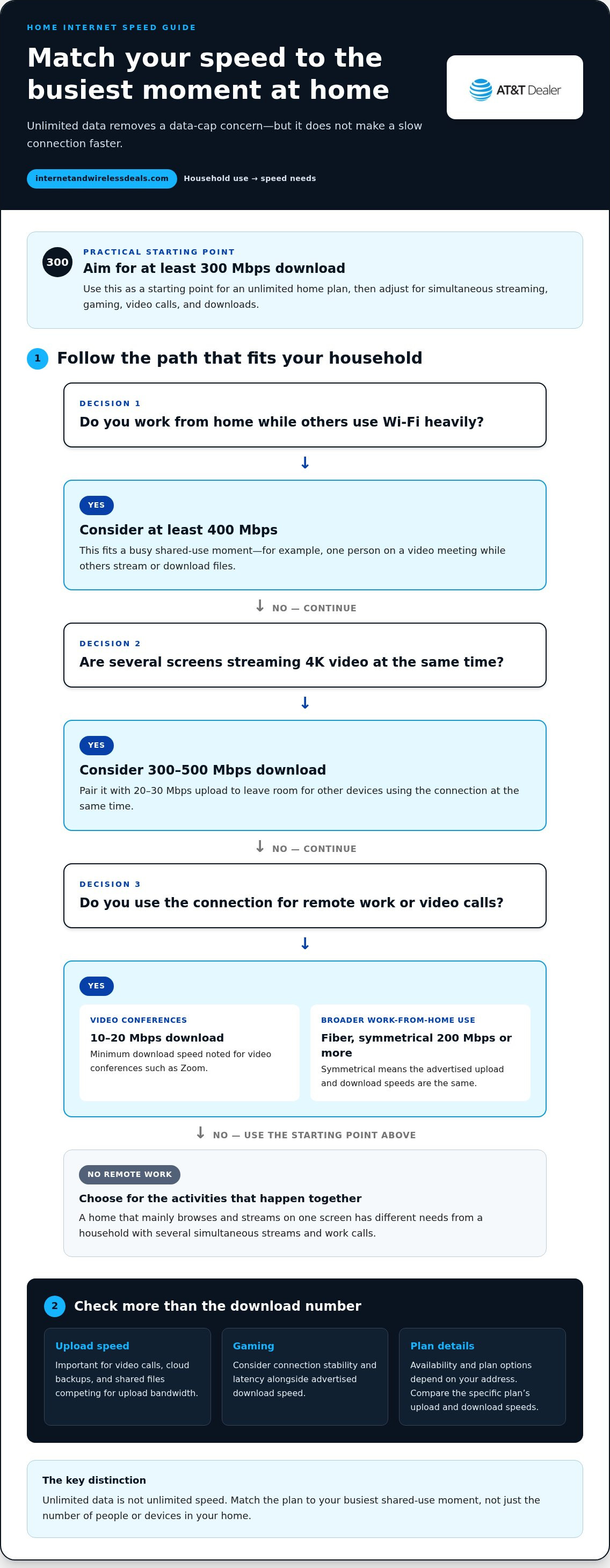
For unlimited home internet, use 300 Mbps download as a practical starting point. That recommendation gives connected devices room to share bandwidth during common household activities. The right speed still depends on simultaneous use, not just the number of people in the home. Compare download and upload speeds, then consider what happens when everyone gets online at once. Unlimited data removes a data cap concern, but it doesn’t increase the speed of your internet service.
For streaming, households watching 4K video on multiple screens should consider 300 to 500 Mbps download and 20 to 30 Mbps upload speeds. High speeds are especially helpful when running live television setups such as NEXOTT IPTV Service across multiple devices. Those figures leave room for other devices using the connection at the same time. Gaming also shares bandwidth with downloads, streaming, and video calls. For a smoother gaming experience, consider connection stability and latency alongside the advertised download speed. A fast download tier alone doesn’t describe every part of actual performance.
Remote work needs upload capacity as well as download speed. Video conferences such as Zoom require a minimum download speed of 10 to 20 Mbps. For broader work-from-home use, the recommendation is fiber with symmetrical upload and download speeds of at least 200 Mbps. Symmetrical means uploads and downloads have the same advertised speed. That can help when video calls, cloud backups, and shared files compete for upload bandwidth.
Households combining remote work with busy Wi-Fi use should consider at least 400 Mbps. For example, one person may join a video meeting while others stream digital television through IPTVFLIC or download files. Add the activities that happen together, rather than choosing a plan based only on one device. If your household mainly browses and streams on one screen, its needs differ from a home with simultaneous 4K viewing and work calls.
Customers can encounter different network types depending on their address. Many households nationwide have access to fiber internet plans, while rural customers tend to have access to at least one provider offering speeds greater than 25 Mbps. Fiber can deliver high speeds and symmetrical uploads. Other connection types may have different speed profiles, so compare the advertised upload and download figures for the specific plan.
AT&T Fiber offers unlimited plans with download speeds from 300 Mbps to 5 Gbps. That range covers different household needs, but the fastest tier isn’t necessary for every home. Match the speed to your busiest shared-use moment, such as work calls alongside several streams. Availability and plan options depend on the address, so check those before weighing a speed tier against its monthly price.
When comparing prices through Internet and Wireless Deals, consider each monthly amount alongside download and upload speeds and any promotional period. Don’t judge value by the lowest advertised price alone. Check whether the plan includes unlimited data, and remember that unlimited data doesn’t mean unlimited speed. To assess performance, test your connection with a wired connection and over Wi-Fi in the areas where you usually work or stream.
How do I check if unlimited internet is available at my address?
Start with your complete service address, then review the networks and plan details available there. Coverage maps offer a broad overview, but an address-specific check helps identify which broadband connections can serve your home.
Address-Based Coverage Checks
Enter the street address, apartment or unit number, and ZIP code in an availability tool. A small address difference can point to a different building or service location, so use the exact details where you plan to connect your router. Then review the available plan names, connection types, advertised speeds, and whether unlimited data is included.
Florida coverage is not uniform. Almost 40% of the state has access to fiber internet plans. Rural Florida customers tend to have access to at least one provider offering speeds greater than 25 Mbps. These broad figures describe statewide access, not service at every home. Use them as context, then rely on the address result to see the options for your location.
Check your home address, not just a nearby landmark or general city name. If you’re moving, search the destination address rather than assuming your current service can transfer. For a multi-unit building, include the apartment number. Availability can differ between properties on the same street because network infrastructure may not reach each unit in the same way.
Availability is only one part of the decision. Review the data terms, listed download and upload speeds, and connection type. A household with several connected devices should compare the plan’s speed details, not just a coverage indicator. Save the address-specific results so you can compare options consistently.
Provider Availability and Connection Types
Check each provider separately. One may offer fiber broadband at your address, while another may show a different wired connection or fixed wireless service. Fiber availability spans more than 21 states, but that national reach doesn’t establish coverage at a particular home. A 5G home internet option also depends on the address and the provider’s network coverage there.
Compare connection types by download and upload speed, data terms, and the equipment needed to connect your devices. Fiber can offer similar upload and download speeds, while other connection types may have different speed profiles. Don’t assume a nearby tower, road, or fiber line means your home qualifies. Use the address-specific results together with each plan’s details.
For a practical check, list the providers shown for your exact address. Record each connection type and unlimited-data terms, then compare speeds and equipment requirements. If you’re considering a move, repeat the search for the new location. Address-based internet availability can help you move from broad coverage information to options tied to your home.
Affordable unlimited home internet plans
Distinguish assistance programs from provider discounts. Lifeline is a federal benefit, while student promotions and low-income plans depend on provider terms. Compare eligibility, download speeds, upload capacity, data terms, and the price after any discount ends. Unlimited data can suit households that stream regularly, but it doesn’t guarantee a fast or reliable connection.
U.S. households may qualify for Lifeline if their income is at or below 135% of the federal poverty guidelines, according to the Federal Communications Commission. Check whether the benefit applies to the service you plan to use.
Low-income internet plans generally offer download speeds of about 50 to 100 Mbps. That range may support basic browsing, schoolwork, and streaming, depending on how many devices connect at once. Compare upload speeds too, especially if someone regularly joins video calls or submits large assignments. Look at eligibility rules and data limits before choosing, because a low advertised rate matters less if the connection doesn’t fit your household’s daily use.
Students can look for provider discounts tied to student status, school affiliation, or household income. Read the eligibility requirements, offer duration, and standard price after the promotion. Then compare the included speeds and data terms with your household’s needs. A student living with family may need a plan that supports multiple connected devices, while someone who uses mobile data away from home may prioritize coverage and data allowances.
Mobile and 5G home internet can be alternatives where wired broadband options are limited. Their availability depends on the address and wireless coverage, including the provider’s access to spectrum. Check the home location, then compare download and upload speeds, data terms, and router requirements. A mobile plan designed for a phone may not meet the same household needs as a dedicated home internet connection.
Some plans use labels such as “Internet Assist” for discounted service. Treat the label as a reason to inspect the details, not proof of unlimited data or a particular speed. Check eligibility, what the plan includes, and whether the connection supports your essential tasks. For example, a household relying on remote classes should consider upload performance and reliability alongside the monthly discount.
Finally, distinguish current benefits from discontinued programs. The Affordable Connectivity Program stopped accepting applications after February 7, 2024, and its funding ran out in May 2024. Focus your search on Lifeline eligibility, provider-specific discounts, and student offers that apply to your situation. Write down each plan’s data policy and speed details before comparing the total value.
Comparing home internet providers and monthly prices
Compare internet plans by their full monthly cost, not just the advertised promotion. Check how speed, data terms, equipment, and discounts affect what you pay.
Cheapest Plans and Starting Prices
The cheapest home internet plan depends on which providers serve your address and what connection types they offer. A lower-speed plan may suit browsing and occasional streaming, while a busy household may need more capacity. Compare plans with similar speeds and unlimited-data terms, so the lowest advertised price doesn’t distract from differences in service.
Promotional discounts can lower the starting price for a limited period. Read the offer details and note when the regular monthly rate begins. Check whether the discount requires AutoPay, paperless billing, or another eligible service. These conditions affect your bill, so compare the full terms rather than treating a promotional price as the long-term cost.
Equipment Fees and Price Increases
Equipment can add to the cost of an internet plan. Check whether a router is included, rented, or available through another option, and look for related monthly charges. Ask how equipment costs appear on the bill and whether they continue after a promotion ends. For example, a plan with a low introductory rate may cost more overall if equipment charges recur.
Review the plan’s price after any promotional period and note conditions that could change your bill. Compare the advertised rate with the regular rate, then account for any equipment or installation charges listed in the terms. An itemized breakdown makes it easier to compare plans fairly, especially when equipment is included with one plan but listed separately with another.
Monthly Plan Prices and Fees
Compare each internet plan using the same checklist: monthly rate, speed, data caps, equipment, installation, and discount requirements. An average U.S. home internet cost is listed at $75.72 per month, but an average doesn’t determine the rate available for your address. Local availability, connection type, selected speed, and promotional eligibility all shape the offer.
Data overage fees of about $10 for every 50 GB are common. Check the plan’s data policy, especially if streaming, gaming, or large downloads use substantial bandwidth. Unlimited data can simplify budgeting, but compare its speed and equipment terms with other plans. Review the bill components together, not as isolated fees.
Your exact price depends on the address, selected speed, connection type, equipment, installation, and eligible discounts. Review the quote for your address to see the applicable terms.
Contracts, equipment costs, and installation
A contract can affect how long a household keeps its internet plan and what happens when service ends. Read the agreement for its term, renewal conditions, cancellation process, and any early termination charges. Consider these separately from promotional pricing. For example, a discounted introductory period may end while the service agreement continues, so check which rate applies afterward.
Before choosing an internet plan, review the agreement and order summary. Look for terms that apply if you move, upgrade your plan, or miss a payment. If a discount depends on AutoPay or another condition, note what happens if that condition changes. Keep a copy of the terms with your order confirmation for easy reference.
Equipment costs depend on the plan and how you obtain the hardware. Check whether a modem or router is included in the monthly price or listed as a separate charge. If you already own a router, compare its specifications with the plan’s requirements before using it. Households with several devices should also consider router placement and Wi-Fi coverage, not just equipment costs.
If your plan requires returning equipment when you end service, read the return instructions in your agreement. Note which devices to return, the return method, and the stated deadline. Keep the packaging and a record of the return if required. These steps can help prevent disputes over unreturned equipment.
Installation depends on the connection type and your home’s existing setup. A new fiber connection may require different work than activating service through existing wiring. Check whether installation is self-guided or requires a technician, and what access is needed. If you rent, arrange permission before work that changes wiring or requires access to shared areas.
Use your full service address, including apartment number and ZIP code, when reviewing installation details. Availability at one address doesn’t establish the same setup for a nearby home. If you’re moving, review the installation steps for the new address rather than assuming your existing equipment will work there. The network type and existing wiring can affect setup.
Before placing an order, note the plan name, contract terms, equipment arrangement, installation requirements, and discount conditions. Compare that checklist across offers, including a Verizon offer if it appears in your address results, without assuming the terms are identical. Focus on the agreement: introductory rates, cancellation rules, required hardware, and installation steps can differ even when plans advertise similar speeds.
Reviewing these details before signing makes the total commitment clearer. Use internet plan options and availability to compare plan details for your household and location.
Internet and Wireless Deals: AT&T Fiber Internet
Internet and Wireless Deals helps you check availability, compare plans, and find current promotional offers for AT&T Fiber Internet. Turn to it after identifying the speeds, data terms, and connection type your household needs. AT&T Fiber offers unlimited plans with download speeds from 300 Mbps to 5 Gbps, where available. AT&T Internet Air is another home internet option to consider, while AT&T Wireless Plans and 5G Smartphones support mobile connectivity.
Use the plan comparison to focus on options that fit your address and everyday use. Then weigh the available speeds and plan terms against the needs you identified. Visit Internet and Wireless Deals to explore AT&T options.
Choose a connection that fits what comes next
Your internet needs can change as work routines, household schedules, and connected devices shift. Choose a plan that supports how you expect to use your home connection, not just how you use it today. A low cost unlimited internet plan is most useful when its data terms and connection type fit your routine.
For your next step, review the options available at your address. Internet and Wireless Deals offers AT&T Fiber Internet, AT&T Internet Air for addresses fiber hasn’t reached yet, and AT&T Wireless Plans. Check availability, then compare the plan details to find a fit for your home.
Contact Internet and Wireless Deals to explore your options. A clear shortlist can make the decision easier, so you can move forward with confidence.
Frequently Asked Questions
Are there contracts or early termination fees with unlimited plans?
Some internet plans have contract terms or early termination fees; others don’t. Before enrolling, review the minimum service period, cancellation conditions, and whether a promotional rate has a separate term. Check what happens if you move or change plans. Save the agreement and set a reminder before any contract or discount period ends, so you have time to review your options.
Do you qualify for low-income internet?
You may qualify for Lifeline if your household income is at or below 135% of the federal poverty guidelines, according to the Federal Communications Commission. Start by comparing your household income with that threshold. Then review the Lifeline application instructions and prepare any income documentation they require. Eligibility and participating service options are separate considerations, so check both before choosing a plan.
Does equipment rental or installation cost extra?
Equipment and installation charges depend on the plan’s terms. Review the order summary for any modem or router charges, shipping, activation, technician installation, or wiring work. For example, self-installation may involve different steps from a technician visit. Check whether equipment must be returned if you cancel, and keep any return instructions with your service agreement.
Is unlimited data really unlimited?
Unlimited data generally means the plan doesn’t set a monthly data allowance that triggers overage charges or cuts off access. It doesn’t automatically mean every activity has the same speed or priority. Read the plan’s data policy for network-management terms, hotspot limits, or other usage conditions. Check that unlimited data applies to the home service itself, not only to a bundled mobile line.
What is the best cheap monthly internet plan?
The best affordable plan is the least expensive option that meets your household’s needs after promotions end. Compare the regular monthly rate, data terms, equipment requirements, and speeds available at your address. For example, a small household that mainly browses may not need the same tier as a home with frequent video calls and simultaneous streaming. Consider the ongoing bill, not just the introductory offer.
What type of internet connection is the cheapest?
There isn’t one connection type that is cheapest for every household. The available network, installation needs, equipment, and plan terms shape the total cost. Compare wired service and fixed wireless options available at your address. Existing wiring or included equipment can affect setup, while a wireless connection depends on coverage at your home. Compare the full plan terms, not just the technology name.
Which internet providers offer unlimited data with no data caps?
AT&T Fiber Internet and AT&T Internet Air include unlimited data. Availability varies by address, so review the plan details for your location. Read the data policy to distinguish a monthly data cap from other terms, such as network management or limits on specific features. This helps clarify what “unlimited” means for the home connection you’re considering.
How much do low-cost unlimited internet plans cost, including equipment and fees?
Your total depends on the address, selected speed, plan terms, equipment, installation, and eligible discounts. Compare the recurring monthly charge with any one-time setup costs and the rate after promotional pricing ends. Review the quote for your address, then consider the itemized terms together to understand how each charge affects the full cost of service.


