

An earlier phone upgrade isn’t automatically a better deal. The AT&T Next Up upgrade program may offer a way to move to another phone before your current installment plan is paid off, but the terms attached to your account determine when you can upgrade, what you need to return, and how the remaining balance is handled.
Program names and terms can change, so information about an older version may not apply to a current enrollment. Before comparing upgrade options, find the feature name and terms for your line, then look at the device installment agreement and any promotional credits together. These details help you avoid confusing an upgrade option with a trade-in promotion or assuming either one clears a remaining balance.
This guide focuses on what to review before deciding: your enrollment details, upgrade eligibility, turn-in requirements, installment balance, and any credits tied to your phone. It also offers a practical way to compare an early-upgrade path with keeping your device longer. Use your account’s current terms for specific conditions, and consider your phone habits and wireless needs before making a change.
Key Takeaways
- Check the feature name and current terms on your account before relying on information about the AT&T Next Up upgrade program.
- Review upgrade eligibility separately from promotional trade-in requirements. Qualifying for one does not necessarily qualify you for the other.
- Before turning in a phone, confirm the deadline, condition requirements, and how the return affects your installment balance.
- Check whether promotional credits are tied to your device or feature, and understand how a change could affect credits that have not yet been applied.
- Compare an early upgrade with keeping your phone longer. Consider how often you replace devices and whether the feature’s terms make sense for your use.
What Is the AT&T Next Up Upgrade Program, and What Does It Offer?
The AT&T Next Up upgrade program refers to an upgrade option associated with an eligible phone and installment arrangement. The exact terms on your account determine whether you can upgrade before the installments are complete, what you must do with your current device, and how any remaining balance is handled. Treat it as an option with conditions, not an automatic upgrade or a promise that every phone or account qualifies.
Think of an early-upgrade feature as a change to the timing of your next phone purchase. It does not automatically mean you can keep the old phone, stop making payments, or carry a balance over without conditions. Before deciding, review how the upgrade process treats the device you return and any installments or promotional credits still connected to it.
Is Next Up the same as Next Up Anytime?
When you see “Next Up” or “Next Up Anytime,” check the name and terms shown for your own line rather than assuming the labels describe identical conditions. Online information can refer to different enrollment periods or versions of a feature. The terms that matter are the ones associated with your account and device.
For background on the company behind the program, see AT&T's history and business. For an upgrade decision, use the current feature details and installment documents for your line. If you’re already enrolled, review the terms tied to your enrollment instead of assuming that information about a newer or older version applies to you.
Who might consider an early-upgrade option?
An early-upgrade option may suit someone who replaces phones frequently, wants to move to a newer model sooner, and is comfortable meeting the applicable return conditions. The potential advantage is access to another phone before the original installment schedule is complete. Whether that timing is worthwhile depends on your account terms and how much value you place on changing devices sooner.
If you typically keep a phone until it is paid off, still meets your needs, or needs replacing, an early-upgrade feature may be less useful. You may prefer to keep using your device rather than pay for an option you rarely use. Compare the feature’s terms with your actual replacement habits, not just the appeal of a new phone.
Before treating “eligible” as a green light, separate three questions:
- Can you enroll? Check whether the phone, installment arrangement, and account meet the current enrollment conditions.
- Can you upgrade now? Review the eligibility status and upgrade terms for your specific line and device.
- Can you complete the turn-in? Confirm the return deadline, condition requirements, and process before relying on a device’s eligibility.
These checks are related but distinct. Having a feature on your account does not necessarily mean you can upgrade immediately, and meeting an upgrade condition does not remove the need to follow the return rules. Check each requirement and how it affects the remaining device balance. That review helps you compare the convenience of an earlier upgrade with the option of keeping your phone longer.
How AT&T Next Up Anytime Upgrades Work: Eligibility, Installments, and Turn-In
Take the process in order: check enrollment, understand the upgrade conditions, and then review the return requirements for your current phone. Enrollment and upgrade eligibility are separate checks. A feature on your account does not, by itself, establish that you can upgrade now or qualify for promotional trade-in credits.
The requirements depend on the terms attached to your phone, installment plan, and account. Look for the eligibility conditions, any time limits for enrolling or returning the device, and the treatment of remaining installments. If your goal is to receive promotional credits on a new phone, check those terms separately. An early-upgrade option and a promotional trade-in offer can have different conditions.
- Check your account and enrollment details. Confirm the feature name, the phone and installment arrangement it applies to, and whether your account meets the stated requirements. If you’re already enrolled, review the terms associated with that enrollment rather than relying on a description of another version.
- Review the requirement for your goal. Find out what you must meet to upgrade, then separately check what is required for any promotional trade-in credits you are considering. Write down the conditions for each option so you do not mistake one threshold for another.
- Confirm turn-in and balance details. Read the device condition rules, return deadline, and instructions. Check how the remaining installment balance and any existing credits will be handled under the specific upgrade path you plan to use.
What enrollment and account conditions should you check?
Read the installment agreement and feature details together. Identify any recurring feature charge, how it appears on your bill, and whether it is separate from the phone installments. Then look for promotional bill credits connected to the phone. Check whether the terms link those credits to maintaining a feature, service, or particular installment arrangement, and what happens to credits that have not yet been applied if you make a change.
Use your bill to compare the actual monthly entries with the agreements on your account. Look at the device installment, any feature charge, and promotional credits as separate items. If you are weighing an upgrade, check the terms for the new device as well as the existing one. This makes it easier to see how the change could affect your monthly bill and the remaining obligations tied to your current phone.
What does a qualified turn-in mean?
Turn-in requirements are set by the applicable program terms. Check the listed physical and functional condition standards, the return deadline, and the instructions for preparing and submitting the phone. If the device has damage or does not work as expected, do not assume it will qualify. Confirm how the stated condition rules apply before proceeding.
Keep a record of the return instructions and any confirmation that the device was received. The FCC’s wireless device and consumer information covers device-related consumer topics, but it does not establish Next Up eligibility or billing terms.
Once you have reviewed the upgrade rules, you can also consider your broader AT&T wireless plan options as a separate part of evaluating your account. Internet and Wireless Deals helps customers explore AT&T wireless plans and smartphones. Keep the service decision distinct from the device upgrade decision, and use the terms attached to your line for eligibility and turn-in details.
AT&T Next Up vs. Standard Upgrade: Which Fits You?
The choice comes down to when you want another phone and what conditions you are willing to meet. The AT&T Next Up upgrade program may offer an earlier route, while waiting means following the options in your installment agreement. Neither path is automatically cheaper or better. Compare the terms on your account with how often you replace your phone and what you would do with your current device.
| Factor | Next Up Anytime | Waiting or standard upgrade path |
|---|---|---|
| Upgrade timing | Check the eligibility conditions for your account and device. Upgrade eligibility may differ from the requirements for promotional trade-in credits. | Review your installment agreement and account options. Do not assume a particular payoff threshold or upgrade date. |
| Device turn-in | Review the required phone condition, return deadline, and instructions before starting an upgrade. | Check whether the option you choose involves a trade-in or another device-return condition. |
| Account conditions | Enrollment, device, service, and promotional-credit terms may affect eligibility. Confirm the requirements shown for your line. | Review the terms attached to your account and installment plan. |
| Flexibility and cost | Consider any recurring feature charge, the available upgrade timing, and whether a change could affect promotional credits. | Keeping your phone longer may let you avoid an optional feature, but your agreement and account terms still determine your options. |
Use the table as a comparison framework, not a substitute for your account terms. An early-upgrade option and a promotional trade-in offer can have separate requirements. For example, you might meet the conditions for one option without meeting those for the other. Before choosing a new phone, decide which outcome matters most: upgrading sooner, receiving a particular promotion, or continuing to use your current device.
When could an earlier upgrade be a better fit?
An earlier option may be useful if you like to move to newer phones often and are prepared to meet the return conditions each time. Weigh the convenience against any recurring feature charge and the effect an upgrade could have on credits or installments tied to your account. Upgrading sooner does not automatically save money, especially if your current phone still meets your needs.
Consider how often you have replaced your last few phones and whether you would actually use an earlier upgrade opportunity. If you tend to keep a device longer than the point when you could change it, a feature designed around earlier upgrades may offer less practical value. Check the conditions before enrolling, then compare the ongoing cost with your expected use.
When might waiting be the simpler choice?
Waiting may be a more straightforward fit if you want to keep your phone longer or avoid an optional account feature. You can assess your device’s condition and performance, then review the options available under your installment agreement when you are ready to replace it. Waiting does not guarantee a particular upgrade date or cost, so check your current terms when making plans.
The better path depends on your phone habits and verified terms. If you replace devices frequently, compare the value of earlier access with the feature charge and turn-in requirements. If you keep phones longer, consider whether the option would provide enough value to justify its ongoing cost. Review the terms again before making a decision, since program details can change.
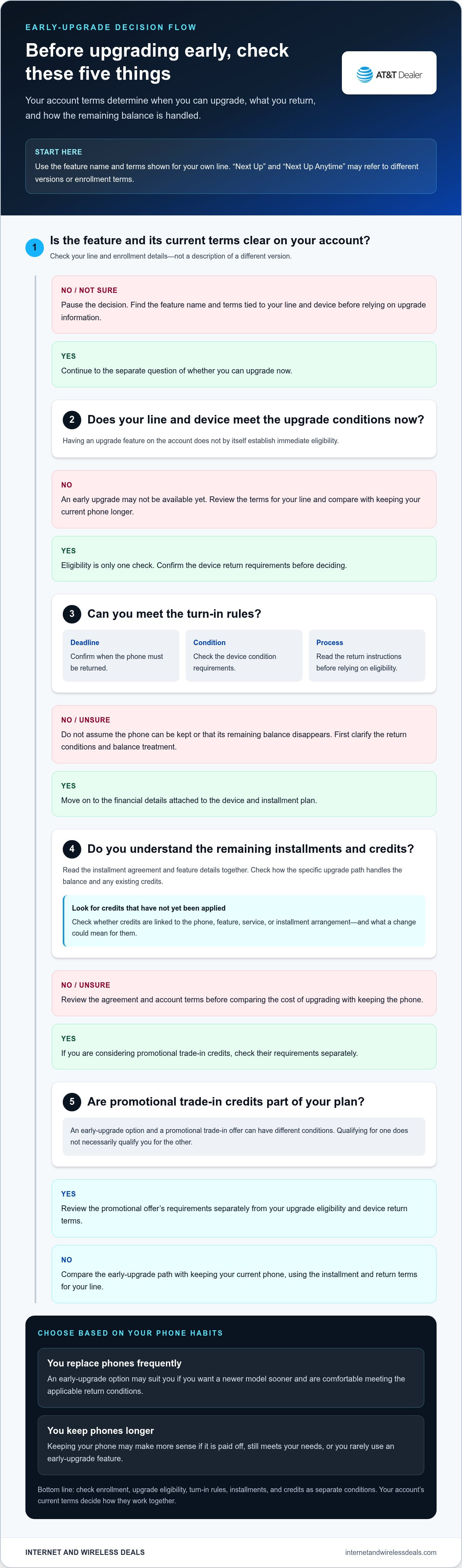
Before You Enroll: A Practical AT&T Next Up Review Checklist
Review your account before adding an upgrade feature or deciding to replace your phone. Separate the terms that apply to the feature from details tied to your specific device, installment agreement, and enrollment. General program information can help you know what to look for, but your account documents determine how the conditions apply to you.
Focus on four decision points: the full monthly cost, how soon you expect to replace the phone, the device return requirements, and whether promotional credits affect your choices. Keep your bill, installment agreement, feature details, and any offer terms together. Reading them side by side can help you spot conditions that are easy to miss when reviewing each document on its own.
Review the complete cost and device obligations
Check whether the feature has a recurring charge and how that charge relates to your device installments. The feature charge, if applicable to your account, does not necessarily reduce the phone balance. If promotional bill credits are involved, read the offer terms to learn what must remain in place for the credits to continue. Also check how a qualified turn-in affects any remaining balance.
- Find the full monthly picture. Review the feature charge, device installment, and promotional credits together. Compare the current bill with the terms for each item, and do not judge the option by one charge alone.
- Understand the turn-in result. Check whether your chosen upgrade route changes or clears any remaining installment balance, and under what conditions. Do not assume every upgrade or trade-in works the same way.
- Check the device standard. Read the physical and functional condition requirements and the return instructions. If your phone has damage or a fault, find out how the stated rules address it before relying on the device’s eligibility.
Confirm timing and eligibility before acting
Enrollment and upgrading are different decisions. Review the date and conditions associated with enrollment, then confirm that your device and account meet the requirements for an upgrade. If you are relying on an older reference to “Next Up,” compare it with the feature details currently shown for your line. Another customer’s experience may not match your enrollment terms.
- Check your upgrade timing. Find the condition that applies to the upgrade you want. If you are also considering promotional trade-in credits, review their requirements separately.
- Verify the return deadline. Locate the deadline and accepted condition for your phone, and follow the return instructions for the upgrade you choose.
- Compare timing with your habits. If you normally keep a phone for a long time, consider whether an ongoing feature charge and its conditions would provide enough value for you.
The AT&T Next Up upgrade program is easier to assess when you distinguish general descriptions from the terms on your account. Before enrolling or changing your device, review the relevant feature, installment, and promotional offer details. For a separate view of your wireless setup, compare AT&T wireless plan options alongside your device and installment commitments.
Explore AT&T Wireless Options After Comparing Your Upgrade Path
Your decision has two parts: whether an early phone replacement suits your habits, and whether your wireless service fits your needs. The AT&T Next Up upgrade program concerns device upgrade timing and related conditions. A wireless plan covers service. They are connected parts of your account, but they are not interchangeable. Do not assume that choosing a particular plan makes you eligible for a device upgrade.
Start by comparing upgrade timing with how long you usually keep a phone. Then review the current conditions for your account, including eligibility, installment details, and turn-in requirements. Keep that review separate from a wireless-plan comparison. Information about AT&T wireless plans can help you assess service needs, but it does not establish Next Up eligibility or replace the terms of your feature.
How does your wireless plan fit into the decision?
Consider service and device financing as distinct decisions. First, assess how you use wireless service and whether your current plan fits those needs. Separately, decide whether an earlier upgrade option matches your replacement habits and the conditions tied to your installment. Reviewing both can give you a clearer picture of your account without assuming that a particular plan is required for an upgrade.
Before taking your next step, have these details in front of you:
- Account eligibility: Review the feature and upgrade status shown for your line, along with any conditions linked to your enrollment.
- Installment agreement: Check the device balance, payment arrangement, and any credits tied to the phone. Read how an upgrade or feature change could affect them.
- Turn-in conditions: Confirm the required device condition, return deadline, and how the phone’s return affects the upgrade process.
- Phone habits: Compare the program’s timing and ongoing requirements with how often you actually replace your device.
- Wireless service needs: Review plan features separately from phone financing so your service choice reflects how you use your line.
Choose your next step with the terms in front of you
Use the current AT&T program terms for final details. Conditions that applied when you enrolled may differ from those for a new enrollment, and account-specific eligibility can affect your options. If you are weighing service choices, use an AT&T wireless plan comparison as a separate reference, not as a source for upgrade rules.
With your account information ready, you can make a more confident choice: pursue an earlier upgrade if its timing and requirements fit, or keep your current phone and revisit your options when it makes sense. Internet and Wireless Deals helps customers explore AT&T wireless plans and smartphones as part of a broader service review. Consider your service needs and device terms together, while keeping their requirements distinct.
Make Your Next Wireless Decision With Confidence
Let your phone habits guide the timing, rather than the excitement of a new device alone. Before making a change, review your account and decide what matters most for your next stretch of wireless service: keeping your current phone, choosing an earlier upgrade path, or revisiting your plan. That gives you a practical starting point for comparing your options.
The AT&T Next Up upgrade program is one part of the decision. Your wireless plan is another. Keep the two questions separate, then consider how they fit together in your day-to-day use. Internet and Wireless Deals is an independent authorized AT&T retailer that helps customers explore AT&T wireless plans and smartphones.
Ready to review the service side of your setup? Compare AT&T wireless options and explore a path that fits your needs. Review your device terms and service needs before choosing your next step.
Frequently Asked Questions
Can I use AT&T Next Up to upgrade before my phone is paid off?
Possibly, if your account, enrollment, installment terms, and device meet the applicable conditions. The AT&T Next Up upgrade program should not be treated as automatic permission to replace a phone before its installments are complete. Before choosing another device, check the current terms for your line and find out how they handle the remaining balance. Do not assume it will be cleared or transferred.
What happens if my phone does not meet AT&T's qualified turn-in requirements?
A phone that does not meet the applicable turn-in requirements may not qualify for the upgrade option. The result depends on the terms for your account and the specific condition issue. Before returning a damaged or malfunctioning phone, read the current condition and return instructions alongside your installment agreement. Keep a copy of the terms that apply to your account.
How much does AT&T Next Up cost?
Check the feature details on your account for any recurring charge and how it is billed. The cost may be separate from your phone installments, so review both items together before enrolling. Also check how the feature relates to promotional credits connected to your device. Your account terms and bill are the best place to confirm the charges that apply to your line.
Is AT&T Next Up Anytime required to buy a phone on installments?
Review the terms for the phone and installment arrangement you are considering, and treat an optional upgrade feature as a separate decision. Check whether the feature is included or separately selected for your purchase, what it costs if applicable, and what conditions it adds. Read the installment agreement and feature details before accepting either arrangement.
Can I upgrade if I am not eligible yet?
You can use an early-upgrade option only if you meet the current eligibility conditions for your account and device. Those conditions may involve your service, installment arrangement, and a qualified turn-in. If your account does not show you as eligible, review the agreement and account status for your line rather than assuming an exception or a specific wait time.
Does AT&T Next Up apply to every smartphone?
Do not assume every smartphone or installment arrangement qualifies. Check the current feature terms for the exact device and financing arrangement you are considering. This is especially useful when comparing phones, since the terms associated with one purchase may differ from those for another. Confirm eligibility before making your purchase decision.


