

A cellular tablet doesn’t always need its own line. It needs a data plan to access mobile internet away from Wi-Fi if it isn’t already connected through an eligible phone plan. AT&T tablet mobile data plans can provide a dedicated connection, while a Wi-Fi-only tablet relies on Wi-Fi or a phone hotspot. Start by considering how and where you’ll use your tablet.
A cellular tablet doesn’t automatically require a separate plan. Some eligible phone plans include tablet connectivity, while other options are sharing your phone’s hotspot or adding a tablet line. The right fit depends on whether you need occasional access on the go or a dedicated connection for regular browsing, streaming, or work. This guide explains when a tablet needs its own data plan, how phone-plan connectivity differs from hotspot sharing, and what to consider with postpaid tablet and iPad options. Use these distinctions to match a connection to your routine.
Key Takeaways
- Decide whether your tablet needs its own connection by weighing how often you use it away from Wi-Fi against your phone plan’s hotspot allowance.
- Learn how eligible phone plans can include tablet connectivity, and when a separate tablet line may better suit regular mobile use.
- Understand the basic steps for adding a tablet line, including checking that the device can connect to cellular service and fits your account needs.
- Compare postpaid tablet options by looking at data allowances, possible speed management, and whether you need a dedicated line.
Do I need a data plan for my tablet?
A tablet needs its own data plan when you want internet away from Wi-Fi without relying on a phone hotspot. A Wi-Fi-only tablet connects through Wi-Fi or a phone’s hotspot. A cellular-enabled tablet can use a tablet line, including a standalone option activated without another service line. Choose based on where you use the device and how often you need mobile access.
Internet and Wireless Deals offers data-only options for tablets, including a 100GB plan. It can suit regular browsing, video, and work away from home. A data-only plan connects the tablet itself; it doesn’t require you to share your phone’s hotspot allowance. Check that your tablet supports cellular service before selecting this route.
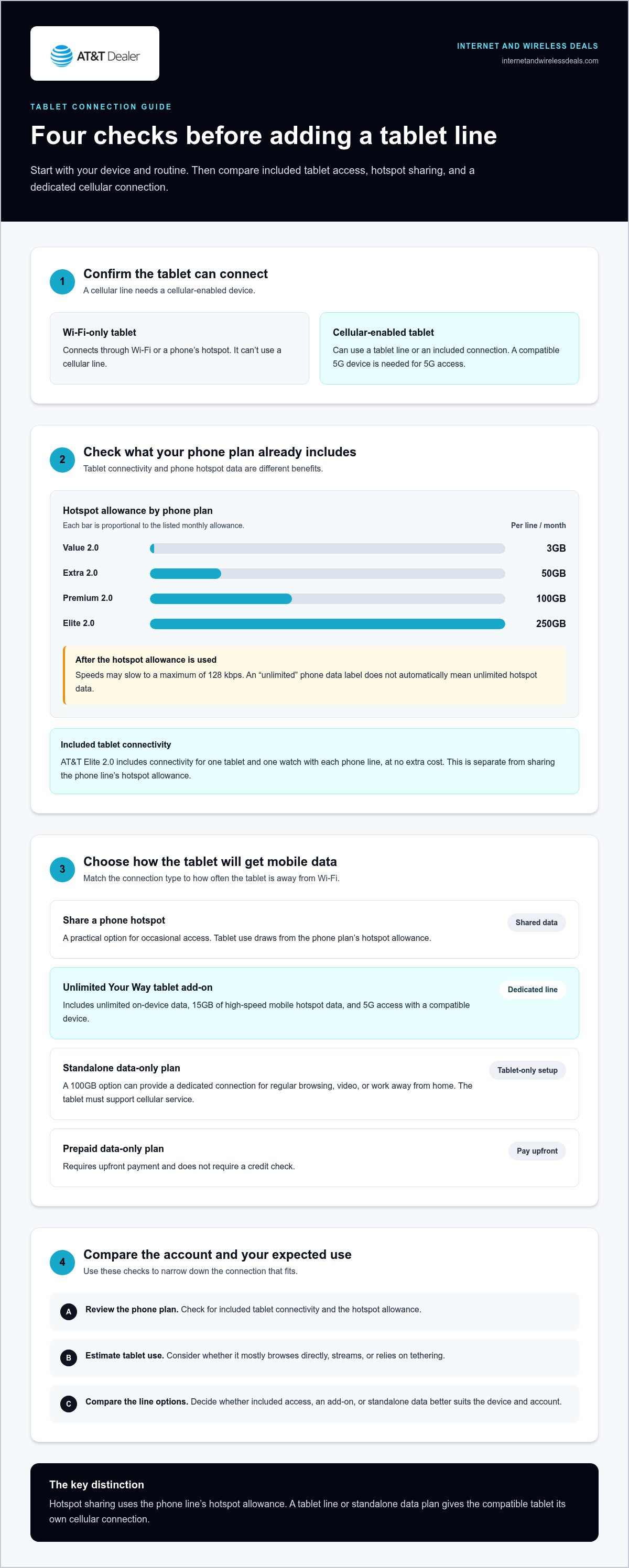
Phone-plan hotspot allowances offer another way to connect a tablet. Value 2.0 includes 3GB per line per month, Extra 2.0 includes 50GB, Premium 2.0 includes 100GB, and Elite 2.0 includes 250GB. After the allotted hotspot data is used, speeds may slow to a maximum of 128 kbps. Match the allowance to your tablet’s expected hotspot use, especially for streaming or large downloads.
Unlimited phone service doesn’t automatically mean unlimited hotspot data. A plan, for example, may include unlimited on-device phone data while setting a separate hotspot allowance. That distinction matters when connecting your tablet through your phone. Compare the hotspot allowance with your typical tablet use, not just the plan’s “unlimited” label.
With a standalone tablet plan through Internet and Wireless Deals, you can activate cellular service on a compatible device without adding a phone line. Consider whether that dedicated connection is more useful than sharing your phone’s hotspot. A separate data plan keeps tablet use independent; hotspot sharing avoids adding a tablet connection. The right choice depends on your usage and your existing plan’s allowance.
Tablet connectivity included with eligible phone plans
Prepaid data-only plans require upfront payment and don’t require a credit check. With connectivity included through a phone plan, the tablet connects through an eligible phone line. This option isn’t described as requiring a separate tablet contract or autopay.
AT&T Elite 2.0 includes connectivity for one tablet and one watch with each phone line, at no extra cost. That can suit someone who wants a cellular tablet without purchasing a separate tablet add-on. The included tablet connection is distinct from using a phone’s hotspot, which draws on the phone line’s hotspot allowance.
Unlimited Your Way tablet add-on lines include unlimited on-device data and 15GB of high-speed mobile hotspot data. They also include 5G access when paired with a 5G device. These features apply to the tablet add-on line. They aren’t the same as the Elite 2.0 inclusion, so compare the exact plan structure before choosing.
Device compatibility matters. DataConnect is available on select tablets, mobile hotspots, laptops, and LTE cameras. For a tablet, confirm it has cellular capability rather than Wi-Fi alone. A compatible 5G device can use 5G access where the network is available; a 5G-ready plan alone doesn’t make a Wi-Fi-only device cellular.
Before adding service, identify how the tablet will connect. Check whether your phone plan includes tablet connectivity, whether you’re considering an Unlimited Your Way add-on, and whether your device supports cellular service. Unlimited Your Way has three smartphone plan options: Unlimited Elite, Unlimited Extra, and Unlimited Starter. The plan name identifies the phone service; the tablet add-on has separate data features.
If you’re comparing phone-line choices alongside tablet connectivity, explore AT&T Wireless Plans. Match the plan’s included connection or add-on to your device and how you’ll use it, including streaming away from Wi-Fi.
Adding a tablet line to an existing AT&T account
Start by identifying the tablet’s connection type. A Wi-Fi-only model can’t use a cellular line, so choose a cellular-enabled tablet for mobile network access. Then compare connectivity through an eligible phone plan with an add-on tablet line. The first may already include tablet connectivity, while an add-on gives the tablet its own line. This distinction helps you choose a connection that suits your device.
For an Unlimited Your Way account, tablet add-on lines include unlimited on-device data, 15GB of high-speed mobile hotspot data, and 5G access with a compatible device. Use the tablet line for its own mobile connection. Use hotspot data when the tablet shares another device’s connection. Those are separate uses, so estimate whether your tablet mostly browses directly or relies on tethering.
Use this sequence to narrow the account choice:
- Check whether your tablet supports cellular service and 5G, if needed.
- Review the phone plan’s included tablet connectivity and hotspot allowance.
- Choose between included access and an Unlimited Your Way tablet add-on.
- Consider whether a standalone data plan better fits a tablet-only setup.
Account discounts can also affect the plan decision. Eligible business employees, union members, and students can save 20% per line on Premium 2.0. That discount applies to eligible lines, so weigh it alongside the tablet’s connection needs. Don’t assume a discount changes the tablet line’s data features; the plan and add-on determine those features.
Credit requirements depend on the plan type. AT&T prepaid data-only plans require you to purchase data upfront and don’t require a credit check. That’s different from adding a tablet line to an existing postpaid account. Compare the account structure, device compatibility, and expected network use before choosing. For frequent mobile browsing, a dedicated cellular line may fit better; for occasional access, included connectivity or phone hotspot use may be enough.
Postpaid tablet and iPad data plans
A postpaid tablet line adds cellular internet to your account. For iPad users, the key choice is dedicated tablet data or phone-plan connectivity. Start by checking whether your iPad supports cellular service. A Wi-Fi-only model can’t connect directly to a 5G network. Then compare your expected tablet use with each plan’s data allowance and speed rules.
AT&T data-only tablet connectivity includes a 3GB threshold. After 3GB, speeds are slowed to a maximum of 128 kbps. That can affect video streaming, downloads, and other internet tasks. A separate DataConnect option provides 50GB or 100GB of data. DataConnect includes nationwide 5G access at no extra charge with a compatible device, where coverage is available.
Unlimited Your Way tablet add-on lines work differently from data-only plans. They include unlimited on-device data and 15GB of high-speed mobile hotspot data. The line’s data is deprioritized and subject to network management policies. In practice, compare the dedicated tablet connection with hotspot use. The right fit depends on how the tablet connects and how much high-speed hotspot data you need.
- Choose a cellular-capable iPad for direct mobile data.
- Compare the 3GB threshold with your typical monthly usage.
- Consider DataConnect allowances for heavier tablet internet use.
- Review hotspot needs separately from on-device tablet data.
DataConnect also covers select tablets, mobile hotspots, laptops, and LTE cameras. It can suit a compatible device needing its own data connection. For an iPad used mostly on Wi-Fi, a dedicated postpaid line may not be necessary. For regular use away from Wi-Fi, compare the available data allowance, 5G compatibility, and speed management rules before choosing. This is the practical distinction: evaluate the tablet’s own connection needs, not just the word “unlimited.”
Internet and Wireless Deals: AT&T Fiber Internet
Internet and Wireless Deals helps you explore AT&T connectivity options after you’ve chosen how your tablet will connect. If you mainly use the tablet at home, AT&T Fiber Internet or AT&T Internet Air may help provide a home internet connection for Wi-Fi use. For mobile needs, explore 5G Smartphones as another part of your connectivity setup.
Use Internet and Wireless Deals to review availability, compare eligible plans, and find limited-time discounts for broadband and 5G mobile options. It’s a useful next step when you’re weighing home internet alongside a tablet’s cellular connection, or considering a device change. Your tablet’s connection choice still depends on its cellular capability and your usage needs.
Visit Internet and Wireless Deals to explore the available options.
Plan your next step for connected devices
Choosing among AT&T tablet mobile data plans is one part of creating a setup that works at home and on the go. Whether you're pairing your tablet with headphones for media on the move or using it as a portable workstation, consider where you rely on internet most, which devices need a connection, and whether your household also needs separate home service. Looking at the full picture can make your next decision more practical.
Internet and Wireless Deals offers AT&T Fiber Internet, AT&T Internet Air, and AT&T Wireless Plans. Explore these options if you’re considering home connectivity alongside wireless service. The right combination depends on your devices, where you use them, and how you prefer to stay connected.
Take the next step at your pace. Contact Internet and Wireless Deals to explore connectivity options, and move forward with a setup that fits your routine.
Frequently Asked Questions
How much do AT&T tablet data plans cost per month?
Monthly pricing depends on plan type, data allowance, and whether the tablet joins an existing account. AT&T tablet mobile data plans include prepaid, postpaid, and data-only options, so compare the billing structure as well as the allowance. The price depends on the plan and account you select. Consider whether you need recurring service or prepaid data.
What data allowances, speeds, and throttling rules apply to AT&T tablet plans?
Allowances and speed policies differ by plan. A postpaid data-only tablet connection has a 3GB threshold, after which speeds may be slowed to a maximum of 128 kbps. Unlimited Your Way tablet add-on lines include 15GB of high-speed hotspot data. DataConnect options include 50GB or 100GB. Compare on-device use with hotspot sharing, since those allowances describe different ways devices connect.
Can you add a tablet to an existing AT&T unlimited phone plan, and what does it cost?
Yes, eligible accounts can add a tablet line or use connectivity included with certain phone plans. Each Elite 2.0 phone line includes connectivity for one tablet and one watch. Unlimited Your Way tablet add-on lines have their own data features. The line’s price depends on the account and selected plan; request a quote for the applicable amount. Check whether your tablet supports cellular service first.
Does AT&T offer prepaid or standalone tablet data plans?
Yes. Prepaid data-only plans require purchasing data upfront and don’t require a credit check. Available prepaid tablet allowances include 15GB, 50GB, and 100GB. AT&T also offers standalone tablet service that can be activated without another service line. These options work differently: prepaid involves paying for data beforehand, while standalone service provides a tablet connection without requiring a phone line.
Which tablets and eSIM devices are compatible with AT&T data plans?
Cellular-enabled tablets, including select iPads, can use tablet data service; Wi-Fi-only models cannot connect directly to mobile networks. DataConnect also works with select mobile hotspots, laptops, and LTE cameras. eSIM support depends on the specific device and plan activation method. Before choosing a device, check its cellular capability and eSIM settings. A device’s 5G support also matters for accessing 5G service.
What are AT&T tablet plan activation, line access, and device fees?
Potential charges can include an activation fee for standalone tablet service, recurring line charges, and device payments if you finance a tablet. Tablet installment plans typically last 36 months. These are separate from the plan’s data allowance and billing structure. Review the account’s service selection and device payment arrangement together so you understand which charges relate to connectivity and which relate to the tablet itself.


