

Cellular data plans for connected timepieces can involve a separate monthly line or access included with an eligible plan, so your cost depends on the wireless service you have. With mobile data active, a compatible watch can make calls, send texts, and stream music or podcasts when your phone isn’t nearby.
It’s reasonable to focus on the monthly charge first. But a wearable line also offers the convenience of staying connected when you leave your phone behind, whether you’re going for a run or running a quick errand.
This guide explains how wearable data lines affect monthly costs, which devices can connect, and what cellular service lets you do away from your phone. You’ll also learn how activation works and what to consider when deciding whether a mobile plan suits the way you use your device.
Key Takeaways
- Learn when a cellular watch can call, text, and stream without your phone nearby, and when Bluetooth or Wi-Fi is enough.
- See how a smartwatch line can help you stay connected during workouts, errands, and other times you leave your phone behind.
- Understand why the watch must support cellular service and use an eSIM to connect to AT&T’s network.
- Find out what affects the monthly cost, including whether your wireless plan includes smartwatch access or requires an added line.
- Follow the basic setup path: pair the watch with your phone, then use the watch app to activate cellular service and NumberSync.
Calling, texting, and streaming without a nearby smartphone
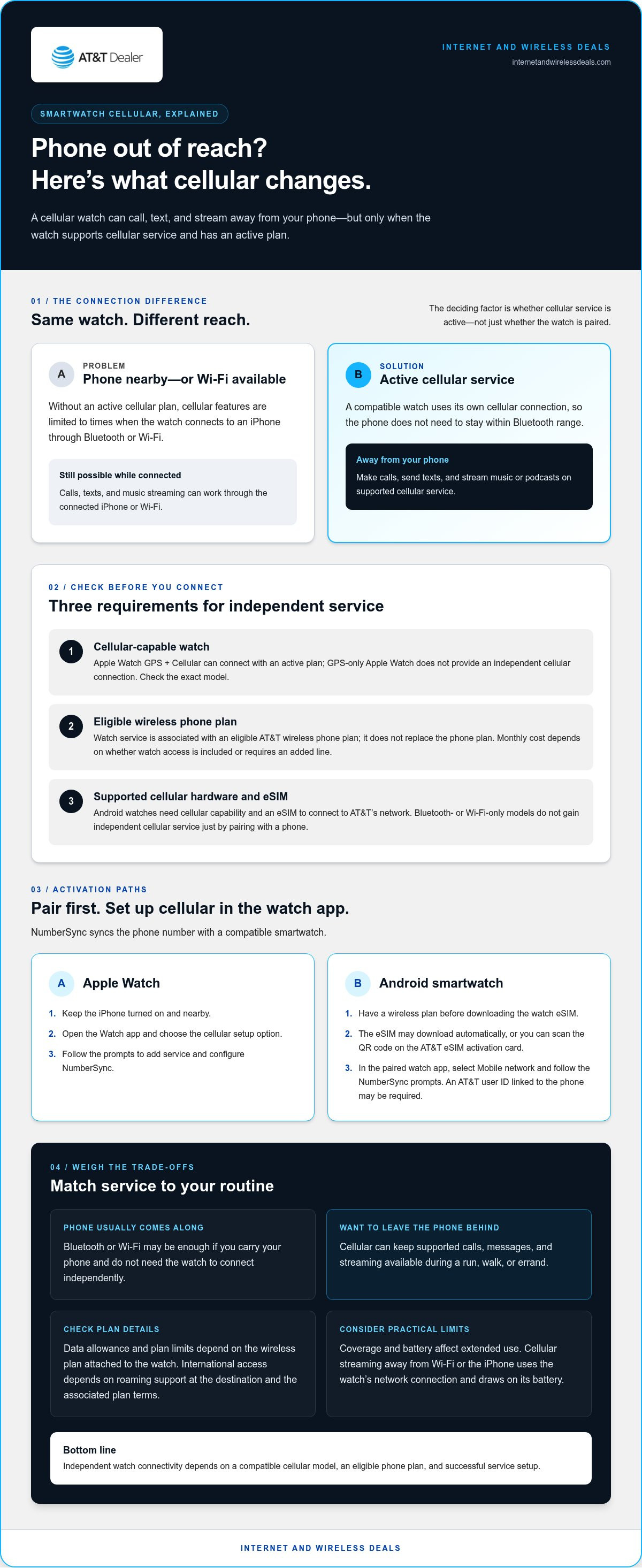
An Apple Watch GPS + Cellular can do more than a Bluetooth-only watch, but an active cellular plan is what enables independent connectivity. Without one, cellular features are limited to times when the watch connects to an iPhone through Bluetooth or Wi-Fi. Connected that way, it can still make calls, send texts, and stream music.
With an AT&T cellular plan, a compatible smartwatch can make calls, send texts, and stream music or podcasts without the iPhone nearby. That’s useful when you leave your phone at home for a run or keep it tucked away during an errand. The watch uses its own cellular connection, so the phone doesn’t need to stay within Bluetooth range.
Does AT&T smartwatch service require an eligible phone plan? Yes. The watch’s cellular service is associated with an eligible AT&T wireless phone plan, rather than replacing it. The phone and watch work together through the carrier’s service and setup process.
Can an AT&T smartwatch share the phone number of an iPhone or Android phone? Yes. AT&T NumberSync syncs the phone number with a compatible smartwatch, including Android smartwatches. For Apple Watch, set up cellular service and NumberSync in the Watch app on the iPhone.
For Apple Watch setup, keep the iPhone turned on and nearby. Open the Watch app, select the cellular setup option, and follow the prompts. For an already-paired Android smartwatch, open its watch app, select Mobile network, and follow the NumberSync prompts. Android setup may require an AT&T user ID linked to the phone being synced.
What cellular data, talk, and text limits or features apply to AT&T smartwatch plans? Cellular service supports calls, texts, and streaming away from the phone. The specific data allowance and any plan limits depend on the wireless plan attached to the watch, so distinguish the watch’s service from the phone’s own features.
Streaming uses the watch’s cellular connection when it isn’t on Wi-Fi or connected to the iPhone. For example, playing a podcast while walking away from the phone uses the watch’s network connection. Cellular coverage and the watch’s battery also affect how practical extended use is.
How do you cancel or transfer an AT&T smartwatch plan? To cancel, remove the smartwatch line from the AT&T account managing its wireless service. To transfer service, set up cellular on the replacement watch using its paired phone’s watch app and NumberSync prompts. For Apple Watch, keep the iPhone powered on and nearby during setup.
Benefits of smartwatch cellular plans
A cellular smartwatch provides a direct connection when carrying a phone feels inconvenient. On a walk, for example, you can leave your iPhone at home and still use supported watch features through cellular service. This makes the watch more useful as an independent device, not just a small screen paired with a phone.
The benefit is flexibility. You can decide whether to bring your phone based on the activity, rather than needing it beside you for every connected task. During a short workout, a cellular Apple Watch can keep calls and messages available. While commuting, it can help you stay reachable without taking your phone out of a bag.
Cellular service can also make the watch a more capable music companion. With service active, you can stream music or podcasts away from your phone instead of relying only on audio available through a nearby iPhone or Wi-Fi connection. That matters when you want to travel light and leave your phone at home.
Can AT&T smartwatch plans be used internationally, and what are the roaming rules? International smartwatch access depends on roaming support at your destination and the terms of the associated wireless plan. Domestic cellular service alone doesn’t establish that calls, texts, or data will work abroad.
Activation links the watch’s cellular service to the phone account. For Apple Watch, turn on the iPhone, keep it nearby, open the Watch app, and select the cellular setup option. Follow the on-screen prompts to add service and configure NumberSync, which syncs the phone number with the watch.
Android setup uses the watch’s companion app and eSIM. You need a wireless plan before downloading the watch eSIM. It may download automatically, or you can scan the QR code on the AT&T eSIM activation card. For an already-paired Android watch, open its app, select Mobile network, and follow the NumberSync prompts. Setup may require an AT&T user ID linked to the phone being synced.
Consider how you use your watch before activating service. Someone who carries an iPhone everywhere may rely mostly on Bluetooth or Wi-Fi. A runner who wants to leave the phone behind may value independent connectivity more. Cellular use also draws on the watch’s battery, so streaming on a long outing can affect how long the watch lasts before charging.
Choose based on your routine, device, and plan terms. For help exploring AT&T wireless plan options, compare how each plan fits the phone and watch you use.
Compatible smartwatch devices
Cellular capability is the key distinction when choosing a smartwatch for independent service. An Apple Watch GPS + Cellular can connect to a wireless carrier’s network with an active plan. A GPS-only Apple Watch doesn’t provide that independent cellular connection. Check the exact watch version, not just its family name or appearance.
Android watches also need cellular capability and an eSIM to connect to AT&T’s network. A watch that relies only on Bluetooth or Wi-Fi won’t gain independent cellular service simply by pairing with an Android phone. Before choosing a device, identify its exact model and confirm it supports cellular service. Don’t assume every version in a product line has the same hardware.
Use this quick device check before setting up a line:
- Apple Watch: Look for the GPS + Cellular version. A GPS-only model doesn’t provide the same independent network connection.
- Android smartwatch: Check that the watch supports cellular service and an eSIM. Its companion app manages mobile-network settings.
- Phone pairing: Match the watch with the phone and companion app used for setup. Apple Watch service is configured through the iPhone’s Watch app.
- Number syncing: NumberSync links an AT&T phone number with a compatible Android smartwatch. Setup may require the AT&T user ID linked to that phone.
An eSIM is built into the watch, so cellular setup doesn’t require a removable SIM card. Android smartwatch users need a wireless plan before downloading the eSIM. Depending on the setup, it can download automatically or through a QR code on the AT&T eSIM activation card. This makes eSIM support a practical compatibility requirement, not just a technical detail.
Apple Watch cellular models also have a specific 5G distinction. They require a data plan for 5G, which is available only in select markets and through select carriers. That doesn’t mean every cellular watch connection uses 5G. The watch model, carrier support, and location all matter for that feature.
Don’t choose by brand name alone. Compare the exact model’s cellular version, eSIM support, and phone-pairing requirements. For example, an iPhone user should look for a GPS + Cellular Apple Watch and use the Watch app for setup. An Android user should check the smartwatch’s cellular and eSIM support, then use its companion app to set up the mobile network. These steps help you avoid buying a Wi-Fi-only version when independent connectivity is the goal.
A compatible wireless-carrier data plan lets an Apple Watch use cellular connectivity independently of an iPhone when the phone is not nearby. AT&T smartwatch device installment pricing is offered at 0% APR for 36 months for qualifying customers.
Monthly cost to add a smartwatch line
The monthly total depends on the wireless plan and how it handles smartwatch access. An eligible plan may include watch access, while another may require an added smartwatch line that typically costs around $10 to $15 per month. Start by identifying your current plan and whether the watch is already associated with its account. This tells you whether you’re reviewing included access or an added service line.
Separate the service charge from the device purchase. A smartwatch line pays for cellular connectivity; a watch installment is a device payment. They’re separate account items. If you already own an Apple Watch GPS + Cellular, focus on the service terms. If you’re buying a watch, consider device payments separately from recurring wireless service.
To compare AT&T smartwatch cellular data plans, review these account details together:
- Wireless plan: Identify the plan covering the paired phone. Its terms determine whether smartwatch access is included or added separately.
- Watch service: Check whether cellular service is active. Bluetooth or Wi-Fi alone doesn’t create an independent cellular line.
- Device payment: If you’re financing an Apple Watch or Android smartwatch, distinguish that payment from the recurring service charge.
- Account setup: NumberSync associates a phone number with a compatible watch. Identify which phone account manages that connection.
Compare the plan’s watch terms with your routine. Someone who leaves an iPhone behind for runs may value independent service. Someone who keeps the phone close may rely on Bluetooth or Wi-Fi. Your usage pattern helps you decide whether an added line offers practical value.
Device capability also affects the decision. An Apple Watch GPS + Cellular supports independent cellular connectivity with service, while GPS-only hardware doesn’t. Android smartwatches use an eSIM, and a wireless plan is needed before downloading it. Both the watch model and account setup matter.
Before activating service, review the wireless account’s plan details and identify separate watch or device items. Have the watch model, paired phone, and account information ready. For Apple Watch, use the iPhone’s Watch app to set up cellular service. For Android, follow the companion app’s mobile-network steps and NumberSync prompts.
Comparing AT&T smartwatch cellular data plans is easier when you list your current wireless plan, watch model, and whether you’re purchasing a device. Then assess the service terms separately from any device payment. This helps distinguish the cost of staying connected from the cost of owning the watch.
Treat that standard $10 to $15 monthly service amount as a starting point when weighing the service charge against the wireless plan already covering the phone. It doesn’t replace checking how watch access is handled on the account or whether an added line is needed.
Keep any watch purchase or installment separate from the recurring service cost. Review the plan terms and account setup together before deciding whether cellular access suits your routine. If your phone usually stays nearby, Bluetooth or Wi-Fi may meet your needs; if you leave it behind, independent cellular service may be more valuable. This comparison clarifies what the monthly line adds without confusing connectivity with the price of the watch itself.
What AT&T cellular plans are available for smartwatches?
Smartwatch service works alongside an eligible AT&T wireless phone plan. Customers can add a watch line to an AT&T Unlimited plan, linking cellular access to a compatible smartwatch. The watch then uses its own eSIM to connect, while NumberSync can sync its number with the phone.
Plan details differ, so separate watch access from the phone plan’s data features. AT&T says its Elite 2.0 plan includes monthly access at no extra cost for one smartwatch and one tablet per line. That is a useful distinction for customers comparing plan features: the included access applies to those devices, while other plan terms govern phone data.
Some plans may include hotspot data and data for use while traveling. Those figures describe plan features, not a smartwatch-specific data allowance. Keep that distinction clear when estimating watch use. The watch’s cellular service supports calls, texts, and streaming away from its paired phone.
AT&T states that data speeds are slowed to a maximum of 128kbps after the stated 3GB, 50GB, 100GB, or 250GB thresholds. These thresholds relate to the plan’s stated data terms; they shouldn’t be mistaken for a separate watch allowance. For example, streaming from a watch away from a phone uses cellular service, while the plan determines applicable data terms.
Compare plans by checking four details together:
- Plan eligibility: Confirm the phone plan supports adding smartwatch service.
- Included access: Check whether the plan includes smartwatch access, as Elite 2.0 does for one smartwatch and one tablet per line.
- Data terms: Distinguish phone-plan data features from the watch’s cellular connection.
- Device setup: Match the plan to a cellular-capable watch and complete setup through its companion app.
The right fit depends on how often you leave your phone behind and which plan features matter to you. If you mainly use the watch near your phone, Bluetooth or Wi-Fi may cover your routine. If you want calls, texts, or streaming while away, an active watch connection adds that capability. Before activation, compare the specific AT&T wireless plan terms with your device and intended use.
Compare wireless plan options to find a plan structure that fits your phone and smartwatch use.
Internet and Wireless Deals: AT&T Fiber Internet
Internet and Wireless Deals helps you explore AT&T Wireless Plans after learning how smartwatch service connects to a phone plan. It’s a useful next step if you’re comparing wireless options for a compatible watch and smartphone. Visitors can also explore AT&T Fiber Internet or AT&T Internet Air for home connectivity, and 5G Smartphones when considering a phone upgrade.
Start with what you need to connect: a cellular watch, a paired phone, or devices at home. Comparing those needs can help you focus on relevant AT&T options without confusing smartwatch service with home internet.
For help exploring AT&T connectivity options, visit internetandwirelessdeals.com.
Make Your Next Connectivity Choice
Your next step is to decide how you want your devices to fit into your daily routine. Consider whether the watch needs its own cellular connection, how it works with your phone, and whether your home internet needs deserve attention too. This helps you assess AT&T smartwatch cellular data plans alongside your household’s broader connectivity needs.
Internet and Wireless Deals offers AT&T Wireless Plans for mobile connectivity, plus AT&T Fiber Internet and AT&T Internet Air for home internet. Explore the option that best matches what you want to connect, whether it’s a smartwatch and phone or devices throughout your home.
Contact Internet and Wireless Deals to explore AT&T connectivity options. Take the next step with a clearer picture of what your devices need, and choose a setup that fits your routine.
Frequently Asked Questions
How much does it cost to add a smartwatch to my AT&T plan?
The monthly cost depends on whether your wireless plan includes smartwatch access or requires an added line. Separate that service charge from any watch payments, since device financing isn’t the same as cellular service. For example, if you already own a compatible cellular watch, focus on the line’s service terms. If you’re purchasing a watch, consider the device and service as separate parts of the total.
How much does AT&T charge per month to add a smartwatch line?
The monthly charge depends on your eligible wireless plan and how it handles smartwatch access. Some plans include access for a smartwatch, while others require a separate line. Compare the line’s recurring service charge with any device installment shown on your account. This distinction helps you tell whether a change in your bill comes from cellular access or the watch itself.
Which smartwatch models support AT&T cellular service?
Look for an Apple Watch GPS + Cellular model or a cellular-capable Android smartwatch with an eSIM. A GPS-only Apple Watch doesn’t provide the same independent cellular connection. For Android, the watch also needs to support eSIM setup through its companion app. Check the exact model designation before purchase, since versions within the same smartwatch family can have different connectivity hardware.
Does AT&T charge smartwatch activation fees, taxes, or other one-time costs?
Activation charges, taxes, and device-related amounts are separate from a smartwatch line’s recurring service charge. The total depends on the account and whether you’re also purchasing a watch. Review the itemized transaction and bill to distinguish service, device payments, taxes, and any one-time items. That breakdown helps clarify what you’ll pay initially and what recurs each billing period.


