

What if your internet plan has a maximum capacity of 5 Gbps, but no single device in your home can download at that speed? That’s the key to understanding 5 gigabit fiber internet speed: the plan’s capacity is shared across your home, and your router, Wi-Fi, and devices all affect the speed you experience.
A big speed number can make it seem as though every online task will feel dramatically faster. In practice, a multi-gig connection reaches its full potential only when the rest of your network can keep up. For everyday browsing, streaming, and video calls, a lower-speed plan may already be enough.
This guide explains what 5 gigabits can and can’t do, how plan speed differs from an individual device’s speed, and which equipment limitations can get in the way. You’ll also compare 5-gig service with lower tiers, learn how to test your connection, and decide whether the extra capacity makes sense for your home.
Key Takeaways
- Understand what 5 gigabit fiber internet speed means and why it doesn’t guarantee that one device will reach 5 Gbps.
- See how your router, Ethernet ports, cabling, Wi-Fi, and device hardware can limit the speed you actually experience.
- Compare lower, gigabit, and multi-gig tiers against your household’s activities and number of simultaneous users.
- Test your current connection over wired Ethernet and assess your equipment before deciding you need more capacity.
- Explore AT&T Fiber options based on the speed tiers available for your service address.
What Does 5 Gigabit Fiber Internet Speed Actually Mean?
A 5-gigabit connection describes a high-capacity data link. It doesn’t promise that every phone, laptop, or game console will run at 5 Gbps. The advertised rate is a maximum under suitable conditions. Actual performance depends on the full path from the internet connection through your home network to the device you’re using.
Advertised plan speed is the connection’s stated maximum data-transfer rate. A device’s measured speed is the rate that device receives during a test. Your household can have a fast connection even when an individual device shows a much lower result.
Fiber-optic service carries information through light transmitted along optical fiber. The Fiber-optic communication principles help explain how data travels, but the speed you experience still depends on the complete connection, not just the fiber line.
How many megabits per second is 5 gigabits?
Using the decimal units commonly used for network speeds, 1 gigabit per second equals 1,000 megabits per second. So 5 Gbps equals 5,000 Mbps. Both figures describe a data-transfer rate, not the amount of data in a file.
Bits and bytes are related but different. A bit is a unit of data, and a byte contains eight bits. A file labeled 1 gigabyte is therefore about 8 gigabits in decimal terms. At a steady, idealized rate of 5 Gbps, transferring that file would take about 1.6 seconds. That’s a theoretical calculation, not a real-world download promise. Network overhead, the download server, congestion, and your device’s capabilities can all affect the result.
Downloads may also be displayed in megabytes per second (MB/s), rather than megabits per second (Mbps). Since there are eight bits in a byte, 5 Gbps converts to a theoretical 625 megabytes per second before overhead. Check the units before comparing a speed test with a file-transfer display.
Does 5-gigabit service mean every device gets 5 Gbps?
No. The plan provides capacity for the connection, and connected devices share that capacity as they use the network. Imagine someone downloading a large game while another person joins a video call and a third streams a show. Each activity draws on the household connection, but demand changes over time. The plan doesn’t assign 5 Gbps to every device at once.
Nor does a single device automatically receive the full plan rate. Its connection can be limited by the router, the port it uses, its own network hardware, or Wi-Fi conditions. A phone may handle everyday streaming smoothly without being capable of measuring anywhere near the plan’s maximum. Think of 5 gigabit fiber internet speed as the potential capacity available to the home, not a guaranteed speed for each device.
What Can Limit Real-World 5 Gigabit Fiber Internet Speed?
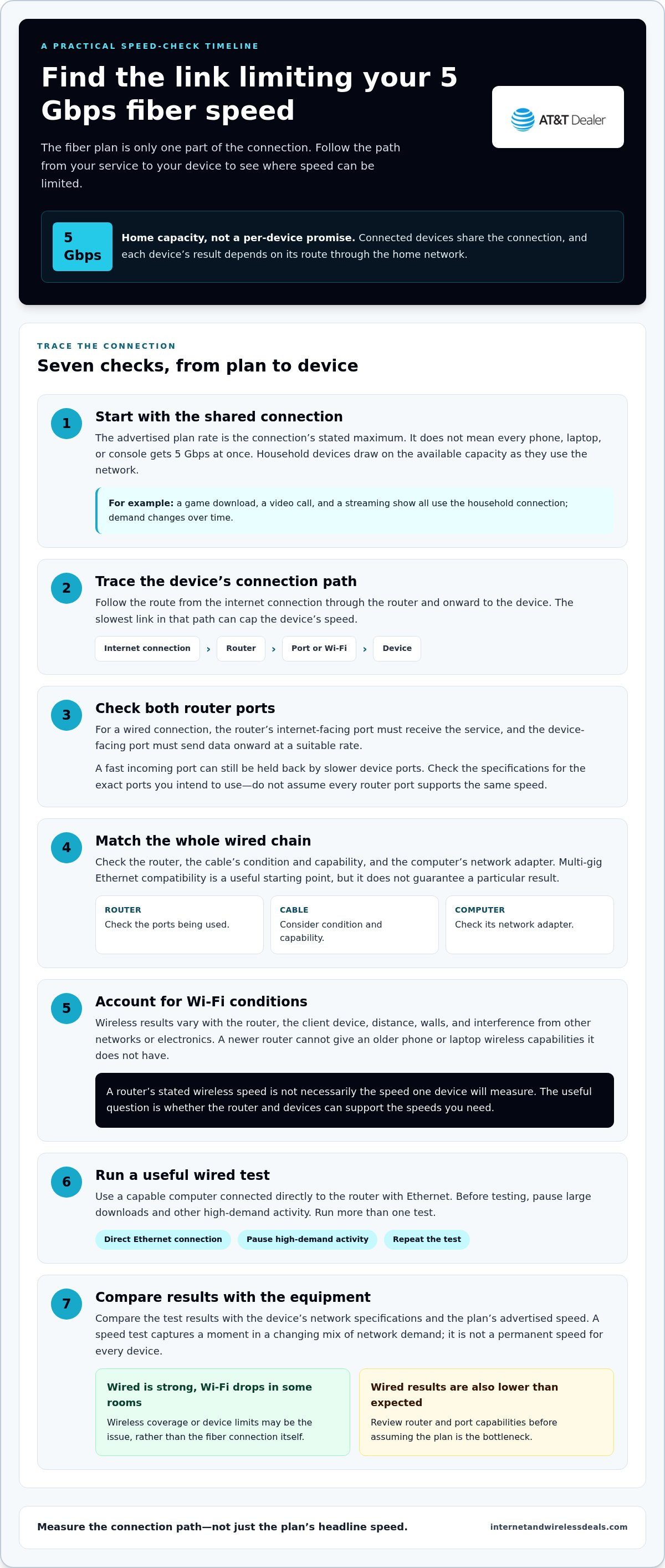
A fast fiber plan is only one part of the route your data travels. From the router to the device, every connection point can affect the final result. The slowest link in a device’s connection path can cap its speed. That link might be a network port, a cable, the device’s network adapter, or a wireless connection affected by distance or interference.
A plan can’t upgrade an older laptop’s Ethernet interface or give a phone newer wireless capabilities. It also can’t eliminate congestion. When several people stream, game, and download at the same time, their devices share the available household capacity. Each speed test captures a moment in that changing mix, rather than a permanent speed for every device.
For a useful test, connect a capable computer directly to the router with Ethernet, pause large downloads and other high-demand activity, then run more than one test. Compare the results with the device’s network specifications and the plan’s advertised speed. The FCC guidelines on broadband speeds also provide helpful context for understanding broadband performance and speed measurements.
Which router and Ethernet connections can support multi-gig speeds?
Wired performance depends on both ends of the connection. The router’s internet-facing port must be able to receive the incoming service, and the device-facing port must be able to send data onward at a suitable rate. A router with a fast internet port but slower device ports can still limit a wired test. Check the specifications for the exact ports you plan to use.
Multi-gig Ethernet compatibility is a useful starting point, not a guarantee of a particular result. The computer’s network port, cable condition and capability, and router performance all play a role. Don’t assume that every port on a router supports the same speed. Match the specifications along the entire wired path, including the computer’s network adapter.
Can Wi-Fi deliver the full 5-gigabit connection?
Wi-Fi speed varies with the router, client device, distance, walls, and interference from other networks or electronics. A newer router can’t give an older phone or laptop wireless capabilities it doesn’t have. Results may also change as you move farther from the router or connect through walls.
A router’s stated wireless speed is not necessarily the speed a single device will measure. It may describe a maximum under specific conditions, while the device’s own wireless hardware, the network environment, and the distance from the router all affect its result. Wi-Fi 7 isn’t a blanket requirement for fast internet, either. The useful question is whether your router and devices can support the speeds you need.
If wired results are strong but Wi-Fi results fall off in certain rooms, the issue may be wireless coverage or device limits rather than the fiber connection itself. If wired results are also lower than expected, review the router and port capabilities before assuming the plan is the bottleneck. Understanding those limits can help you decide whether to explore AT&T Fiber options that fit your household. Internet and Wireless Deals is an independent third-party marketing partner and authorized AT&T retailer.
5 Gigabit vs. Lower Fiber Speeds: Which Connection Fits Your Home?
The right fiber tier depends on what your household does online at the same time, not simply the biggest number on a plan label. A home with routine browsing and a few active devices may not use multi-gig capacity regularly. A household with several demanding users and compatible equipment may have more reason to consider it.
Use these broad speed categories as a guide, not as a provider’s exact plan names. Tiers and labels vary, so compare the options available for your service address.
| Speed category | May fit households that... | What to weigh |
|---|---|---|
| Lower-speed fiber, below 1 Gbps | Mostly browse, check email, stream, and handle a limited number of simultaneous online activities. | Consider whether anyone regularly experiences slowdowns during busy periods. |
| Gigabit, around 1 Gbps | Have several connected users and want more room for simultaneous everyday activities. | Assess whether the added capacity addresses a real household need. |
| Multi-gig, above 1 Gbps | Often move large files, use demanding cloud workflows, or have several high-bandwidth activities happening together. | Check whether your network equipment and devices can use more than gigabit capacity. |
These categories describe plan capacity, not guaranteed device speeds. For a broader explanation of how connection speed works, see the complete guide to fiber internet speed.
When might a household benefit from 5 gigabits?
Consider a home where one person is downloading large files, another is moving substantial data through cloud-based work, and other household members are streaming or gaming. These overlapping demands can make a higher-capacity connection worth evaluating, especially if slowdowns regularly affect work or entertainment.
Still, the 5 gigabit fiber internet speed headline matters only if the connection’s capacity matches real demand and compatible equipment can use it. Think about peak-use periods, not just how many devices are connected. Several devices used for light browsing don’t necessarily create the same demand as a few devices handling large transfers at once.
When could a lower speed tier be enough?
If your household mainly browses, streams, joins occasional video calls, and rarely handles multiple demanding activities at once, a lower tier may already suit your routine. Don’t upgrade just because a larger number sounds future-ready. Look at when slowdowns occur and whether they affect tasks that matter to you.
Track a typical busy evening: note how many people are online, what they’re doing, and whether performance feels strained. If everyday use remains smooth, extra capacity may bring little noticeable value. If heavy simultaneous use is common, compare available tiers and consider whether your equipment can take advantage of the added bandwidth.
How to Decide Whether 5 Gigabit Fiber Internet Speed Is Worth It
Choose capacity based on a real household need, not a headline number. These steps can help you decide whether a multi-gig plan could address recurring slowdowns or whether your current tier and network are already doing the job.
- Map your busiest periods. List who’s online and what they’re doing during the times your connection feels stretched. Include large downloads, cloud-based work, video calls, streaming, gaming, and other activities that happen at the same time.
- Look for a repeated bottleneck. Note whether slowdowns happen regularly during those busy periods or only occasionally. If everyday use is smooth, more capacity may not make a noticeable difference.
- Check your network’s capabilities. Review the router, Ethernet ports, cabling, and devices you expect to use for high-speed tasks. A multi-gig plan is most useful when the connection path and the devices can make use of its capacity.
- Compare your test results and available tiers. Test the current connection over Ethernet, then compare the results with the advertised plan speed and the service tiers available for your address. Consider a faster tier if repeated tests and real household demand point to a need, not just because it’s the largest option.
What should you check before choosing a multi-gig plan?
Make a quick inventory of household users, connected devices, and recurring high-bandwidth tasks. Then check whether your router and device ports, cabling, and computer network adapters support multi-gig connections. Focus on the equipment used by the devices that matter most, such as a work computer that regularly transfers large files.
Compare the results of wired tests with your current plan’s advertised speed. If a test is limited by equipment or conditions, upgrading the plan alone may not address the cause. Check the specifications for the computer, router, and cable along the test path before drawing conclusions from one result.
How do you interpret a home internet speed test?
A speed test is a snapshot, not a permanent verdict. For a clearer reading of the internet connection, test over Ethernet and pause other high-demand activity if possible. Wi-Fi can add variables, while the test server, background traffic, and the device’s own capabilities can also influence the result.
Run several tests at different times and note whether the pattern repeats. One low result doesn’t prove there’s a persistent service issue, and a result from one device may not represent the whole household. Use repeated wired results alongside your experience during peak use to decide whether your current capacity is falling short.
If your usage, test results, and equipment point toward a faster connection, explore available AT&T Fiber options for your service address. Available tiers depend on location. Internet and Wireless Deals is an independent third-party marketing partner and authorized AT&T retailer.
How to Explore AT&T Fiber Options After Comparing 5-Gig Speeds
Make the decision around usable household capacity, not the largest speed printed in an ad. A higher tier is most relevant when your household regularly needs more bandwidth and your router and devices can use it. If your current connection handles everyday demands comfortably, a bigger number alone may not change your experience.
AT&T Fiber availability and offered speed tiers depend on the service address. Use an address-based availability tool to see which options are currently available to you. Don’t assume that comparing a 5 gigabit fiber internet speed plan means AT&T offers that same tier at your address. Review the options displayed for your location.
How should you compare available AT&T Fiber options?
Start with the household needs you assessed earlier: how many people are online at busy times, which activities compete for bandwidth, and whether the devices you rely on can make practical use of higher speeds. Then compare those needs with the current speed tiers shown for your service address. Focus on fit rather than automatically selecting the highest tier.
For additional context on AT&T Fiber plan information, including new-customer offers, read AT&T Fiber deals and new-customer offers. Offer details can vary, so rely on the current information presented during your review.
What should readers do before signing up?
Review the plan details and eligibility shown during the sign-up process. Check the selected speed, any listed terms, and whether the option meets your household’s needs. Compare that with your network equipment, especially the router and the wired or wireless capabilities of the devices you expect to use. A plan’s potential is only useful if your home network can take advantage of it.
Internet and Wireless Deals is an independent third-party marketing partner and authorized AT&T retailer. The site helps customers explore AT&T Fiber options and check availability through its online tool. Enter your service address to see the available options, then choose based on actual household demand and compatible equipment.
Explore AT&T Fiber options and review what’s available for your address.
Choose the Connection That Fits Your Next Chapter
Your household’s internet needs can change as work routines, devices, and online habits evolve. Choose a connection that supports the way you use the internet now, then reassess if your demands grow. The 5 gigabit fiber internet speed label may sound impressive, but the best fit is the option your home can use effectively.
Ready to take the next step? Use the online availability tool to see which AT&T Fiber options are available at your address, then compare the displayed tiers with your needs and equipment. Choose based on the options available to your household rather than assuming a particular speed is offered everywhere.
Explore available AT&T Fiber options and make your next connection choice with confidence.
Frequently Asked Questions
Is 5 gigabit fiber internet speed the same as 5 gigabytes per second?
No. Gigabits per second (Gbps) measure a data-transfer rate, while gigabytes (GB) measure data size. Since one byte contains eight bits, 5 Gbps is equivalent to a theoretical 625 megabytes per second before network overhead. This distinction helps explain why a download display in MB/s may show a smaller number than a plan advertised in Mbps or Gbps. Check the units before comparing results.
Can one computer use the full speed of a 5-gigabit fiber plan?
Possibly, but only if the computer’s network hardware and its connection to the router can handle that throughput, and the test conditions support it. A computer with a slower network adapter can’t use the full capacity, even if the plan is faster. The download source may also limit transfer rates. Review the computer’s network specifications and use a capable wired connection to assess its potential.
Do I need a Wi-Fi 7 router for 5-gigabit fiber internet?
No. Wi-Fi 7 isn’t a universal requirement for using a fast fiber plan. The wireless speed a device can reach depends on both the router and the device, along with distance and interference. An older phone won’t gain newer Wi-Fi capabilities just because you replace the router. Choose equipment based on the devices you use and the performance you need, rather than treating one Wi-Fi generation as a guarantee.
How can I test whether my home network can use multi-gig internet?
Connect a computer to the router with Ethernet, then check that both devices’ ports and the cable support the speed you’re testing. Pause large downloads and other high-demand tasks, run a speed test, and repeat it at different times. Compare the results with the computer and router specifications. A test over Wi-Fi can help assess wireless performance, but it doesn’t isolate the wired connection’s limits.
Is 5-gigabit fiber worth it for a household with several users?
It can be worth evaluating if several people regularly use bandwidth-heavy applications at once, such as large file transfers, cloud workflows, and streaming. A household with lots of connected devices but modest activity may not benefit as much as one with simultaneous high-demand tasks. Consider when slowdowns happen and whether they interfere with work or entertainment. Also factor in whether the household’s network equipment can use the additional capacity.
What happens if my router or Ethernet port is slower than my fiber plan?
The slower component limits the speed that can pass through that connection. For example, if a computer connects through a port that supports less throughput than the plan, that computer’s wired test won’t show the plan’s full potential. Other devices can still perform differently depending on their connection paths. Check the specifications for the router’s internet-facing port, device-facing ports, and the device’s own network adapter.
Can I get 5-gigabit AT&T Fiber at my address?
AT&T offers 5-Gig Fiber in eligible areas, but availability and offered speed tiers depend on your service address. Use the online availability tool to see which options are currently shown for your location. Compare those options with your household’s needs and equipment, and review the displayed plan details before signing up. An advertised tier elsewhere doesn’t mean it’s available at every address.


