

What if your ZIP code says internet is nearby, but your exact home can’t get it? That gap matters. Service availability can change from one street to the next, so a broad coverage map may not answer the question that counts: which internet service can you get at your address? An internet availability checker can help you find out.
A ZIP-code search is a useful starting point, but it may not settle the question. An internet availability checker uses an exact address to show options for that location, while coverage maps and provider tools can display availability differently. Treat the result as a guide to listed services, not a promise of installation or a complete picture of every plan detail.
Here, you’ll learn how address-based checkers work, how to interpret their results, and what to do next, whether Fiber appears available or not. AT&T options may include residential Fiber with speeds up to 1 Gigabit, Hyper-Gig with symmetric speeds up to 5 Gigabit in select areas, or Internet Air, which offers 40-300 Mbps download speeds for addresses Fiber hasn’t reached. Check the exact address, then use the result to choose a practical next step.
Key Takeaways
- Use an internet availability checker with the exact service address for a more relevant result than a ZIP-code search alone.
- Follow a simple sequence: enter the address, review the results, compare eligible AT&T options, then choose your next step.
- Read results as location-specific guidance, not a guarantee. If a map and checker appear to differ, check the precise service address again.
- If Fiber isn’t available, AT&T Internet Air may be an option for addresses Fiber hasn’t reached, subject to street-by-street availability.
- When reviewing eligible AT&T home internet options, factor in unlimited data, no annual contracts, and an equipment fee included in the monthly price.
What an Internet Availability Checker Can Tell You About Your Address
An internet availability checker shows which services a provider lists for a specific location. Entering the exact service address can reveal whether AT&T Fiber or AT&T Internet Air is listed for that home or business. It turns a broad coverage question into a useful starting point for deciding what to explore next.
A result is a snapshot of listed availability, not a guarantee that every plan or speed is available or that installation can proceed. It also doesn’t necessarily describe every provider serving the address. Use it to narrow your search and see what AT&T reports for the location you entered.
The connection type matters, too. Internet access can be delivered through different technologies, and an availability result helps identify which services are listed at a location. AT&T options may include residential Fiber, select-area Hyper-Gig Fiber, or Internet Air for addresses Fiber hasn’t reached, subject to street-by-street availability.
Why availability can vary from one address to another
Coverage can change street by street. Nearby properties may connect to different network infrastructure, or a service may reach one part of a block without being listed for every address on it. A neighborhood-level map can therefore suggest that a technology is nearby without establishing that a particular home is eligible. Check the exact service location before drawing a conclusion.
This is especially useful when moving, setting up internet for a business, or checking a home near the edge of a coverage area. A ZIP code groups many addresses together, so it can’t show which options apply to each property. An exact-address result is more relevant because it focuses on the location where service is needed.
Address checker versus coverage map
A provider’s checker focuses on that provider’s services. It’s a practical way to see what AT&T lists for a specific address and which options may be available to consider. A provider-specific result doesn’t, by itself, provide a complete view of services from every company or technology in the area.
The FCC’s National Broadband Map offers a broader view of reported internet availability across the country. Providers submit availability data to the FCC’s Broadband Data Collection program, which is used to build the map. Use it to understand the wider reported coverage picture, then use a provider checker to examine that provider’s offerings for an address.
These tools serve related but different purposes, so their results may not match exactly. One may present reported coverage at a broader level, while the other is designed around a provider’s own address lookup. Neither is a universal verdict on every service detail. For a practical next step, compare the map’s broad view with the provider’s result for the precise service location.
How to Use an Internet Availability Checker Step by Step
Get a useful result by checking the location where you need service, then reading what the checker actually says. An internet availability checker can help identify listed options, but the result applies to the address entered, not automatically to every nearby property.
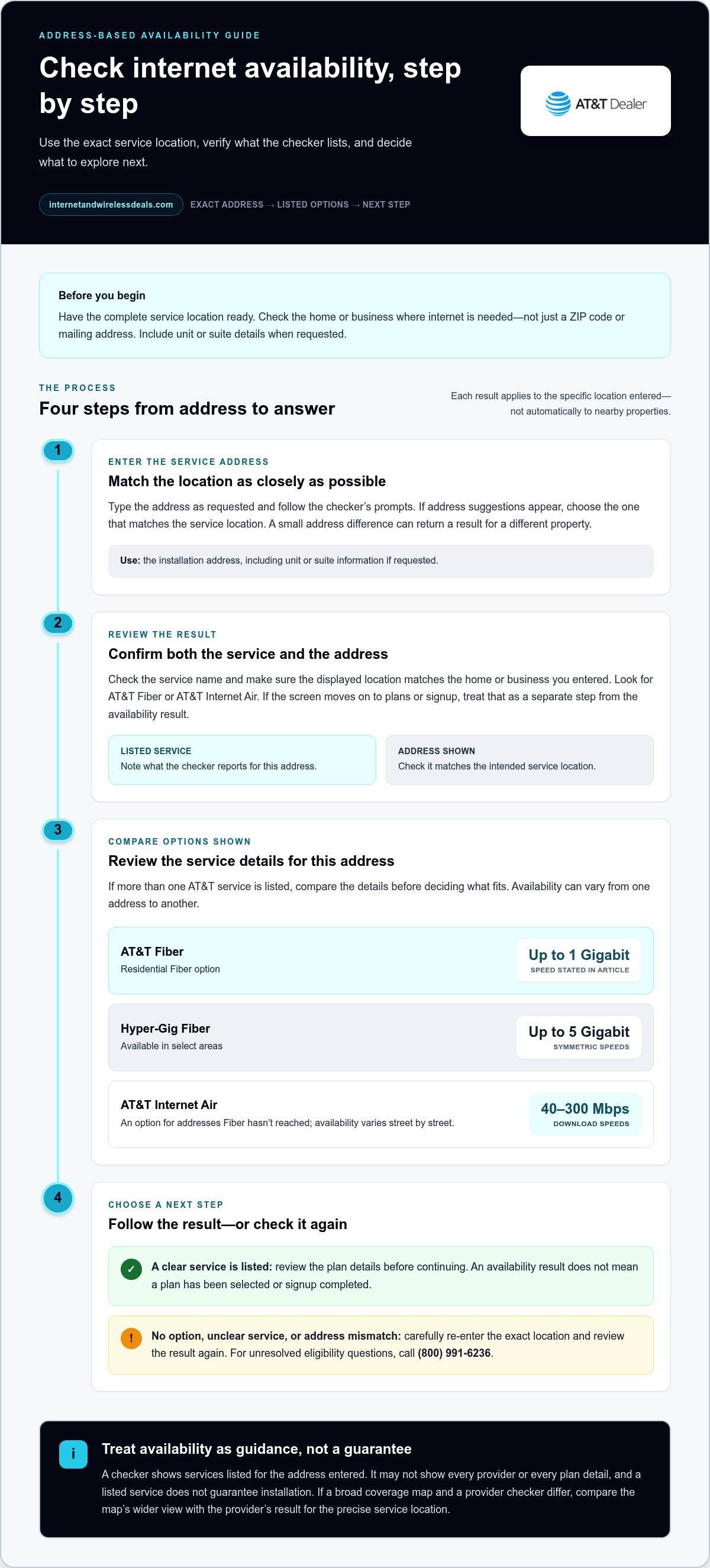
Before you begin, have the complete service location ready. For a home, use the address where internet will be installed. For a business, check the location that needs the connection, rather than a mailing address or ZIP code alone. Include any unit or suite information requested by the checker so the lookup matches the right property.
- Enter the service address. Type the address into the checker as requested and follow its prompts. If it offers address suggestions, select the one that matches the service location. A small difference in the address entered can lead to a result for a different property.
- Review the result before moving forward. Check the service name and the address shown on the results screen. Look for AT&T Fiber or AT&T Internet Air, and confirm that the displayed location matches the home or business you entered. If the screen moves directly to plans or signup, distinguish those next steps from the availability result itself.
- Compare the options shown for the address. If the checker lists more than one AT&T service, review each option’s details before deciding what fits your needs. One address may show a Fiber option, while another may show Internet Air. Don’t assume a result for one property applies to a nearby location.
- Choose a next step based on the result. If the result clearly identifies an option that suits you, continue to the plan details or signup steps. If no option appears, or the service name or address is unclear, re-enter the exact location carefully and review the result again. For unresolved eligibility questions, call (800) 991-6236.
Keep availability separate from plan selection. A result that lists a service helps answer what may be available at the address; it doesn’t mean you’ve selected a plan or completed signup. Review the service and plan information displayed before continuing. The FCC’s FCC Broadband Data Collection explains how reported availability data supports the National Broadband Map, another resource for understanding coverage beyond one provider’s checker.
Once you know which AT&T service the address check lists, you can focus on the relevant details instead of guessing from a broad search. For a guided look at AT&T internet options, explore AT&T internet options.
How to Interpret Fiber, Hyper-Gig, and Internet Air Results
Read the service name first, then check the speed details and any location-specific wording. An internet availability checker can show which AT&T home internet options are listed for the address you entered. The label matters: Fiber and Internet Air use different connection technologies, while Hyper-Gig identifies a higher-speed Fiber option in select areas.
| Result | What it indicates | Speed information |
|---|---|---|
| AT&T Fiber | Fiber service may be available at the entered address. | Residential download and upload speeds up to 1 Gigabit. |
| Hyper-Gig Fiber | A higher-speed Fiber option in select areas. | Symmetric speeds up to 5 Gigabit. |
| AT&T Internet Air | Fixed wireless option for addresses Fiber hasn’t reached yet, subject to street-by-street availability. | Download speeds from 40 Mbps to 300 Mbps. |
What an AT&T Fiber result means
A Fiber result indicates that the checker lists AT&T Fiber for the address entered. Residential AT&T Fiber offers download and upload speeds up to 1 Gigabit, but “up to” is a maximum, not a statement that every address receives that speed. Review the specific plan details shown for your location before deciding which option suits your household or business.
If the result names Hyper-Gig, it refers to select-area Fiber service with symmetric speeds up to 5 Gigabit. Symmetric means the advertised upload and download speeds are equal. Don’t assume this option is available just because standard Fiber appears in a result; look for Hyper-Gig to be named specifically.
When Internet Air may appear as an option
AT&T Internet Air is fixed wireless service for addresses Fiber hasn’t reached yet. Its download speeds range from 40 Mbps to 300 Mbps, and availability varies street by street. A result for a nearby property doesn’t establish eligibility for your address.
A missing Fiber result does not establish that no AT&T home internet option exists. Look for Internet Air as a separate result, then read its listed speed range and any details shown for the entered location. If the checker doesn’t clearly identify the service, repeat the address lookup carefully before drawing a conclusion.
Use the FCC’s Federal Communications Commission resources for broader information about communications in the United States, but rely on the address-specific result to understand what the provider lists for that location. Keep the service type, speed description, and exact address together as you review your options. This makes it easier to compare what the checker actually says without treating a general coverage indication as a promise about a particular plan or speed.
What to Do When an Internet Availability Result Is Unclear
An unclear internet availability checker result isn’t a reason to guess. First, confirm that it applies to the exact place where you need service. A ZIP-level coverage map and an address-specific result may differ because they present information at different levels of detail. One can show reported coverage across a broader area; the other focuses on the location entered.
If the result does not match nearby coverage
Service availability can vary street by street. A nearby property may have different options because the network does not necessarily reach every address in the same way. If a map suggests coverage but the exact-address result doesn’t show the service you expected, don’t treat the neighborhood view as proof of eligibility.
Run the address check again, carefully matching the service location shown in the result. Then compare it with the broader information on the FCC National Broadband Map. The map provides context about reported availability, but it doesn’t guarantee that a particular service can be ordered or installed at your address. Use both results as separate clues, not interchangeable answers.
If Fiber is not listed
A missing Fiber result doesn’t, by itself, establish that no AT&T home internet option exists. AT&T Internet Air is an option for addresses Fiber hasn’t reached yet, but availability is street by street. Look for an Internet Air result for the precise location rather than assuming a nearby address has the same eligibility.
For a clearer picture of how this fixed wireless option works, explore the AT&T Internet Air guide. Keep the address and the service name together as you review the checker’s response. That helps prevent a broad map result or a neighbor’s experience from standing in for your own lookup.
If the result still leaves eligibility unclear, repeat the check using the precise service location. Review the address displayed on the results screen and note which service names appear, or whether none are shown. Then call (800) 991-6236 for unresolved eligibility questions. Have the service address and the wording of the result ready so you can explain what you’re seeing.
A checker result is useful for identifying listed options, but it isn’t a guarantee of installation. Once you have a clear result, use the service details shown to decide what to review next. If you’re ready to explore the AT&T options listed for your address, review available AT&T internet options.
Choose Your Next Step After Checking AT&T Internet Availability
Your address result is a starting point, not the finish line. Use it to identify the service listed, review the options for that service, and decide whether the details fit your household or business. Checking availability is separate from choosing a plan or activating service.
- Check the exact service address. Make sure the result matches the home or business location where internet is needed.
- Identify the service shown. Note whether the result lists Fiber, select-area Hyper-Gig Fiber, or Internet Air.
- Review the eligible options. Compare the plan details and speed information displayed for the listed service.
- Continue if it suits your needs. Move on to plan selection or the next step shown, or get help with an eligibility question.
Match the result to your home internet needs
Think about how the connection will be used. A household with several people working, streaming, or connecting devices may have different priorities from a small business that mainly needs basic online access. Consider your typical activities and the speed details shown, rather than choosing based on the service name alone.
Residential AT&T Fiber offers speeds up to 1 Gigabit. Hyper-Gig offers symmetric speeds up to 5 Gigabit in select areas. AT&T Internet Air is an option for addresses Fiber hasn’t reached yet, with download speeds from 40 Mbps to 300 Mbps and street-by-street availability. These are stated speed ranges, not a guarantee of a particular experience at every location. For context on what fiber speed terms mean, see this fiber internet speed guide.
As you review eligible AT&T home internet options, factor in the plan terms too. AT&T home internet includes unlimited data, no annual contracts, and an equipment fee included in the monthly price. For more detail on Fiber plan context, explore the AT&T Fiber internet deals guide.
Move from availability check to service options
An internet availability checker tells you which services are listed for the address. It doesn’t mean you’ve selected a plan or activated service. Read the displayed options, decide whether one fits, and then follow the next step presented. If the result leaves eligibility unclear, call (800) 991-6236 for eligibility checks, availability checks, or general inquiries.
Ready to find out which AT&T internet options are listed for your location? Check AT&T internet availability using your exact service address.
Turn Your Address Check Into a Confident Next Step
Your connection needs can change as you move, set up a workspace, or add more connected devices. Keep the service address handy and revisit an internet availability checker whenever you need a fresh look at the options listed for that location. A clear result gives you a practical place to begin, while the plan details help you decide what deserves a closer look.
Internet and Wireless Deals is an authorized AT&T retailer. Take the next step at your own pace: check the address, explore the options shown, and choose the path that fits your needs. Check AT&T internet availability and explore your options. Your next connection decision can start with one precise address.
Frequently Asked Questions
Can internet availability vary between homes on the same street?
Yes. Two nearby homes can receive different availability results because eligibility can vary street by street. A broad map might show coverage across an area while an address-specific search returns different options for two neighboring properties. Use the checker for the exact home or business location, then review the service names it returns. A nearby result is useful context, not proof of eligibility.
Does an internet availability checker guarantee that service can be installed?
No. An internet availability checker identifies services listed for the address you enter, but that result isn’t a guarantee of installation. Treat it as a starting point for reviewing options, not as confirmation that every plan or speed is available. Check that the result displays the correct service location. If you still have an eligibility question, call (800) 991-6236.
What happens if AT&T Fiber is not available at my address?
AT&T Internet Air is an option for an address Fiber hasn’t reached yet. Its availability varies street by street, so a result for a nearby property doesn’t establish that it’s available at yours. Internet Air offers download speeds from 40 Mbps to 300 Mbps. Check the result for your exact location to see which AT&T home internet options are listed.
Is AT&T Internet Air the same as AT&T Fiber?
No. AT&T Fiber is fiber-optic home internet, while AT&T Internet Air is fixed wireless for addresses Fiber hasn’t reached yet. Their speed descriptions differ: residential Fiber offers speeds up to 1 Gigabit, and Internet Air offers download speeds from 40 Mbps to 300 Mbps. Neither service is available at every address, so use the location-specific result to see which option applies.
Are the internet speeds shown available at every address?
No. Residential AT&T Fiber offers speeds up to 1 Gigabit. Hyper-Gig offers symmetric speeds up to 5 Gigabit in select areas, and Internet Air offers download speeds from 40 Mbps to 300 Mbps for addresses Fiber hasn’t reached yet. These are service speed ranges, not a promise that every speed is available at each location. Review the address-specific result and plan details.
Can a business use an internet availability checker?
Yes. A business can check the exact location where it needs internet service. Don’t rely only on a nearby business or a general area map, since eligibility can differ by address. AT&T offers business Fiber sized for business needs. Review the options returned for the service location, and call (800) 991-6236 for eligibility, availability, or general inquiries if you need help interpreting the result.
Does an availability checker also check AT&T wireless plans?
No. An internet availability checker is for home internet options at an address, not a confirmation of AT&T wireless plan eligibility or smartphone availability. If you’re considering both home internet and mobile service, treat them as separate decisions and review the relevant information for each. A home internet result alone doesn’t tell you which wireless plan or phone options may fit your needs.


