

What if your internet plan looks fast on paper, but two 4K streams still compete with video calls, game downloads, and everyone’s phones? The bandwidth requirements for multiple 4K streams depend on more than the number of TVs. A useful starting point is about 25 Mbps per stream, but that estimate doesn’t include other household activity or normal speed fluctuations.
You’re right to think beyond one advertised speed. The speed your devices actually receive can be lower, and a busy or weak home Wi-Fi network can cause buffering even when your plan seems fast enough. Live 4K sports can also need a steadier connection than on-demand shows.
To estimate demand, multiply the number of simultaneous 4K streams by a per-stream baseline, then allow for other devices and changing network conditions. Compare that total with your plan’s advertised download speed, and use the troubleshooting steps below to tell whether a slowdown may come from the plan, your home network, or the streaming service.
Key Takeaways
- Estimate the bandwidth requirements for multiple 4K streams by adding simultaneous video and other household activity.
- Keep Mbps speed separate from monthly data use so you can assess connection capacity and streaming consumption correctly.
- Compare estimated demand with usable plan capacity. Gigabit service isn’t essential for every household.
- Troubleshoot in order to pinpoint whether buffering may come from stream settings, Wi-Fi, or simultaneous device activity.
- Once you’ve estimated your needs, explore suitable AT&T home internet options and check availability at your address.
How much bandwidth does each 4K stream use?
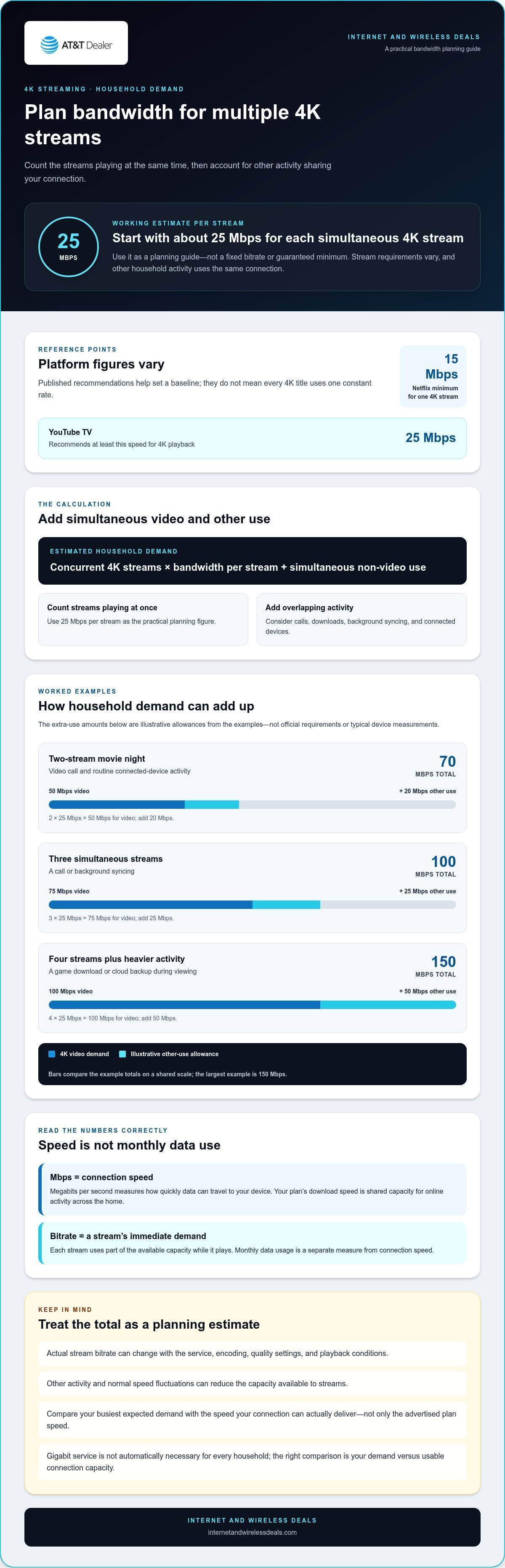
Required bandwidth depends on each stream’s bitrate and what else is happening in your home. A practical starting estimate is about 25 Mbps for one 4K stream, though a platform may need less under some conditions or more for demanding content. Treat 25 Mbps as a planning guide, not a fixed rule.
Mbps means megabits per second, a measure of how quickly data can travel to your device. It describes connection speed, not monthly data usage. A stream’s bitrate is the amount of video data delivered each second; your internet plan’s download speed is the total capacity available for all online activity. Think of bitrate as one vehicle’s lane demand and plan speed as the road’s total capacity.
Each simultaneous 4K stream adds download demand, so several TVs can draw bandwidth at once alongside calls, downloads, and other connected devices. That combined demand is why the bandwidth requirements for multiple 4K streams can’t be judged by looking at a single TV in isolation.
Streaming platforms publish useful reference points, but their recommendations vary. For example:
- Netflix lists 15 Mbps as the minimum for a single 4K stream. Using 25 Mbps per stream is a more cautious planning target.
- YouTube TV recommends at least 25 Mbps for 4K playback.
Why 4K video needs more bandwidth than HD
4K carries more image information than HD, which can mean more data needs to reach your screen. Compression reduces the amount sent, and formats such as HEVC can encode video efficiently. Resolution alone doesn’t tell you the exact bitrate. This 4K resolution and streaming bandwidth overview explains how resolution standards and compression relate to streaming.
The video bitrate is the stream’s immediate data demand; your internet-plan speed is the shared delivery capacity for the whole home. A stream using part of that capacity leaves less available for other devices while it plays.
Why one 4K stream does not have one fixed speed requirement
Services use different encodings and quality settings, so two 4K videos may not consume identical bandwidth. A platform’s published recommendation is a useful baseline, not a promise that every title or device will use one constant rate. Picture complexity and playback conditions can also affect how much data is delivered.
Adaptive streaming responds to available bandwidth. If the connection can’t keep up, a service may reduce video quality to maintain playback, making the picture look softer instead of buffering continuously. Leave room for other household activity when estimating demand, then use the calculation below to add up simultaneous streams.
Calculate bandwidth requirements for multiple 4K streams
Start with the number of screens playing 4K at the same time, then add bandwidth used by other activity during that viewing period. The result is a planning estimate, not a guaranteed minimum: stream bitrate changes, and your connection’s usable capacity can vary.
A simple formula for estimating simultaneous 4K viewing
Estimated household demand = concurrent 4K streams × bandwidth per stream + simultaneous non-video use. Count only streams playing at once. For a practical planning figure, use 25 Mbps per stream. Netflix lists 15 Mbps as a minimum for one 4K stream, while YouTube TV recommends at least 25 Mbps for 4K playback.
The FCC’s Broadband Speed Guide offers a reference for estimating internet needs across common online activities. The added household-use amounts below are illustrative allowances, not official requirements or typical device measurements. Replace them with your own activity estimate where possible.
- Two-stream movie night: 2 × 25 Mbps = 50 Mbps for video. Add an illustrative 20 Mbps allowance for a video call and routine connected-device activity, for an estimated total of 70 Mbps.
- Three simultaneous streams: 3 × 25 Mbps = 75 Mbps for video. Add an illustrative 25 Mbps allowance for other active use, such as a call or background syncing, for about 100 Mbps total.
- Four streams plus heavier activity: 4 × 25 Mbps = 100 Mbps for video. Add an illustrative 50 Mbps for a game download or cloud backup running during viewing, for an estimated 150 Mbps.
Adjust the estimate for your household’s activity
Each active 4K screen draws bandwidth from the same home connection, and other simultaneous activity adds to that total. The examples make the arithmetic clear, but their totals aren’t universal thresholds. A download’s actual demand can vary, and a video call or backup may use different capacity depending on its settings and activity.
Adaptive playback can change the calculation in real time. If bandwidth drops, a streaming service may lower video quality; at other times, a stream may use more than a basic estimate suggests. Treat 25 Mbps per stream as a working assumption, not a fixed bitrate. Estimate demand during your busiest expected viewing period and allow for activity that overlaps with streaming.
Once you’ve estimated your household demand, compare it with the download speed your connection can actually deliver. You can check AT&T internet availability at your address and review options that fit your needs.
Do multiple 4K streams mean you need gigabit internet?
No, not every household needs gigabit internet. Compare your busiest expected household demand with the download speed your connection can actually deliver. Four 4K streams alone don’t automatically require a gigabit plan, but simultaneous work calls, downloads, and other devices can increase demand. The guide to how fast fiber internet is offers broader context for understanding speed and performance.
Your advertised download speed is shared capacity, not a separate allowance for each TV. If a plan advertises 300 Mbps, every active device draws from that overall connection. Actual performance at a streaming device can also be lower because of Wi-Fi signal, router capability, or network conditions. Use the table as a practical planning guide, not a promise of a particular viewing experience.
| Concurrent 4K streams | Other heavy household use | Practical planning baseline |
|---|---|---|
| Two | Light or moderate activity, such as browsing and a video call | About 100 Mbps as a practical minimum for a household with other connected devices |
| Three | Several devices active, with occasional downloads or calls | About 300 Mbps as a practical baseline for a family with three or more streams |
| Four or more | Home office activity and other connected devices | At least 500 Mbps; 1 Gbps offers additional capacity for future needs |
How much headroom should a household plan for?
Leave capacity above your estimated peak rather than choosing a plan that only just matches the arithmetic. There’s no universal buffer that fits every home. A game download, cloud backup, software update, or video call can use spare capacity while you stream. Review your busiest hours and compare real connection performance with your household’s typical activity.
These baselines are starting points, not guarantees. The bandwidth requirements for multiple 4K streams depend on stream quality, competing use, and how much usable speed reaches each device. A plan with ample advertised capacity may still feel constrained if a distant TV has a weak Wi-Fi signal.
When a faster plan may make a noticeable difference
A faster plan may help if several devices repeatedly slow down during peak use, downloads take over the connection, or video quality drops when the household is active. But not every lag points to insufficient download speed. Video calls and gaming can be sensitive to latency, while work calls and cloud backups may depend on upload capacity too. Diagnose the bottleneck before assuming gigabit is necessary.
Check performance during the hours you stream, and compare a test near the router with one in the TV’s location. If the router test is strong but the distant TV struggles, the in-home Wi-Fi path may be the issue. If several wired and wireless devices slow together during heavy use, available plan capacity may deserve a closer look.
How to troubleshoot buffering during multiple 4K streams
Buffering doesn’t always mean your internet plan is too slow. A weak Wi-Fi signal, a device or app issue, or simultaneous downloads can create similar symptoms. Follow this diagnostic order to narrow down the cause before changing your plan.
- Check stream quality. Confirm the app is set to play at the quality you expect, and see whether the same title buffers on another device. Check for app or device software updates, too. If only one screen has trouble, its settings, software, or connection may be the cause rather than a whole-home capacity issue.
- Test the connection. Run a speed test near the router while streaming is affected, then compare results with a test in the room where the TV is located. A test beside the router measures a stronger Wi-Fi connection than a distant TV may receive through walls or across the home. If supported, connect the TV to the router with Ethernet and compare playback.
- Inspect Wi-Fi. If performance is much better near the router or over Ethernet, focus on the in-home wireless connection. Router placement, distance, walls, and interference can affect how much usable speed reaches a device. A plan can have capacity to spare while a weak signal limits the TV.
- Review concurrent activity. Temporarily pause large downloads, cloud backups, and software updates. If the picture stabilizes, those activities may be competing with video for available capacity. Repeat the test during normal household use to see whether the issue returns.
Check whether the issue is bandwidth, Wi-Fi, or the device
Compare the affected TV with another device in the same room, then compare Wi-Fi playback with Ethernet if possible. If only one device struggles, inspect its app, settings, and software. If multiple devices slow down together, pause heavy transfers and test again. An internet-capacity bottleneck limits the connection available to the household; a weak Wi-Fi signal limits what reaches a device inside the home.
Improve whole-home streaming reliability
Place the router in an open, central location where practical, rather than inside a cabinet or behind large objects. Reduce avoidable interference by keeping it clear of crowded or enclosed spaces. For a stationary TV that supports it, Ethernet provides a useful comparison and can avoid wireless signal issues on that device.
Also separate download needs from upload needs. Streaming video to your TV primarily uses download capacity, while sending video from a camera or backing up files uses upload capacity. A video call can use both. This guide to fiber internet upload speed explains why upload performance matters for sending data, even though it isn’t the same as the download capacity used for 4K playback.
If your tests point to limited connection capacity rather than a Wi-Fi or device issue, explore AT&T home internet options after estimating your household’s peak demand.
Choose home internet for your household’s 4K streaming needs
Make the decision in order: count the screens streaming 4K at the same time, add activity that overlaps with viewing, then compare that peak estimate with the speed your devices actually receive. This keeps you focused on household demand, not a headline number alone. The bandwidth requirements for multiple 4K streams are only part of the picture; connection technology, router placement, Wi-Fi coverage, and device performance can all shape playback.
AT&T Fiber is a home internet option. The experience also depends on your in-home network, so a plan’s advertised download speed won’t tell the whole story if a TV is far from the router or competing devices are busy. Check address-level availability and review plan details alongside your real-world connection performance before deciding what fits.
A quick checklist before comparing internet options
Build a realistic picture of your busiest viewing period before looking at plan details. A household that streams on two TVs after dinner may have different needs from one that also runs work calls, gaming, and large downloads at the same time. Use this checklist to make your estimate specific:
- Record how many screens play 4K at once, and note the times when simultaneous viewing is most likely.
- Include competing activity such as online gaming, video calls, game downloads, software updates, and cloud backups.
- Compare estimated peak demand with plan details, then test performance where you actually watch. A strong result beside the router may not reflect Wi-Fi speed at a distant TV.
Keep a note of recurring slowdowns and what was happening at the time. That context can help distinguish a connection with limited capacity from a home-network issue and gives you a more useful basis for reviewing options.
What to do if fiber is not available at your address
Home internet options depend on address-level availability, so start with an availability check rather than assuming a particular connection type is offered where you live. AT&T Internet Air is another home connectivity option. Review the information shown for your location to understand the applicable offering.
Whichever option you explore, consider both the connection and the path from the router to each screen. A centrally placed router and a suitable Wi-Fi setup can help devices make better use of the available connection. If your estimate points to a need for more capacity, compare that demand with the internet options available at your address.
Once you’ve counted streams and competing activity, explore AT&T Fiber internet deals alongside address-level availability and plan details.
Make your next streaming setup a confident choice
Turn your estimate into a practical decision, not a guess. Think about the evenings when everyone is home, the devices that need to work smoothly, and how much extra capacity would make streaming feel comfortable rather than just possible. The bandwidth requirements for multiple 4K streams are personal to your household, so use your own routines to guide the choice instead of chasing the biggest advertised number.
Ready to explore what could fit? AT&T Fiber Internet is a residential internet option, and the online availability experience lets you explore options by address. Review available details against your household’s needs, remembering that availability and plan specifics depend on location. Explore AT&T Fiber internet deals and check available options to compare what’s available for your address.
Frequently Asked Questions
How much bandwidth do two 4K streams need at the same time?
Plan for about 50 Mbps for the two video streams using a 25 Mbps-per-stream estimate. That’s video demand alone, not a guarantee of smooth playback or the full household total. If someone is on a video call while another device downloads a game, those activities add demand. A 100 Mbps plan is a practical minimum starting point for two streams and other connected devices, provided the connection delivers usable speed where you watch.
Can I watch three or four 4K streams on a 100 Mbps connection?
Possibly, but 100 Mbps leaves little room for other activity at three streams and no room at four when using a 25 Mbps estimate per stream. Real playback varies, and the full advertised speed may not reach every device. For households with three or more 4K streams, 300 Mbps is a practical baseline; four or more streams alongside work and connected devices point toward at least 500 Mbps as a planning baseline.
Is 200 Mbps enough for multiple 4K streams?
It can be enough for two streams and may support three if other heavy activity is limited and your connection performs well. At a planning estimate of 25 Mbps per stream, three streams use about 75 Mbps before calls, downloads, or other devices are counted. If several people regularly stream while gaming, working, or downloading large files, compare your real peak demand with usable speed, not just the plan’s advertised number.
Does each 4K TV need its own internet speed?
No. TVs don’t receive separate plan speeds by default. Each active stream uses part of the household connection’s shared download capacity, and other devices draw from it too. A router distributes that connection across the home, usually over Wi-Fi or Ethernet. For example, if one TV plays 4K in a room far from the router, its weak Wi-Fi signal can limit playback even while another TV streams smoothly nearby.
Why does 4K streaming keep buffering when my internet plan is fast?
A fast plan doesn’t rule out a local problem. The TV might be receiving weak Wi-Fi, the streaming device may be struggling, or another device could be using substantial bandwidth at that moment. Try the same stream near the router, check the app and device for updates, and temporarily pause large downloads. If buffering affects several devices at once, test during the slowdown to see whether available connection capacity is also a factor.
How can I calculate bandwidth requirements for multiple 4K streams?
Multiply the number of streams playing at once by your chosen per-stream estimate, then add other household activity occurring at the same time. For example, three simultaneous streams at 25 Mbps each give a video-only estimate of 75 Mbps. Add capacity for overlapping calls, downloads, backups, or gaming. Treat the result as a planning estimate: platform bitrate, playback quality, Wi-Fi, and actual connection performance can all change what your household needs.
Does 4K streaming use more bandwidth than 1080p?
Usually, yes. 4K video carries more image detail than 1080p, so it can require more data to deliver. Compression affects the amount sent, however, which means resolution alone doesn’t set a fixed bitrate. A service may also adjust quality based on available bandwidth. If a 4K stream keeps shifting to a softer picture, the connection or home network may not be sustaining the stream’s preferred quality at that time.


