

Could your home internet skip a cable line and still support streaming, video calls, and everyday browsing? AT&T Internet Air wireless home internet uses AT&T’s 5G and 4G LTE networks to connect your home through a gateway instead of a wired cable connection. The plug-and-play setup can be simple, but the service must be eligible at your address, and wireless conditions can affect the experience.
Whether wireless internet can handle your household depends on how people use the connection, how many devices are active at once, and which other internet options are available at your address. Setup convenience is one factor, not the whole decision.
This guide explains how fixed wireless works, what to consider when setting up the gateway, and how to compare Internet Air with cable or fiber. Use the checklist to assess your address, household needs, and current service terms before deciding whether a cable-free connection suits your home.
Key Takeaways
- List your household’s online activities, connected devices, and busiest hours to clarify what your connection needs to support.
- Consider how wireless conditions can shape your day-to-day experience with AT&T Internet Air wireless home internet.
- Compare fixed wireless, cable, and fiber by connection type, setup, eligibility, and the priorities that matter at home.
- Review address eligibility, household needs, and current plan terms before choosing a service.
- Decide whether a cable-free setup fits your home, then explore available AT&T Internet Air options.
What Is AT&T Internet Air Wireless Home Internet?
AT&T Internet Air wireless home internet connects a home through a wireless network rather than a cable running from wired infrastructure into the residence. AT&T Internet Air uses AT&T’s 5G and 4G LTE networks. A gateway receives the connection and shares it with devices over Wi-Fi. This avoids the need for a traditional wired internet connection to the home, but service eligibility and wireless conditions vary by address.
Fixed wireless internet delivers a broadband connection to a fixed location over a wireless network rather than through a physical cable wired directly to the home. The broader concept of fixed wireless technology includes different uses and network arrangements. For a household, the basic setup is straightforward: the wireless network supplies the connection, the gateway receives it, and Wi-Fi carries it to devices around your home.
How fixed wireless connects a home
The gateway links two connections. Outside the home, it communicates wirelessly with the provider’s network. Inside, it creates a Wi-Fi signal for phones, laptops, smart TVs, and other devices. The network signal reaching the gateway and the Wi-Fi signal inside your home are related, but they are not the same thing.
That distinction makes placement worth considering. The gateway needs a suitable connection to the wireless network, and its Wi-Fi signal needs to reach the rooms where you use connected devices. Follow the setup guidance for your service and think about where household members typically go online. First, check eligibility for the exact service address. Then consider how wireless conditions may affect the connection.
What plug-and-play setup does, and doesn’t, mean
Plug-and-play describes a gateway-based setup that does not require a traditional cable installation to the home. Setup may involve connecting the gateway to power, choosing a suitable location, and following the steps to get online. Use the current instructions for your service, since equipment and setup details can differ.
Simple setup isn’t a performance guarantee. An easy-to-connect gateway does not mean the service is eligible at every address, that Wi-Fi will reach every part of your home equally, or that wireless conditions will remain identical. Check eligibility for your service address and review the current plan and equipment terms. Then consider where the gateway will go and how your household uses the internet, including work calls, streaming, and everyday browsing.
The practical takeaway: fixed wireless can simplify the connection between a home and the internet, but the wireless link still matters. Treat “plug-and-play” as a setup advantage, not a promise about coverage or performance. That distinction helps you judge whether this cable-free option fits your address and household.
How AT&T Internet Air Fits Work, Streaming, and Everyday Browsing
A home connection has to handle more than a single speed test. Imagine one person on a work video call while someone else streams a show and another household member downloads a large file. Each activity uses the connection differently, and several at once can feel different from testing one device when the home is quiet.
Internet suitability depends on both service conditions and household demand. For AT&T Internet Air wireless home internet, consider what your household does online and the wireless conditions at your address. The right fit is a practical match, not a blanket claim that fixed wireless is always better or worse than a wired connection.
Matching a wireless connection to household activities
Start with your routine. Video calls need a responsive connection, while streaming and downloads can use more capacity, particularly when several people are online together. Browsing and messaging are usually lighter activities on their own, but connected devices can add to demand in the background. Count the people and devices active at the same time, not just the total number in your home.
A single-device test gives you only a snapshot. Pay attention to the hours when your household is busiest, and consider whether calls, streams, and downloads remain comfortable together. Wireless conditions and network management can affect the experience, so one result may not represent every time of day. For more detail on the service and its connection, see this AT&T Internet Air 2026 guide.
When wired internet may deserve a close comparison
Compare the connection types eligible at your address, then weigh them against your household’s needs. Fiber, cable, and fixed wireless rely on different infrastructure, and availability varies by location. Fiber can offer faster, more consistent performance where it’s available, while fixed wireless may appeal to households that prioritize a cable-free connection. The right choice depends on the options at your address and how you use the internet.
If work involves frequent large uploads, several people regularly stream at once, or your online activities are sensitive to interruptions, give consistency extra weight in your comparison. Match those needs against eligible options and current service terms. The AT&T Fiber Internet Deals 2026 guide offers a closer look at the wired option.
Make the decision concrete: list your busiest online activities, note how many people and devices use the connection together, and identify tasks that cannot tolerate a pause. Then factor in address eligibility and the wireless conditions where you live. If a cable-free connection fits those priorities, explore AT&T Internet Air options as part of your comparison.
AT&T Internet Air vs. Cable or Fiber: What Should You Compare?
Start with a practical question: which connection types are eligible at your address? Fixed wireless, cable, and fiber use different infrastructure, so availability, setup, and the experience can vary from one home to another. Compare the options against the same household needs instead of judging by a service label or setup promise.
The best connection depends on address eligibility and household priorities. Use the comparison below to identify what differs, then review current availability and service terms for your specific address.
| Factor | Fixed wireless | Cable | Fiber |
|---|---|---|---|
| Connection type | A gateway connects to a wireless network and shares the connection through home Wi-Fi. | A wired connection reaches the home through cable infrastructure. | A wired connection reaches the home through fiber-optic infrastructure. |
| Installation approach | May use a gateway setup without a traditional cable line to the home. Follow the service’s specific instructions. | Setup depends on existing wiring and the service’s installation process. | Setup depends on whether fiber infrastructure reaches the address and the service’s installation process. |
| Eligibility | Depends on service availability and eligibility at the exact address. | Depends on cable infrastructure and service availability at the address. | Depends on fiber infrastructure and service availability at the address. |
| Household priorities | May suit a household prioritizing a cable-free connection, if eligible. | Consider it alongside your household’s usage needs and available service terms. | Consider it when wired fiber service is available and its features fit your household’s needs. |
Compare connection type, installation, and availability
AT&T Internet Air wireless home internet uses a gateway to connect over AT&T’s wireless network. Cable and fiber use wired infrastructure, although setup can differ by address and service. A simpler setup may be appealing, but it does not establish which service will perform better. Check address eligibility first, then compare the installation approach and current terms for each available option.
Choose based on the trade-offs that matter to you
Write down your priorities, such as convenient setup, work calls, streaming, downloads, or consistency for demanding activities. Apply the same list to every eligible option. For example, don’t judge wireless only by setup convenience while comparing fiber only by performance. Weigh connection type, installation, household use, and current terms side by side. To explore wired coverage, use this fiber internet availability map guide.
There’s no universal winner. A wired option may fit your household where the infrastructure is available; fixed wireless may appeal when a cable-free connection suits your needs and the address is eligible. Keep the comparison specific to your address, rather than assuming a connection type is available because it serves nearby homes. This makes the decision about your actual options, not general assumptions.
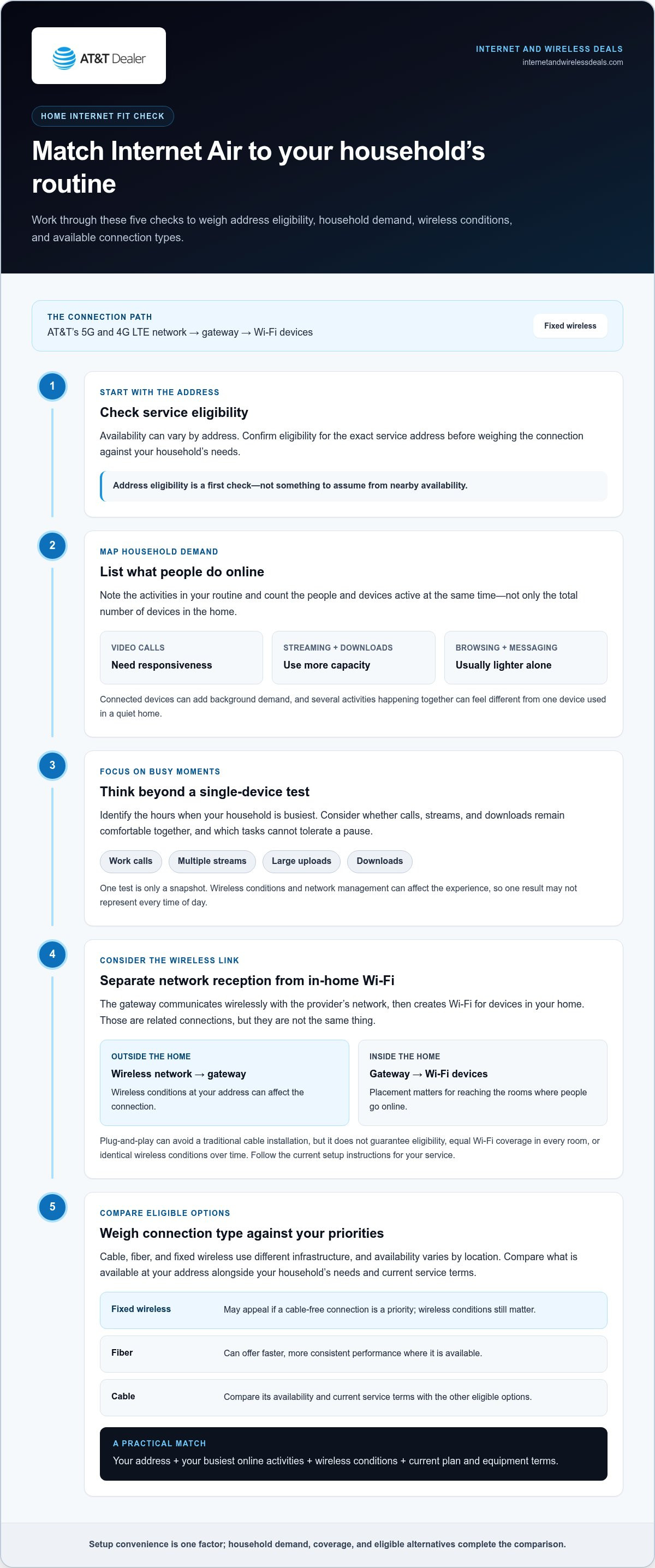
Is AT&T Internet Air Right for Your Home?
Start with your address, then consider how your household uses the internet. AT&T Internet Air wireless home internet may suit a home looking for a cable-free connection, but eligibility and wireless conditions matter. Use this checklist to turn a general interest into a practical decision.
A practical pre-sign-up checklist
- Check address eligibility. Confirm whether AT&T Internet Air is available at the exact service address. Nearby homes can have different eligibility, so don’t assume service at one location means it’s available at another.
- List your usual online activities. Note what household members do online, such as video calls, streaming, browsing, gaming, or downloading large files. Flag work or entertainment tasks where interruptions would be especially disruptive.
- Count users and connected devices. Consider how many people and devices are active at the same time, not just how many phones, computers, and smart devices are in the home. Overlapping use can shape what your household expects from a connection.
- Identify your busiest periods. Think through a typical evening or workday. Do calls, streaming, and downloads happen together? This gives you a more useful picture of household demand than considering each activity in isolation.
- Compare eligible connection options. Review the connection types available at your address and weigh them against your priorities. Convenient setup may matter most to one household, while work needs or entertainment habits may make other factors more important.
- Review current plan terms. Read the current plan, equipment, and setup information before deciding. Terms can change, so rely on the details presented for the service you’re considering rather than old descriptions or assumptions.
Plan gateway placement and first-day setup
After reviewing eligibility and service details, consider where the gateway could go. Choose a practical location that follows the current setup instructions and makes sense for the rooms where people use Wi-Fi. Room layout and distance between the gateway and devices can affect Wi-Fi around the home, so think about work areas, common spaces, and devices that need a connection.
Placement is a useful setup consideration, not a performance guarantee. Walls, layout, and wireless conditions can influence the experience, and you may need to adjust the gateway’s position. Follow current AT&T guidance for the gateway, equipment, and setup steps rather than assuming every customer receives identical instructions or terms.
If the address is eligible, the service fits your household’s needs, and the current terms match your priorities, Internet Air may be worth exploring. Explore AT&T Internet Air sign-up options and review the details for your home.
Explore AT&T Internet Air and Take the Next Step
Narrow the decision to four questions: Is service eligible at your address? Does the connection suit your household’s work and entertainment needs? Do you prefer a cable-free setup? Have you reviewed the current service terms? Answer these before moving forward. AT&T Internet Air wireless home internet is worth exploring when your address is eligible and its wireless connection fits the way your household gets online.
What to review before choosing a plan
Review the details for the service you’re considering: the address-specific eligibility result, current plan terms, gateway information, and setup guidance. Compare them with your household’s expected online activities, including the tasks that matter most for work, school, or entertainment. A side-by-side review can help clarify what fits and what needs more consideration.
- Address: Confirm eligibility for the exact home where you’ll use the service.
- Household use: Consider who goes online, which activities they rely on, and what happens when multiple people connect at once.
- Connection preference: Decide whether avoiding a wired connection to the home is a priority, then compare it with other eligible connection types.
- Current details: Review the service description, plan terms, gateway details, and setup instructions that apply now.
Use current information rather than an old promotion, outdated description, or broad assumption about wireless service. Terms and available options can change, and eligibility is address-specific. Reviewing the details helps you set realistic expectations before choosing.
Explore available AT&T Internet Air options
If your address is eligible and the connection fits your household’s needs, review available AT&T Internet Air options and current terms. Internet and Wireless Deals is an independent third-party marketing partner and authorized AT&T retailer. The site provides an online way to explore service options and access sign-up pathways.
Keep the decision grounded in your household’s needs. Match the connection to your daily activities, account for demanding work or entertainment uses, and read the current plan and gateway information. No general description can guarantee how a wireless connection will perform at every address, so use the eligibility result and service details for your home.
Ready to take a closer look? Explore current AT&T Internet Air options and review the details for your address. It’s a straightforward next step toward deciding whether cable-free home internet is the right fit.
Make Your Next Connection Decision With Confidence
Before moving forward, identify the online task your household most needs to keep running, whether that’s a work call, a class, or regular evening streaming. Use it as a practical benchmark while reviewing AT&T Internet Air wireless home internet options and current service details. A clear priority can make the choice feel less like guesswork and more like a match for the way you live.
Internet and Wireless Deals is an independent third-party marketing partner and authorized AT&T retailer. The site facilitates AT&T Internet Air sign-ups and provides an online way to explore options. Review the information for your address, then decide whether this cable-free connection belongs on your shortlist.
Explore AT&T Internet Air options and take the next step at your pace. A well-matched connection starts with a thoughtful choice.
Frequently Asked Questions
Is AT&T Internet Air available at every address?
No. Availability depends on the specific service address and AT&T’s network conditions there. A nearby household’s eligibility doesn’t establish that your home can get service, even if the addresses are close. Check the exact address where you plan to use the gateway, such as your apartment or house, and review the result before planning a switch or cancelling another connection.
Can AT&T Internet Air work during a power outage?
The gateway needs power, so it won’t operate during an outage unless it has a suitable backup power source. Even with backup power, the wireless network also needs to be functioning, so continued internet access can’t be assumed. If you rely on a connection for work or urgent communication, consider how you’ll stay connected during an outage and follow the gateway’s current power and equipment guidance.
Can I use AT&T Internet Air for video calls and remote work?
It may support video calls and remote work, but the experience depends on wireless conditions and what else is happening on the connection. For example, assess a call during a time when other household members are streaming or downloading, and notice whether the audio or video becomes unstable. If your work depends on uninterrupted calls or large file transfers, include those tasks in your assessment before choosing.
Does AT&T Internet Air require a cable line or technician visit?
AT&T Internet Air connects through a gateway over AT&T’s wireless network rather than through a cable line running to the home. The service is described as self-install, so a technician visit generally isn’t part of the setup approach. Follow the current instructions and terms for your order, since equipment and setup details may vary. Plan for a working power outlet where you’ll place the gateway.
Can I move an AT&T Internet Air gateway to another home?
Don’t assume the gateway will work at a new address simply because it worked at your current home. Eligibility is address-specific, and service terms may tie use to the registered location. Before moving it, review AT&T’s current guidance for changing the service address and check eligibility at the destination. This can help prevent a move-day surprise, especially if you’re counting on internet access as soon as you arrive.
Is AT&T Internet Air the same as a mobile hotspot?
No. AT&T Internet Air is a home internet service that uses a gateway to connect a household to AT&T’s wireless network. A mobile hotspot typically shares a phone or hotspot device’s cellular connection with nearby devices. If you’re choosing how to connect devices at home, compare the service purpose, device setup, and applicable terms rather than assuming a hotspot and home gateway work alike.
Will AT&T Internet Air work with multiple devices at once?
It can connect multiple household devices through the gateway’s Wi-Fi, but the experience depends on connection conditions, Wi-Fi coverage, and what the devices are doing simultaneously. Several light tasks may feel different from concurrent video calls, streaming, and large downloads. List the devices and activities your household typically uses together, then use that scenario to judge whether the service fits your routine.


