

Your phone may be ready for a new carrier, but that doesn’t automatically make every plan the right fit. A bring your own device wireless plan works best when your handset is compatible, your number transfers smoothly, and the service matches how you actually use your phone.
Keeping a familiar device can make switching simpler, but check that it’s ready before you enroll. Then look beyond promotional headlines and compare data, calling, hotspot, and other features with your everyday needs. A deal that sounds impressive may not suit your routine.
This guide explains how to check your phone’s compatibility and lock status, compare plan features, and prepare to transfer your number without canceling your current service too soon. You’ll also find an activation checklist to help you plan the switch. Internet and Wireless Deals, an independent authorized AT&T retail partner, helps you compare AT&T wireless options and review sign-up pathways, so you can make an informed choice for your phone and priorities.
Key Takeaways
- A bring your own device wireless plan lets you use an eligible phone with new service, but compatibility and device status matter.
- Use your phone’s IMEI to check network compatibility, then review whether the device is ready for activation.
- Compare plan details such as data terms, hotspot access, international use, and promotional conditions against your typical phone habits.
- Prepare account information for a number transfer, and keep your current service active until the transfer instructions are complete.
- Internet and Wireless Deals helps customers compare AT&T wireless options and review sign-up pathways.
What is a BYOD Wireless Plan and Who Is It For?
A bring your own device wireless plan lets you use an eligible phone you already own with a new wireless service plan. You keep your handset and choose service separately, instead of selecting a new phone as part of carrier enrollment. This can be a practical option if your current phone works well and meets your needs.
BYOD separates three decisions that are easy to conflate: whether your device can connect to the network, which plan features suit your routine, and what network experience to expect where you use your phone. Passing a compatibility check doesn’t mean every plan feature will suit you or that coverage will be the same everywhere. For a broader overview of the concept, see What is Bring Your Own Device (BYOD)?
What Does Bring Your Own Device Mean for a Wireless Plan?
Your phone is the hardware. The wireless plan provides service, with its own features, terms, and billing. With BYOD, you choose a service plan and continue using your existing handset rather than choosing a new phone through the carrier as part of the transaction. Device and plan eligibility can differ, so don’t assume every phone works with every service option. Check your phone’s readiness before comparing enrollment details or promotional messages.
When Does Bringing Your Current Phone Make Sense?
Keeping your phone may make sense if it’s familiar, working reliably, and suited to how you communicate, work, and use apps. You may be happy with its screen, camera, storage, and everyday performance. If so, focus on finding service features that match your routine rather than treating a new handset as a necessary part of switching.
Assess the device itself, too. Damage, aging hardware, limited software support, or performance problems could make a replacement worth considering. Think about how you use your phone: calls and messaging, navigation, video, or connecting other devices through a hotspot. A plan’s headline offer can’t make an unsuitable phone a better fit, and a compatible phone alone doesn’t determine which plan is right. Check device readiness first, then weigh the service features and network experience that matter to you.
How to Check Whether Your Phone Is Ready for a BYOD Wireless Plan
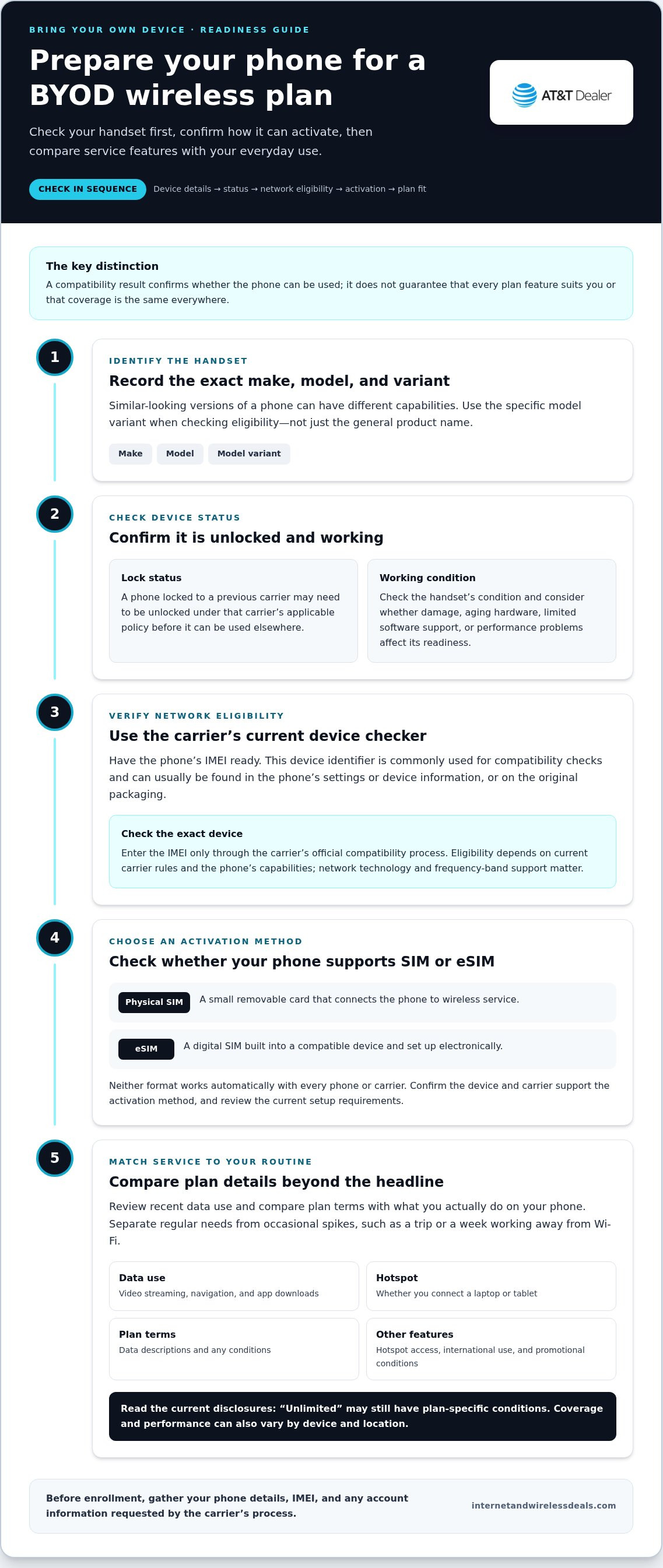
Before comparing enrollment steps, confirm that your phone is ready to connect. Work through these checks in order:
- Identify the phone. Note its make, model, and model variant. Similar-looking versions can have different capabilities.
- Check its status. Find out whether the device is locked to a previous carrier and make sure it’s in working condition.
- Review compatibility. Use the new carrier’s current device checker or eligibility information to see whether your specific phone can be used.
Have the IMEI ready. This device identifier is commonly used for carrier compatibility checks. You can usually find it in your phone’s settings or device information. It may also be printed on the original packaging. Enter it only through the carrier’s official compatibility process. Eligibility can depend on current carrier rules and your phone’s capabilities, so a general model name isn’t a final confirmation.
Check Your Phone’s IMEI, Lock Status, and Network Support
Find the IMEI in your device settings, then check the phone’s lock status. A locked phone may need to be unlocked under the original carrier’s applicable policy before it can be used elsewhere. Also consider network support: a phone needs compatible technology and frequency bands to connect as intended. The carrier’s current eligibility result is the key check, and performance can vary by device and location.
Choose Between a Physical SIM and eSIM
A physical SIM is a small removable card that connects your phone to wireless service. An eSIM is a digital SIM built into a compatible device and set up electronically. Neither format works automatically on every phone or with every carrier. Your handset and carrier must support the activation method you choose, and available options can change.
Before activation, gather your phone details, IMEI, and any account information the carrier’s process requests. Review the current device requirements and SIM or eSIM steps before enrolling. This preparation can help prevent avoidable delays and make the setup process clearer.
Once you know your phone’s model, status, and activation options, you can compare plan features with better information. For a practical next step, explore AT&T wireless options through Internet and Wireless Deals.
How to Compare BYOD Wireless Plans Beyond the Promotional Headline
A promotion can catch your eye, but the right bring your own device wireless plan should fit your phone habits and the places you use your device. Start with your recent data usage, then compare plan details side by side. Read the full terms, not just the headline description. “Unlimited” may still come with plan-specific conditions, so review the current disclosures before deciding.
Match Plan Features to Your Actual Phone Usage
Check your phone’s data-use history to estimate a typical month. Include video streaming, navigation, app downloads, and any time you use your phone as a hotspot for a laptop or tablet. Separate everyday use from occasional spikes, such as a trip or a week of working away from Wi-Fi. This helps you identify which features you need regularly and which are simply nice to have.
Use a simple comparison table to organize your options:
| Feature | What to check | Ask yourself |
|---|---|---|
| Data terms | How data is described and whether conditions apply after certain usage | Do I stream or browse on mobile data most days? |
| Hotspot | Whether hotspot use is included and what limits or terms apply | Do I regularly tether a laptop or tablet? |
| International use | What calling, messaging, or data features apply to destinations relevant to you | Do I travel or contact people abroad? |
| Plan conditions | Eligibility, recurring terms, and any promotional requirements | Will the terms still suit me after a promotion ends? |
Calls and messaging may also matter, especially if your usage or travel needs differ from your usual routine. There’s no single best plan for everyone. Prioritize features you’ll use instead of focusing only on the most prominent offer.
Review Billing Terms and Switching Details
Before enrolling, read the current plan disclosures for recurring service terms, taxes, fees, and promotion conditions. Check how long an offer applies and what terms follow it. Review coverage information for the places you use your phone most, such as home, work, and regular routes. Coverage maps are a useful reference, but your experience can vary by location and device.
Keep service charges separate from any remaining phone balance. A device financing obligation or other account commitment may continue even if you change wireless service. Review your account details and the plan’s current terms so you understand both parts of the switch. Internet and Wireless Deals helps customers compare AT&T wireless options and review sign-up pathways.
Switch to BYOD Without Losing Your Number
You can usually request to keep your number when moving service. This is called number porting: your number transfers from your current carrier to the new one. Start the transfer through the new service’s process and keep your existing line active until the transfer instructions are complete. Don’t cancel your old service first, since that may interrupt the transfer.
Use this sequence to keep the switch organized:
- Check eligibility. Confirm your phone can be used and review the current number-transfer requirements.
- Gather account details. Find the information your current carrier requires to authorize the transfer.
- Select service. Choose a plan and a supported SIM or eSIM activation method.
- Activate. Follow the new carrier’s current instructions and wait for the transfer process to finish.
- Test your phone. Check calls, messages, mobile data, and voicemail on the new service.
Prepare Your Account and Number Transfer Details
Before you begin, locate your current carrier account number and any transfer PIN or other credentials it requires. You may also need the phone number being transferred and account-holder information, such as the name and billing details on file. Requirements vary, so follow the current transfer instructions for both accounts. Make sure the details you submit match the existing account to help avoid preventable delays.
Transfer timing can vary with the carriers and circumstances. Keep access to your current account and phone while the request is underway. If you’re also switching from a physical SIM to an eSIM, or vice versa, follow the activation sequence provided for that method.
Activate and Test Your Phone on the New Service
Once the transfer is in progress, follow the new carrier’s instructions for inserting or setting up your SIM. Don’t assume activation is complete just because the phone displays a signal. Test an outgoing and incoming call, send and receive a text, and open a webpage using mobile data with Wi-Fi turned off. Check voicemail, too, and confirm the selected SIM or eSIM is being used for calls and data.
If something doesn’t work, review the activation steps and use the relevant carrier’s support channel for help with the account or setup. Keep your account details handy. To review your next steps, review AT&T wireless sign-up options through Internet and Wireless Deals.
Explore AT&T Wireless Options for Your Own Phone
You’ve completed the key preparation: identified your phone, checked whether it may qualify for service, and noted the features that fit your everyday use. Now bring those details into your plan research. Device eligibility, plan features, and network experience are separate considerations. A compatible handset doesn’t automatically qualify for every option, so review current AT&T terms and applicable eligibility details before enrolling.
Use Your BYOD Checklist to Review AT&T Wireless Plans
Compare the features you’ll actually use, such as data, hotspot access, calls, messaging, or international features. Consider your typical data use and where you rely on your phone, then review current coverage information for those places. Compare current AT&T plan details side by side, and treat any promotional message as one factor, not a substitute for reading the plan conditions.
Internet and Wireless Deals, an independent authorized AT&T retail partner, helps customers compare AT&T wireless options and access sign-up pathways. Use your phone-readiness checks and real usage needs to assess the service details, rather than assuming a particular device or plan will be eligible.
Move from Plan Research to Your Next Step
Before starting enrollment, have your phone’s make and model, IMEI, and preferred SIM or eSIM method ready. If you plan to transfer your number, gather the account details and transfer credentials required by your current carrier. Keep that line active until you’ve followed the transfer instructions. Review current activation steps and plan terms before proceeding.
A confident BYOD decision rests on three things: a device that meets current requirements, features that suit your routine, and a clear understanding of the switching process. With those pieces in place, you can assess a bring your own device wireless plan on more than its headline offer.
Ready to take the next step? Review available AT&T wireless options and sign-up details through Internet and Wireless Deals, an independent authorized AT&T retail partner.
Make Your Next Wireless Switch with Confidence
A successful BYOD switch starts with the phone, not the promotion. Check that your device meets current compatibility requirements, then compare plan features with your typical data, calling, hotspot, and travel needs. Review the terms carefully, and keep your current line active until your number transfer instructions are complete.
With a bring your own device wireless plan, readiness, plan fit, and activation are separate steps. Having your phone details and account information ready can make the process clearer. After activation, test calls, messages, and mobile data to confirm your service is working.
Internet and Wireless Deals is an independent authorized AT&T retail partner. Explore current AT&T wireless options and review available sign-up details online with your checklist in hand. Explore AT&T wireless options for your phone and take your next step with confidence.
Frequently Asked Questions
Can I keep my phone number when I switch to a BYOD wireless plan?
Yes, in many cases you can transfer your existing number to new service. This process is called number porting, and it depends on the carriers’ current requirements and the account information you provide. Gather the requested account details and transfer credentials, then follow the new service’s instructions. Keep your current line active until the transfer is complete, unless the carriers instruct you otherwise.
Is my current phone compatible with a bring-your-own-device wireless plan?
Compatibility depends on your specific phone, its lock status, supported network capabilities, and the carrier’s current eligibility rules. Check the device identifier, or IMEI, through the carrier’s compatibility process before activation. A phone that works on one network may not support every feature or network band on another. Confirm both eligibility and support for the functions you rely on before choosing a plan.
Do I need a new SIM card for a BYOD wireless plan?
You may need a compatible physical SIM or eSIM setup for the new service. The right method depends on your phone and the carrier’s current activation process. Check which option your device supports, then follow the instructions provided for your plan. Don’t remove or replace your existing SIM before reviewing the number-transfer and activation steps, especially if you’re keeping your current number.
Can I bring a locked phone to a new wireless plan?
A locked phone may be restricted from activation on another carrier. Both the original carrier’s unlocking rules and the new carrier’s compatibility requirements matter. Check the phone’s lock status and review any relevant account obligations before starting a switch. Don’t assume your device is ready based only on its model or its ability to connect to another network. Verify its current eligibility first.
Will my phone work with 5G on a BYOD plan?
5G access depends on your phone’s network capabilities, software, selected plan, and coverage where you use the device. A phone may be eligible for service without supporting every network feature. Check current carrier compatibility and coverage information, then consider the places where you use your phone most. Compare those details with your everyday needs before choosing a plan or beginning activation.
How do I switch to a BYOD wireless plan without interrupting service?
Start by checking phone compatibility and gathering the account information required for a number transfer. Follow the new service’s current activation instructions, and keep your existing line active until the transfer is complete, unless the carriers instruct otherwise. Once service is active, test calls, messages, mobile data, and voicemail. Steps and timing can vary, so use the instructions for the service and activation method you select.
Can I use an eSIM when I bring my own phone?
You can use an eSIM only if both your phone and the selected carrier support that activation method. Check device compatibility and current enrollment instructions before you begin. If your phone uses a physical SIM, follow the carrier’s setup steps for that option instead. Have account details ready, and complete number-transfer and activation steps in the order specified by the current instructions.


